Maybe use ranked choice voting? 
I’m on board with allowing more votes per person.
We have received permission from the KDE sysadmins to run our poll on survey.kde.org
So far I have not fully evaluated it. But I think our voting system will be better with this.
That’s great news, @raghukamath.
Should we increase the number of nominations each of us can make for the monthly poll? Currently we can only nominate one image.
I propose the limit be moved to 4 per month.
This idea has been brought up before and was mentioned again in @Mythmaker’s comment this morning.
I feel frustrated again having to pass on so many other worthy pieces - even more so as I missed a month. I wish we could nominate more than one!

Definitively we should, and that was my biggest issue with the new system, that we will see not enough pictures that were worth being nominated.
Michelist
I don’t know how best to balance things out. 
We don’t tend to get much participation in either the nominating or the voting. Having a lot of nominations means more pieces get a chance, but the votes will be spread out more thinly. I don’t know if that will be problem - it might increase the risk of a tied result, but maybe that’s okay?
It doesn’t really help with the problem of bias caused by only a few people nominating i.e. pieces nominated according to the tastes of the few who are willing.
One thing I’ve mentioned before is about having the thread stickied so it remains visible - to encourage participation. I think you do that already, but it’s not implemented quite the way I’d hoped - I think it needs to be persistent so it doesn’t fall of the radar once a member has seen it.
My feeling is that we should have more votes, but two or three - so we’re still encouraged to consider our choices. Couple this with a permanent stickied thread so it’s kept visible and in awareness of all users. Hopefully that will improve the participation problem - generating further nominations and improving the vote numbers.
1st idea
What we can do is increase the number of nominations per user and also reduce the time period of feature to 15 days. So each month can have 11 featured images (excluding one from the monthly challenge) . If we see less participation on a particular month then we can switch the feature time to 1 month.
Another Idea
We can also queue (this is manual to be done by moderators each day) posts to be featured so each day we can feature new post and the front page will have some change in artwork and also each artwork will get 1 month and the featured row will look fresh.
Both ideas can have more votes as well as more nomination per user. So a user can choose may be upto 5 images regardless of the time period in which the artwork was submitted. Then there can be two monthly polls where users can select top 5. Each top 5 will be queued for feature. We can run the poll in 15 days interval
Wildcard entry of most liked artwork
In addition to this voting process we can have one (or two) more entry to the feature queue by taking most liked image during that month directly enter the queue without polling. If it is already nominated we wait to see if it wins if not we will have it in queue due to number of likes, if it wins then we can take the second most liked post for that month. I can already see many artworks with likes in this page sorted by top posts - Finished Artworks - Krita Artists
@Mythmaker and @raghukamath I’ve been thinking about all your ideas (I went ahead and posted the new submissions thread to keep things on schedule – please don’t take that as lack of interest in your ideas).
I recommend we keep the same monthly cycle for this calendar year as we’ve promised to hold a Best of K-A 2024 poll in January.
I also recommend we increase the number of submissions each member can make in a given month to 3 or 4. The current submissions thread can be edited and an announcement sent out.
For 2025, maybe we can make some more sweeping changes, such as reverting to the previous manual process where the moderators are continually featuring images and there is no poll (to your point, @raghukamath, it would keep the banner constantly refreshed).
I have a suggestion for the Submission tutorial of the monthly Best of K-A:
Point 4 currently says:
Return to the artist’s post and right click on the image to copy the image link. DO NOT COPY/PASTE THE IMAGE ITSELF. DO NOT DOWNLOAD THE IMAGE AND UPLOAD IT TO THIS THREAD.
But “Copy Image Link” would actually result in linking to the thumbnail/low size preview (at least for me on Firefox/Linux). The picture cannot be enlarged by clicking on it. I notice most people suggesting the art ignore this and already post the link to the full size image they get after opening the image in a new tab or by selecting “Copy Link” (not: image link).
Example Low Res “Image Link”:

Example High Res “Link”:
Admittedly I do not know the exact wording in other common browsers.
This is interesting, glad you brought it up. I’m on Brave browser and as I click on each submitted image, a larger image opens. Does that not happen when you click on the submissions?
Edit: forgot to mention I’m on Android.
If you look at my post here? Yes a slightly larger image opens, but nowhere near the same resolution. It is displayed on mouseover here: 600x423 px on “Low Res” vs. 1920x1357 on “High Res”.
If you look at the actual thread, as I said, most added the high-res Version, deviating from your suggestion. I also edited my own posts to give the artists the same chances.
By opening a slightly larger version, people may think they already see the maximum size - but that is not the case with the “Image Link” low-res version.
Thank you, I didn’t realize. There’s no mouse over in Android (that I know of) so I couldn’t see the dimensions.
UPDATE
How would this be?
Return to the artist’s post and click on the image to copy the image link. DO NOT COPY/PASTE THE IMAGE ITSELF. DO NOT DOWNLOAD THE IMAGE AND UPLOAD IT TO THIS THREAD. To capture a link to the full size version, ensure the word “original” appears in the URL.
Example:
Select the picture like you would select text so it will be shown highlighted, then the forum software should show the following selection bar to you in which you either click on Quote or on Copy Quote, the first choice puts it directly into your editor the second has to be pasted into the editor. →
The picture¹, I have chosen as example, looks like this when it is unselected:
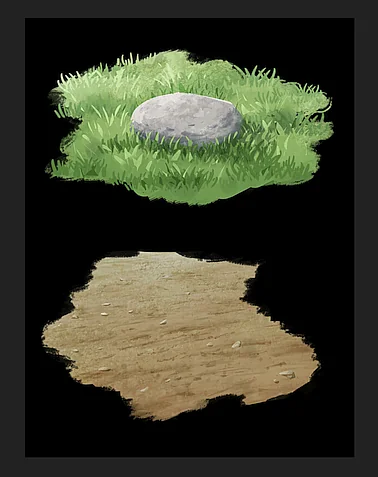
Selected it is highlighted and looks a little bit different and should give you the selection action bar above, there I usually use Quote, but you can also choose Copy Quote and manually copy it into your nomination postings:

That will copy this text into the editor where it should look like this:
[quote="YipGameArt, post:1, topic:187203"]

[/quote]
From which you then have to remove the red framed parts:
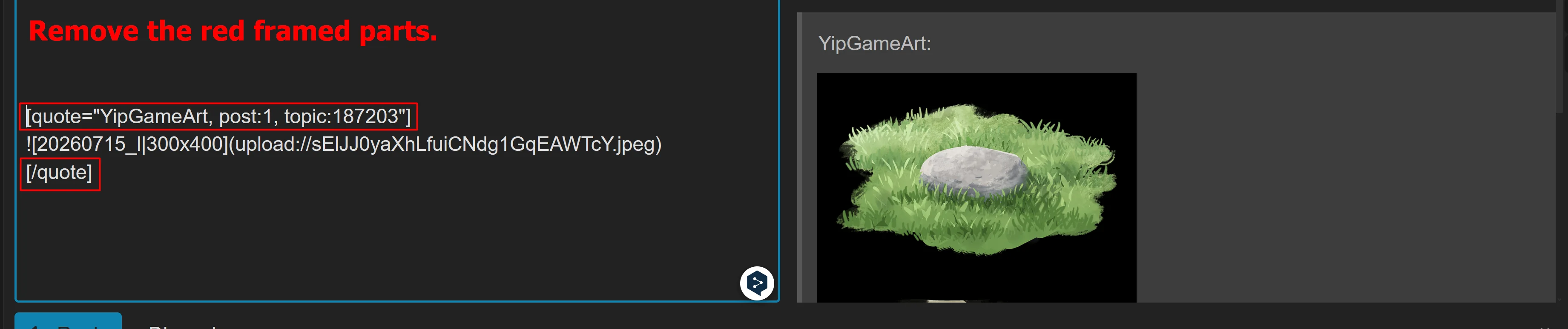
That you get the pure picture-link that you can use for your nomination:

or as screenshot:

Of course, the link for the pictures will change from picture to picture, that depends on the name and the size of the the picture.
But I hope that this description may help our users to get the picture links via an easy repeatable way.
Michelist
¹ I have used this picture of @YipGameArt as example.
Thank you. But unless we also remove the stuff inside the [ ], we still get a small size picture that can’t be enlarged by much, right?
I also wonder if it is not an easier solution to tell people to right-click (PC)/long-press (phone) the image in the original artists’ post. Go “open in new tab”. Copy the URL of new tab.
This should give the full resolution according to my test also with Vanadium (Chromium derivate) on a mobile OS.
We need a simple and universal description ideally. The step of having a second tab open and copying the URL is already known from Step 3 of the Submission tutorial.
I find the forum-specific thing via quote unusual and hard to remember. (And deleting stuff on small mobile displays could also be a challenge for some).
Edit: @sooz Just adding “To capture a link to the full size version, ensure the word “original” appears in the URL.” will not tell people how to get there I think.
@TaleOfACat Very, very helpful.
How’s this?
How to Submit Nominations
1. Open two tabs in your browser; one for the nominations thread and one for the artist’s post.
2. Tap ‘reply’ in this thread to start a new comment. In this new comment, tag the artist by typing their @ name.
3. On a new line type  or long-press (mobile) the image. Select “open in new tab.” Copy the URL of new tab. Keep the artist’s post open while you return to the nominations thread. Paste the image URL and add a ) with no space. The image will appear.
5. Return to the artist’s original post and copy it’s URL. Paste this into your nomination.
6. Tap the reply button to finalize the nomination.
Regarding point 4: Maybe change to “Select “Open (Link) in New Tab””. It seems some browsers add the “Link” some skip it. And it furthermore eliminates the “Open Image in New Tab” option, which would again result in a small image.
Some grammar stuff: “Copy the URL of the new tab.” and under point 5 “its” without the ’ .
You may want to check the “image will appear” part on your mobile OS. I have not tested that yet (on my PC a split screen will appear with the preview of the post on the right side, so there it is true).
Thank you for listening to my feedback. I’m more than happy to contribute to this great monthly event you organise. 
Thank you for all of this. I’m going to edit the current post and I have also edited my template.
On mobile the image appears instantly as soon as the markup characters are added and one taps enter (I added text about hitting enter) so I think we’re all good with that one.
Thanks again!
(Edited to include enter key in instructions)
The nomination guidelines don’t specify how to vote for a nomination, it just says the top five vote getters win. Do you just like the original post of the art by clicking the heart icon, or do you like the art in the nomination thread?
You’re right, I didn’t even realize that the date for the polls each month isn’t part of the instructions. I’ll put it in there.
The poll is published as a reply in the nominations thread every month on the 11th and it stays open until the 14th.