I recently asked on reddit, whether there was an easy tool in krita to help divide a distance into equal portions, but it turned out that there was apparently no easy way to do it other than using grids, which don’t do the calculations for you and mainly work along the x/y axes.
So I decided to put my C++ knowledge to use and add it to the ruler assistant myself, because that one is at the moment more like a straightedge than an actual ruler.
I’d like to gather some feedback on the idea and share the prototype I made, before I open the merge request.
Description of the changes
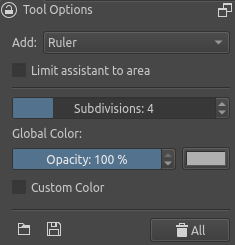
First off, the feature is fully opt-in; by default the rulers behave exactly the same as before and don’t show any subdivisions. I added a slider to their settings however, that sets how many segments the ruler should be divided into.
By default it is set to 0, which means “off”. Any value higher than that displays equidistant tickmarks along the ruler to divide it into the set number of segments.
I’ve also added the same to the infinite ruler, which continues the tickmarks with the same spacing off to infinity (Though I still need to work on some bugs regarding edge cases there…)
Do you think there are other assistants that could use a similar addition? What comes to mind for me is the perspective tool, where at the moment 8 subdivisions are hardcoded.
Would you like to have the option to have major and minor tickmarks? It would probably make the interface a bit more cluttered, but could help e.g. with identifying the center more easily.
Anything else you’d like to tell me about this idea?
Technical stuff
Right now I made the size of the tickmarks hardcoded in document coordinates, i.e. they scale with the canvas. This could be awkward when zooming in really far. Would it be better to make the marks in window coordinates (independend of zoom)? Then it would be awkward though to have it really far zoomed out.
What would you think is a good maximum number of subdivisions (since one needs to be set in the slider)? For the time being, I set it to 20, but I could also imagine any number from 10 to maybe 40 to work well… Any opinions on that?
I think the tickmarks should be the same size allways, regardless of zoom level.
When I remade the slider spin box widget, I added the ability to have both soft and hard ranges. The hard range sets the actual range. The soft range is a sub-range that expands the most commonly used values inside the hard range. So you can use that to set a large range, just in case someone ever needs it, and then set a soft range expanding [0, 20]. That way by default the soft range is used but the user can change to the hard range and set a larger value. You can see how that is used in the screentone generator.
Tickmarks size should be the same regardless of zoom level
Distance between segments is the only thing which may vary with zoom level
I personally think that adding the possibility to give the ruler a “physical length” (in cm/mm/inch) for instance, would be a plus : example is to give it 5 cm length and then, with 3 subdivisions, distance between segments would equal 1 cm.
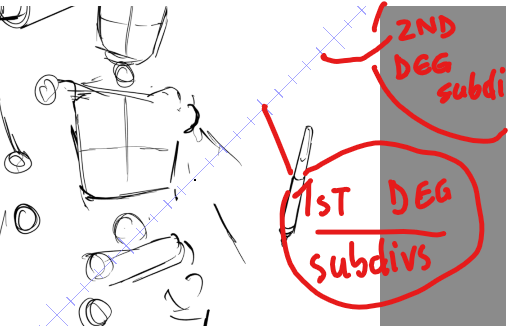
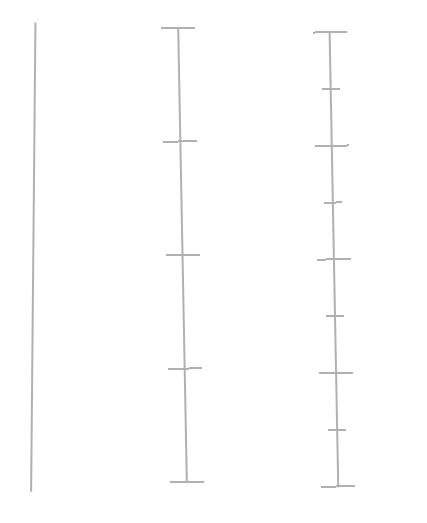
Having the option to display segments just as on a real ruler(subdivisions of subdivisions maybe), would be a plus(longer lines for 1st degree subdivisions, smaller lines for 2nd degree subdivisions). Check picture for reference.
Max number for 2nd degree subdivisions would be just 3.
Max number for 1st degree subdivisions can be up to 50.
This seems like exactly what I need, I’ll need to look that up. Thanks! EDIT: Just tried it out and I have to say, that’s way better than what I expected from a UI/UX perspective. Well done!
I’m not quite positive that your math is correct here
But that’s a good suggestion! I’m just wondering how the ruler should then behave if the handles are grabbed. Either this could change the set distance (probably not what you wanted), or one of the two handles can be used to move the ruler, while the other can then only be rotated around the first (Not sure how easy that is to implement, since the handles are independent of the assistant class). One final thing I could think about is that the second handle just sets the direction, while the distance of the full ruler is kept constant. Which of these do you prefer? Or do you have yet another idea?
Yeah, that’s basically what I had in mind for that. I guess, if I’m adding more UI elements for the constant length anyway, minor subdivisions could also just go into the mix
You can have the main divisions (I would call them just divisions instead of subdivisions) to accept some unit. In this case the semantics of the slider would change from “number of sub-segments” to something like “put a tick every X units”.
If the unit is a percentage it would work relative to the main segment length: instead of setting the amount of sub-segments, the user would have to set the fraction that a sub-segment occupies relative to the whole segment. This requires math but the slider can accept basic arithmetic expressions, so if the users want to have 5 segments they would have to enter 100/5, which would translate into 20 instead of just setting 5. A bit more complex, but it can work.
If the units are some other then it should just put the ticks along the main segment independently of its length.
In any case I think that the first point should be considered as the origin and the ticks should be positioned relstive to that along the segment.
Regarding the sub tick marks, if the approach I just described is used, I’m not sure if they should follow the same approach or just the approach you have right now. I mean, maybe for those it’s better to specify the number of sub-divisions of one sub-segment instead of a global “sub-divide every X units”.
Keep in mind that this feature you propose is already great and that I’m not trying to impose any design into it. I’m just trying to see and discuss the whole picture and possibilities because I’m sure that every user has their own opinions on how this should work, so, the more general, the better, I think.
I’m not sure if I want to have the size of the subdivisions settable explicitly. This seems to me to be a usecase where grids would actually be more suitable.
And I’d argue that you could get the same result by setting your ruler to say 4 subdivisions and then the total length to 4*2cm or 4*100px for instance. This appears more intuitive and general to me than the other way round.
And if you just want a ruler with a mark every 10 pixel, you could use an infinite one with 1 subdivision, then you don’t even need to multiply.
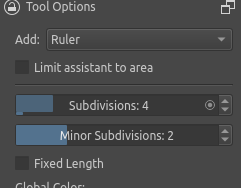
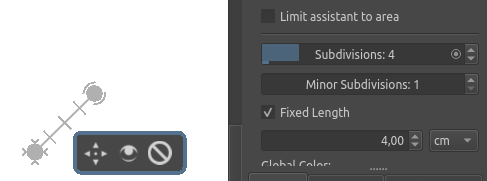
The first update is that I now have two sliders for major and minor subdivisions, where the former ranges from 0 to 20 (or to 100 if you click on the circle to enable the full range. I love this feature xD). The latter ranges from 1 to 5.
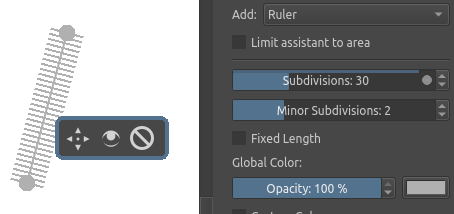
As you can see, I also added UI elements for the fixed length idea, but they don’t have functionality yet. So if you still have comments on that potential addition, feel free to post them
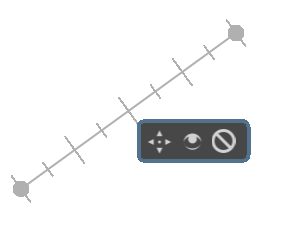
When the ruler is now added, the major divisions are rendered as 32px lines and the minor ones as 16 px lines.
They no longer scale with the canvas now (same pixel size all the time) and also work properly when you rotate the canvas (that was a funny to look at bug).
One more thing I added is that the lines stop being rendered if they would get too close to each other, so that they would no longer be distinguishable. Instead, if the subdivisions would be too dense, first the minor and then also the major divisions just aren’t shown anymore. Looks a lot better than a grey blob.
Example where the minor lines are skipped:
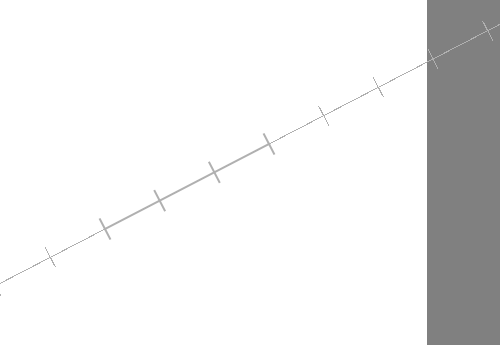
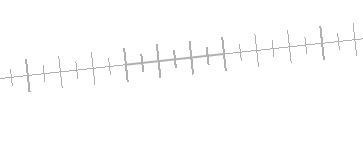
I also got the infinite ruler to work properly now and it’s looking really neat. Notice the thicker line when the full length of the base ruler is reached in the infinite expansion.
I’m looking forward to your feedback, both on these changes and on the other ideas that came up (fixed length, settable subdivisions for other assistants, etc.)
Hm… I guess that depends a lot on your screen and, as you mentioned, the number of rulers in use. I have a rather small screen with larger pixels, but for me it’s OK. Still, if more people think that way I can of course change the size
Here I disagree, because the bullets are no longer shown once you switch out of the assistant tool. Then, having a marker at the end seems useful. This is how it looks in regular drawing mode:
That is a good point. I haven’t really paid attention to that until now. It seems that everything drawn by assistants that is cached (static stuff confined to a limited area, like the main part of the rulers) is antialiased, while everything else (e.g. the extension of the infinite ruler or all of the two-point perspective assistant) is not.
However, the antialiasing flag is set on the painter, so I don’t know why it doesn’t actually antialias the lines.
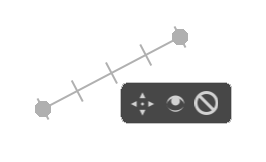
One more update from me: I’ve gone ahead and implemented the suggestion for fixed-length rulers. I chose to go with the behaviour that one of the handles turns into a move-only and the other into a rotate-only handle once you enable the fixed length. This is also indicated in the UI (while the assistant tool is active. Once you switch to any other tool, the indications are turned off, like the handles). Obviously, this whole feature is also opt-in, the default behaviour of the rulers remains untouched. The same thing also works for infinite rulers, but is there probably only interesting in conjunction with the subdivision tickmarks.
If you have more feedback or suggestions, feel free to post them here! I’ll go ahead myself and check for potential bugs and if I don’t find any, I’ll open the merge request for review by the devs on monday or tuesday.
Can I still add suggestion, to give angle to the ruler too. So wherever the ruler is angled, it shows, like the measurement tool but in ruler so i can line it properly at certain angle.
The subdivision options work wonders. God bless you for the feature.
It’s now less painful to divide comic pages into a set of equal parts in Krita, by using this tool.
Just an example among the many things this tool can help to do.
I imagined the main use case to align the ruler to existing drawings or the paper itself, that’s why I’m not too sure how useful that would be. Additionally, it is probably not that easy to implement, since you probably don’t want to have it displayed all the time, but say only when moving a handle. The handles, however, are for some reason not managed by the assistant itself but by the plugin for all assistants at once. That makes things a lot more complicated than need be (in my opinion, the whole assistant plugin’s code is messy enough to warrant a complete rewrite while especially focusing on decoupling the individual assistants from each other. Then stuff like this would be way easier to integrate.). So I don’t think I’d like to dive into that right now.
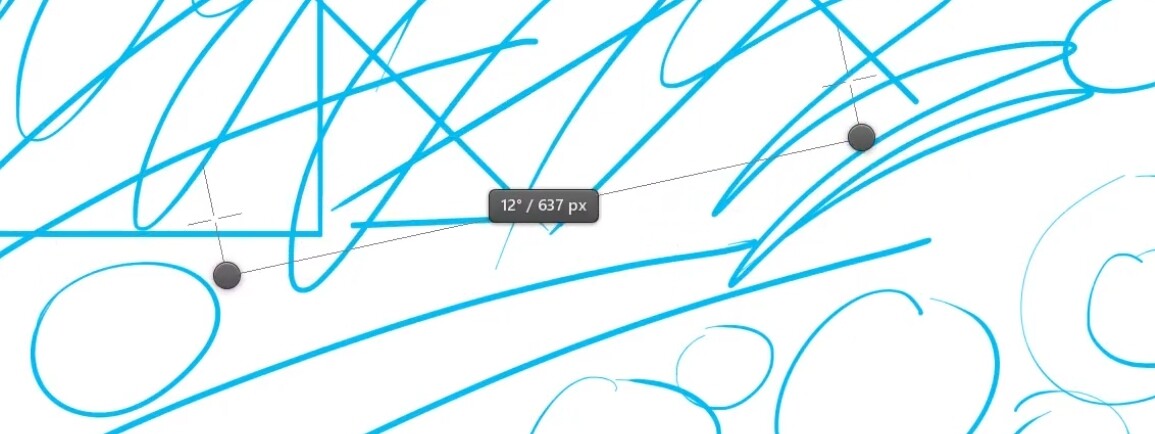
If you need a fixed angle, that you really don’t have a reference to on canvas, you could calculate it once and create it with one fixed-length vertical and horizontal ruler (they snap to these directions when pressing ctrl). If you have a reference once, you can align new rulers to that and move them later. It’s hopefully not too much of a hassle…
Great to hear that it works so well for you
While structured construction of more complex dimensions still seems quite complicated in Krita if you compare it to other programs (e.g. inkscape), I’m glad to have made it easier for you.