Hi there,
I’ve seen lots of threads talking about the whole ffmpeg on android mess. So I have tried the “export PNGs and stitch them together with ffmpeg media encoder” method.
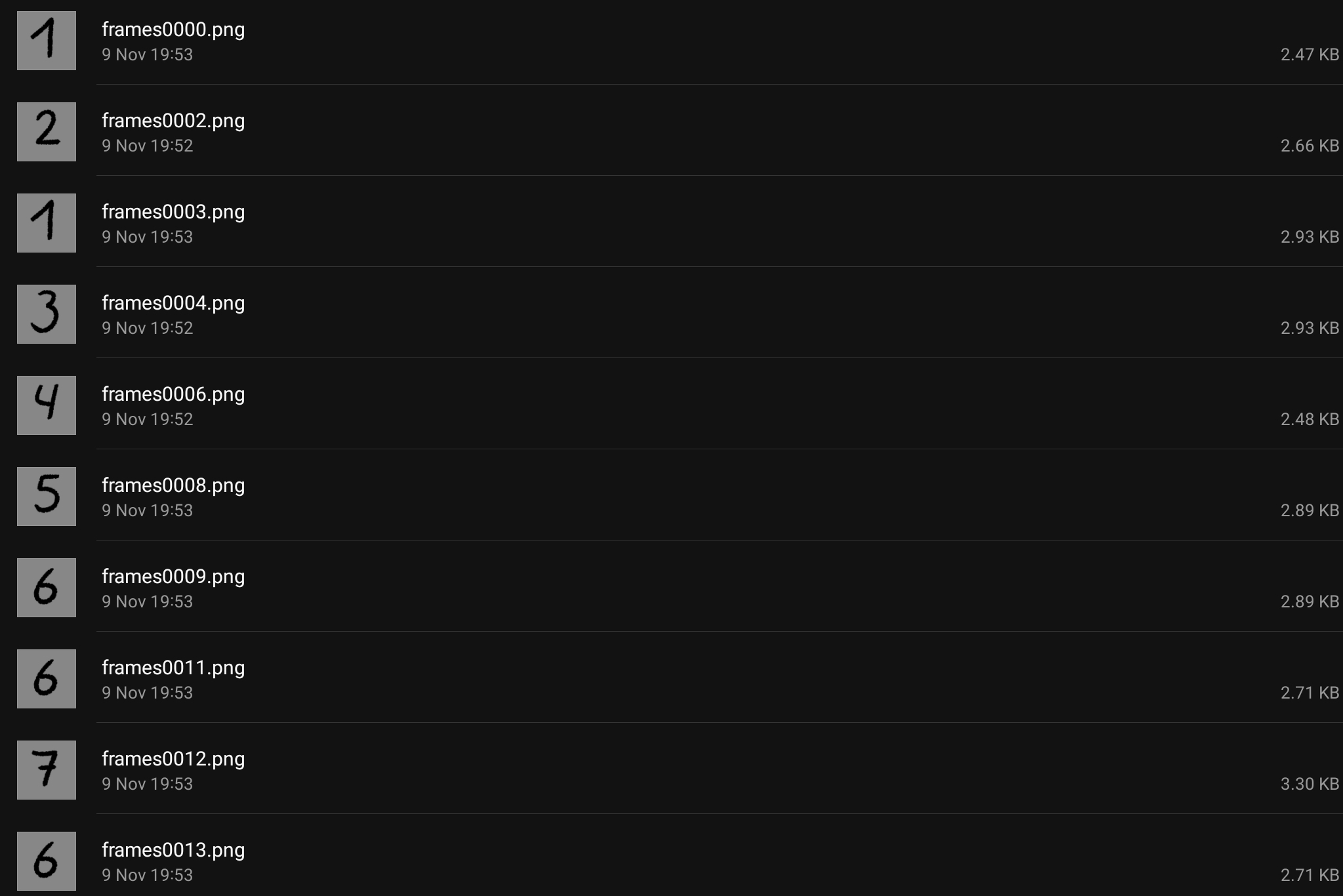
First hurdle is the export animation into an image sequence (png) . After a short export, not all of the frames are rendered. Re-rendering it a few times, i almost managed to get all of the frames rendered, any fix for that?
Then comes the compiling in ffmpeg media encoder (I also tried ffmpeg android), after a few hours of trying (I’m really new to this kind of command based program) I still haven’t managed to make it work…
Has anyone managed to do this and would they share their ffmpeg instruction for like a basic mp4?
I thought about looking up how Krita “phrases” that instruction in it’s code or a log of a succesful render, but I wouldn’t know where to start searching for that…
Thanks for any tips/tricks/solutions you guys can think of. I know I could just export on pc, but it won’t always be available on the go, so the more mobile solutions would be very welcome.
That one is to make a slide show video of images that are to be shown at 1 image per second in an .mp4 output video that plays at 30 fps.
sequence001.jpg, sequence002.jpg, etc is the input image sequence.
There seem to be dozens of similar sites with this sort of advice but I’ve never tried it myself.
Also, that example may be for use on Linux with ffmpeg compiled for Linux.
I’ve no idea what the situation is on Android with ffmpeg.
I have to say, I don’t find the video editors that can combine single images into videos on Google Play anymore since they redesigned the Playstore, as if their developers had withdrawn them. There are still heaps of “video editors”, but I see them more in the toy area, category “funny videos from three vacation photos”, for pubescent teens and grandparents who want to do it like their grandchildren, only three serious were left for me to discover, but then rather for editing existing videos, but with multiple tracks, from there probably also suitable. So only the command line editors remain to keep it “lightweight”.
Regarding FFmpeg at the command line, there are still these three apps:
Thanks for that quick answer
Yup I looked into that page and a bunch of others, even going back to ffmpegs documentation.
My command is pretty much the same as yours
But it looks like ffmpeg wasn’t my problem, my commands were ok all along it seems, by adding a -stream_loop i noticed that my video simply broke off after only 2 of the 29 PNGs.
So my real problem seems to be the fact that krita doesn’t export my image sequence properly. If there is a frame missing (in this case there are only frame0001, frame0002 and then frame0004) it doesn’t skip that frame. So Renaming a frame manually and relaunching the command works, but it’s tedious even with only 29 frames…can’t imagine with a longer animation.
Any idea on why that render skips frames and how to avoid it?
Ffmpeg android (from crossplat) doesn’t seem that great if you had a longer sequence of frames to stitch together, I haven’t found a way to input all of the sequence without taping every single frame through their interface. To me it looked more like a tool to edit an already existing video.
And yeah installed a few of those other video editors and none made it past 10 minutes on the tablet before getting uninstalled. ^^
I have a vague memory of reading that there is an ffmpeg option that makes it skip missing sequence frames. That would stop it from failing to render but would result in a glitchy .mp4 animation.
I haven’t heard of problems with rendered frame output skipping but someone might have.
I’ll edit the title of your topic to draw attention to this in case anyone knows about it and I’ll ping @sh-zam who does Android development.
I’m going to look into that frame skipping option, thanks.
Just to be sure tablet performance isn’t the issue with the incomplete sequences (the animation is on a 2000X2000px canvas after all), i tried exporting 10 frames of a 100x100 px canvas with nothing more than a circle. I’m missing 3 out of 10 frames.
Hi guys, just to not hit that 15th day and having to remake a post.
I have played a bit with the frame rendering timeout, and tested a few different file formats without any success.
I also noticed it’s not just missing frames but also going chaotic. Here is the last test i made with a keyframe change every second frame.