To adjust brightness/contrast/saturation, I use Filter > Adjust > Color Adjustment Curves. The default first setting is RGBA which is what will adjust all of them at once.
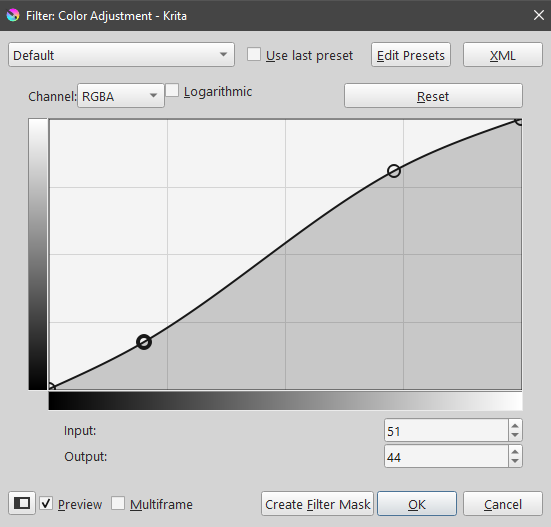
Lifting the curve to the right will increase brightness and lowering the curve on the left will darken the shadows, adjusting it together and you will increase the contrast and saturation of the image (as well as being able to control how bright or dark the overall image is)
Here’s an example curve setting that I would use:
You click to add a dot and then drag it up or down to adjust the brightness. RGBA adds saturation to the image when you do this, if you need more or less saturation you can switch the Channel setting at the top left to Saturation and lift or lower the curve to increase/decrease it.
If you need to adjust just the contrast without affecting saturation, there’s another Channel called Lightness that will only adjust lights/darks. Play around with the channels a bit and you’ll be able to adjust whatever you need! RGBA is the setting I use most, it’s just very convenient and fast.
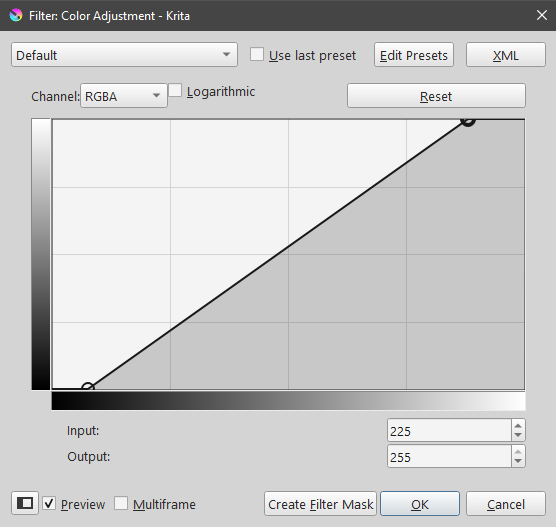
Another trick is if you need JUST the highlights brightened, and JUST the darks darkened (so a more intense contrast applied without changing the image brightness too much) you can also do this kind of setting where you drag the default dots left and right:
There is a brightness slider located in the HSV filter (Filter>Adjust>HSV Adjustment).
It used to bother me there wasn’t a simple Brightness/Contrast slider filter, but I gradually got used to using the Levels filter which offers much more control.
Similarly, there’s no basic sharpness slider. There is the automatic sharpen filter which has always seemed a bit useless to me. But the unsharp mask offers more control than a basic single slider.
I do still feel like these two options should exist in Krita, but there are definitely advantages to learning the available alternatives - which you’re basically forced to do if you want a usable solution.
I would really appreciate being able to adjust a sharpness filter, that would be much more convenient. The automatic sharpen filter can still be used in that you can create a copy of the whole artwork as a new layer, sharpen it, and then reduce the opacity of that layer until it’s at the correct level of sharpened that you need.