Hi! I encountered some issues when playing with the appimage.
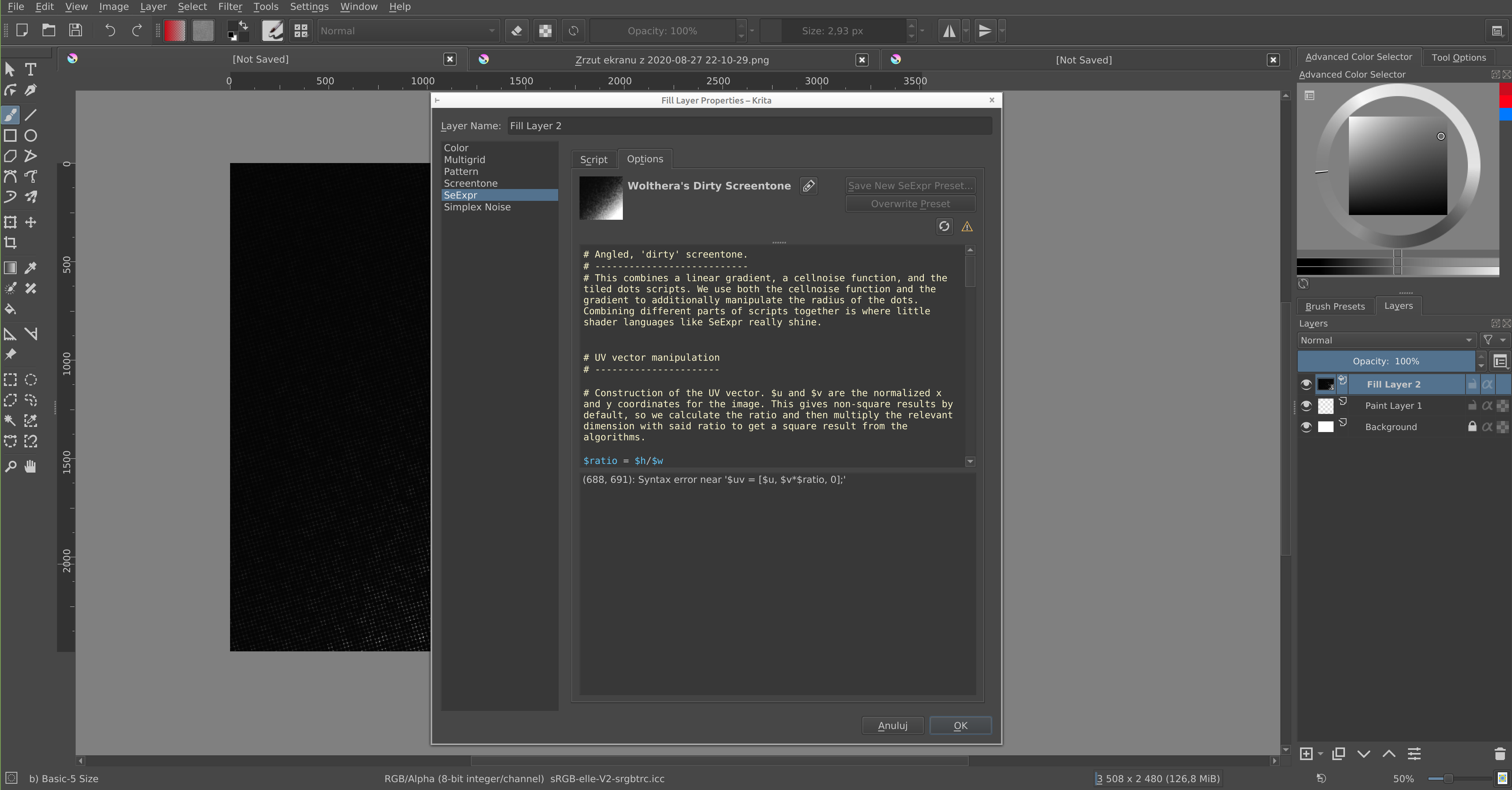
semi-transparency of the layer
I cannot tell why and when it happens, first I thought I painted it myself to grey, but later I was just really enthusiastic with scripting so it had to be a cause inside the system itself.
“Add new variable” adds a variable at the end of the current line, even if it’s inside a comment or something like that. Maybe if the line is not empty, it should add a new line afterwards and then add the variable text?
“Render script to thumbnail” is not working, when I believe you already got it, maybe it broke? (Twice it rendered to black square, once into a blue square…).
If I save a new custom preset, close the dialog and reopen and change stuff, it will forget that it was that preset and I cannot overwrite it, I need to save a new one
Some little details about the interface:
Because of the layout or sizehints or whatever of the layout, sometimes the space for variable widgets is bigger than needed but I cannot resize the script area to make it bigger
I don’t see whole variable names, they are cut off, even if I make the dialog much wider
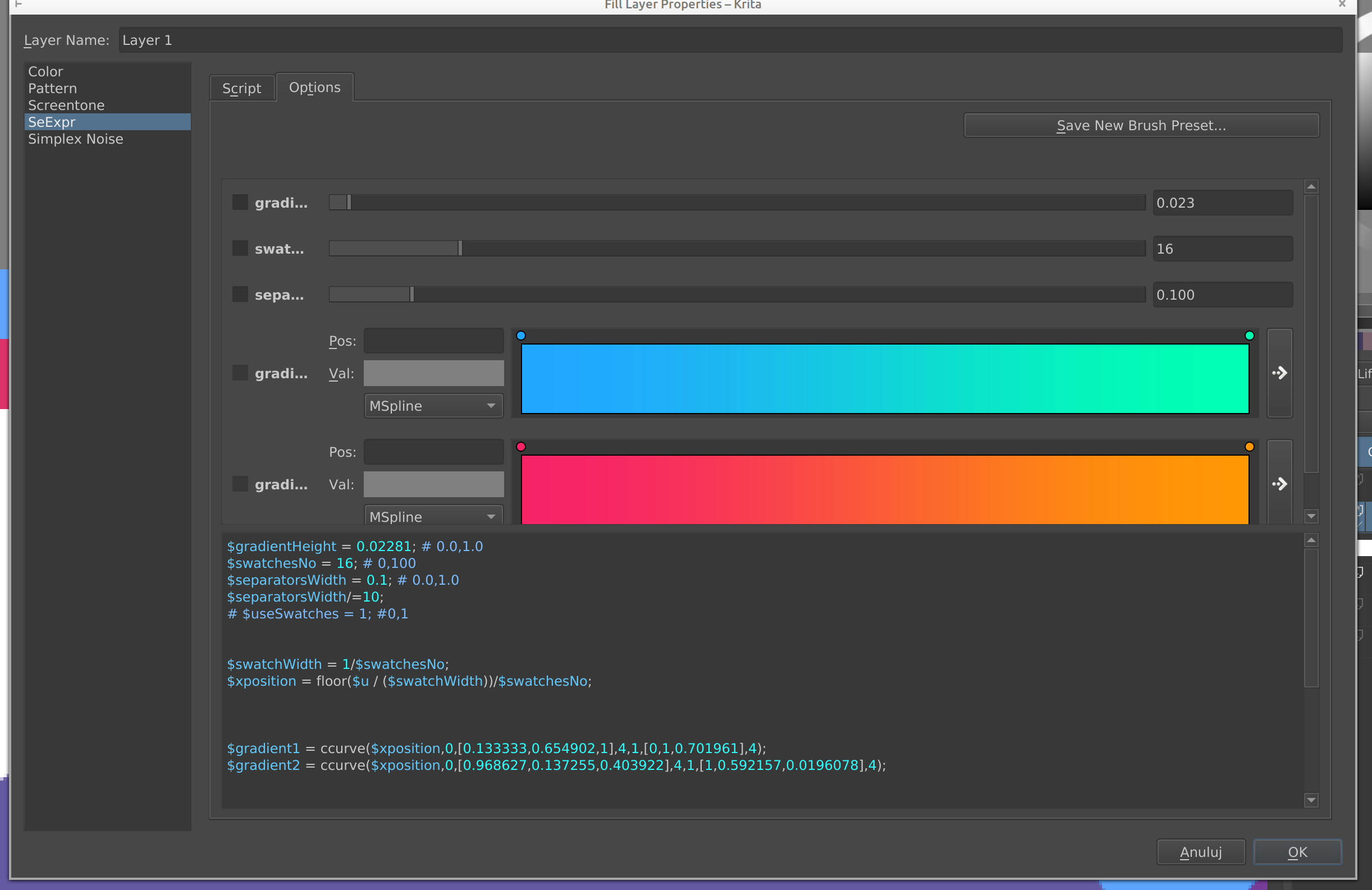
Size of the dialog is not remembered and I need to resize it every time (this script are is sooo small maybe you could remove the thumbnail from here, and just leave those two buttons “Save” and “Overwrite”? And other presets actions can be seen in the script chooser in the other tab anyway).
There is obviously “Save … Brush” and “Overwrite Brush”
ctrl+S saves the kra file (it doesn’t bother me, but that’s something to keep in mind since it can bother someone else potentially?)
I would wish for the comment color to be a bit more different from other things in the scripting area… I know it’s a different color, but it still blends in to other things, mostly variables. Maybe it could be even configurable? (Probably doesn’t need to be though).
I wonder, wouldn’t be it too much if it asked “Are you sure? You have unsaved changes” on Cancel? but that can be seen as too intrusive…
For now it’s all, I will write if I encounter something else.
Overall I think it’s really nice. It gives a lot of power to the user.
Ok, I think I know what’s wrong with the semi-transparency… I’m often pushing Backspace even when the script area isn’t in focus, which makes Krita catch it and paint everything with light grey since that was the color I had as a Background color.
You should be able to use SeExpr for fun and profit as soon as the next nightly.
The next objective is getting the docs in shape – see this merge request for more information; and, of course, we still need your help for a good batch of scripts to bundle with!
writing before I forget - what checkboxes next to variable names in the scripts widgets area do?
I don’t get how thumbnails are handled:
when I save a new script and press “Generate thumbnail”, it doesn’t show the full square; which I know because I have a script that paints edges differently.
later when it’s saved, in the area I can see the script, the thumbnail is correct (shows the full square)
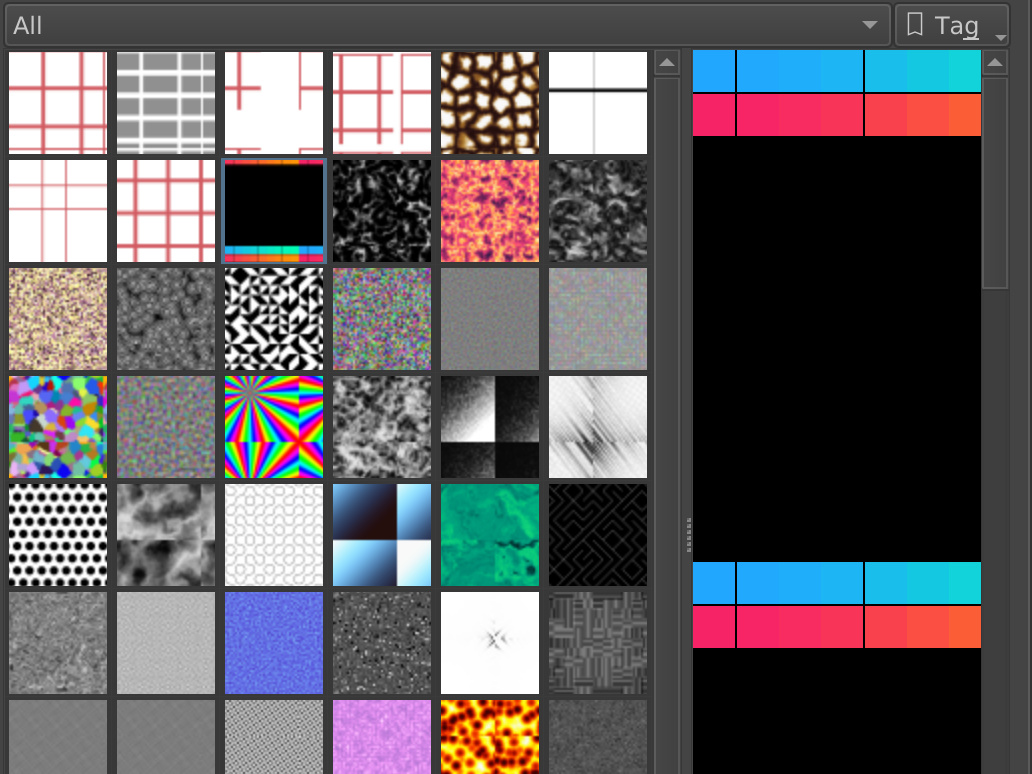
the squares on the multiple scripts view are all kinda messed up.
For example for the script I show here, the script is basically a gradient on top and then nothing and nothing to the bottom of the rectangle it was painted on. On the right side we can see it’s repeated. Sure, it’s cool, I guess, you can see if it’s seemless or not. However on the left the icon is messed up - there is gradient on the bottom and a bit of gradient on top. There is also seem visible vertically: where the orange (end of the gradient) suddenly changes into red again, and green changes into blue. The same effect you can see on the script in position (0, 4) - the white space is an offset on the top and left side of the rectangle, why it happens in the middle here? The same is visible on the linear gradient and dirty screentone presets.
Considering that it’s supposed to be taking thumbnails from the zip archive, it doesn’t make sense to have it repeated and cropped into those weird things.
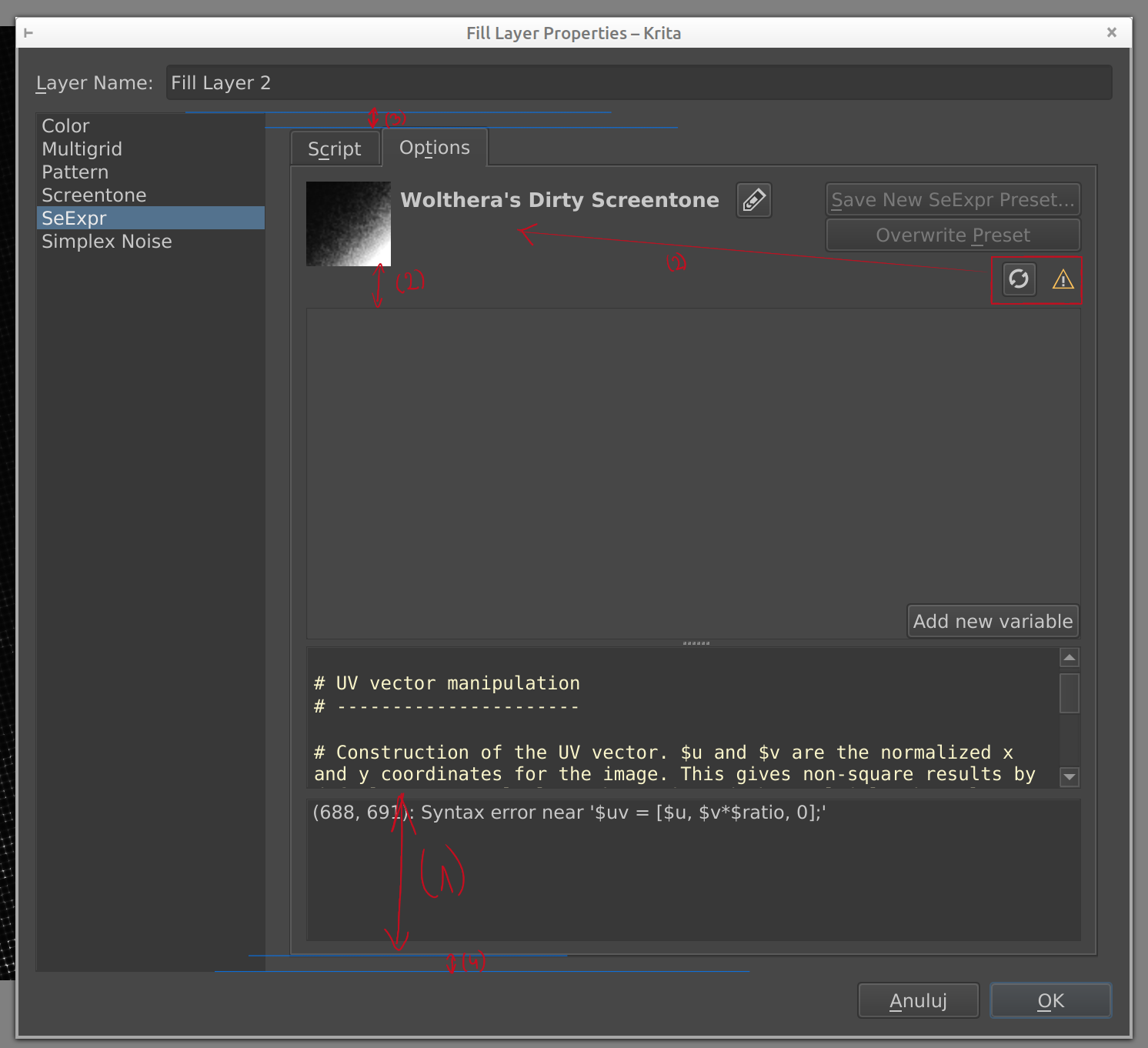
Small usability fixes in the scripts area, mostly intended to make more space for code:
(1) the error message space is very often too big and it shows up very often when I’m in the middle of writing, sometimes it even covers the line I’m writing. It has a delay, but it’s bound to happen. Maybe it’s possible to make it for example always those few lines, so when I make the dialog really tall, it won’t take up 50% of the coding space? I must say I’m a bit lost in Qt’s resizing widgets ideology, but I hope there is something that could be done there.
- this is how little space for coding I have even when I make the dialog reasonably tall and remove the widgets view, if only I have some syntax error. And the error message is usually just one line.
(2) maybe it’s possible to those two little icons either next to the name (and make the name wrappable) or under the name? (also those buttons take up space even when they aren’t there)
(3) unused space on top of the tabs
(4) unused space below the widget
Sure it can all be dismissed since I can make the dialog tall and remove the widgets view, and only the (1) is really that important to fix, but when I’m coding and I see I have not enough space, then every of those details kinda annoy me, like, why can’t I have this one more line!
I constantly try to do ctrl+S and ctrl+Backspace, both doesn’t work. The first one saves the image (which is not what I want), and the second fills the layer with the current color. Also not what I want
It’s so cool to have a type of shading language available in Krita now. I added a few of my examples to the other thread.
Some bugs and usability paper cuts I encountered:
Strangely, I can’t really type [ and ] in the editor window, which on my keyboard layout are AltGr+(8,9), unless I switch to specific tools like shapes select or canvas pan. With a brush tool it will instead change the brush size in the main window, but if I hold it for a while so Krita struggles to keep updating the brush size, it prints a bunch of brackets after releasing. No issues with other symbols.
The first undo state of a script will always return to the default voronoi with gradient map example, even after closing and reopening the editor or selecting another preset.
Dragging around sliders or curve node handles adds a ton of events to the undo history. Maybe those could be compressed.
Curves and color curves don’t seem to update when typing values for the selected node into their input fields, but RGB color vectors do update correctly.
Adding a new variable through the button and dialog places it at the end of the script, instead of the text cursor position.
The tooltip popup for any specific built-in expression doesn’t display the lines of the docstring that have the explanation of the function, only its declaraction.
Variable names containing an _ aren’t highlighted in blue, even though they are valid.
Don’t know how much further you’d want to or could take it and I’m happy as is, but I wanted to at least mention some wishes I had in mind:
A frame variable to access the current frame number for animations. The SeExpr documentation mentions it and the implementation for Natron seems to have it working.
Access to the pixel data from the below layers projection to be able to script filters. I guess this is the role of Cs and As from the documentation.
A toggle to disable auto updating could be handy.
Maybe a toggle to enable a form of super-sampling. I know that would be quite brute-force, I just wish I had that option instead of having to always work around sharp edges manually.

 maybe you could remove the thumbnail from here, and just leave those two buttons “Save” and “Overwrite”? And other presets actions can be seen in the script chooser in the other tab anyway).
 (it doesn’t bother me, but that’s something to keep in mind since it can bother someone else potentially?)