I’m new to Krita and have no experience with digital painting. I have a wacom intuos 4 but actually never came to use it. I’m 63 (well almost) and trying to learn this and that. I mostly draw with pencils and pens on real paper. If you want to have a look at some of my work…you can find it here: https://www.deviantart.com/yainderidoo
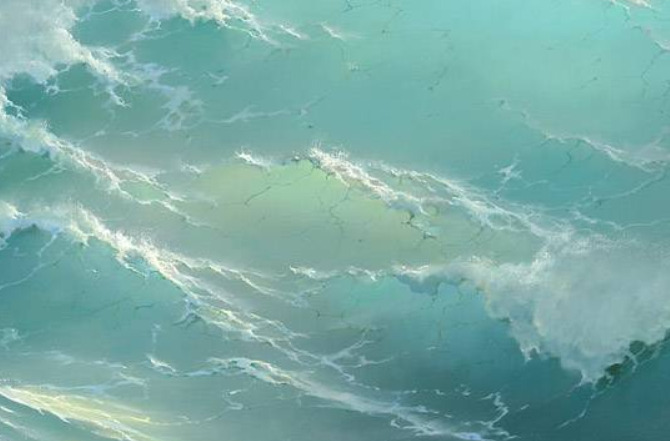
I have this scene or vision in my head I would like to try and paint. For that I need a sort of glazing effect seen in paintings of waves with light shining through the top.
How can this be done in Krita? Is there maybe a tutorial? Or other examples? I have tried and search for it, but don’t know exactly what words to use. Maybe someone can point me in the right direction.
Thanks
ps. I’m from Fyslân…so that explains why some of my english is maybe somewhat “odd”
Hi @Yainderidoo - Welcome to Krita. It would be good to learn about layers and opacity if you want to add glazes as one would do with traditional paints. My favourite way to glaze is to add a layer on top of the subject and paint with a brush set to very low opacity – like 20%.
I recommend a YouTube teacher called Blade and Quill. Here’s a very nice beginner’s lesson.
The hazy, glazy light shining through. I’m not going to use it for painting waves, but I need the effect for something completely different. Reds and oranges and yellows, light shining through.
Going to watch Bob Ross for sure…thanks for the tip.
You can experiment with blending modes to get the diffused light glowing through an object effect. Set a layer to screen or colour dodge mode, set it to low opacity and paint with a soft brush. This should add glowy light effect.
As Anurag_Ekka posted, I think your best bet is to paint with the light’s colour on a new layer then set the blending mode of that layer to a lightening effect. Anurag mentioned screen or color dodge. You can also try overlay, or hard light.
Alternatively you could paint directly over the existing wave with the brush itself set to that color, but that will permanently alter the color. It’s better to do it on a new layer so you can try different blending modes and edit it as much as you want without ruining the painting underneath.
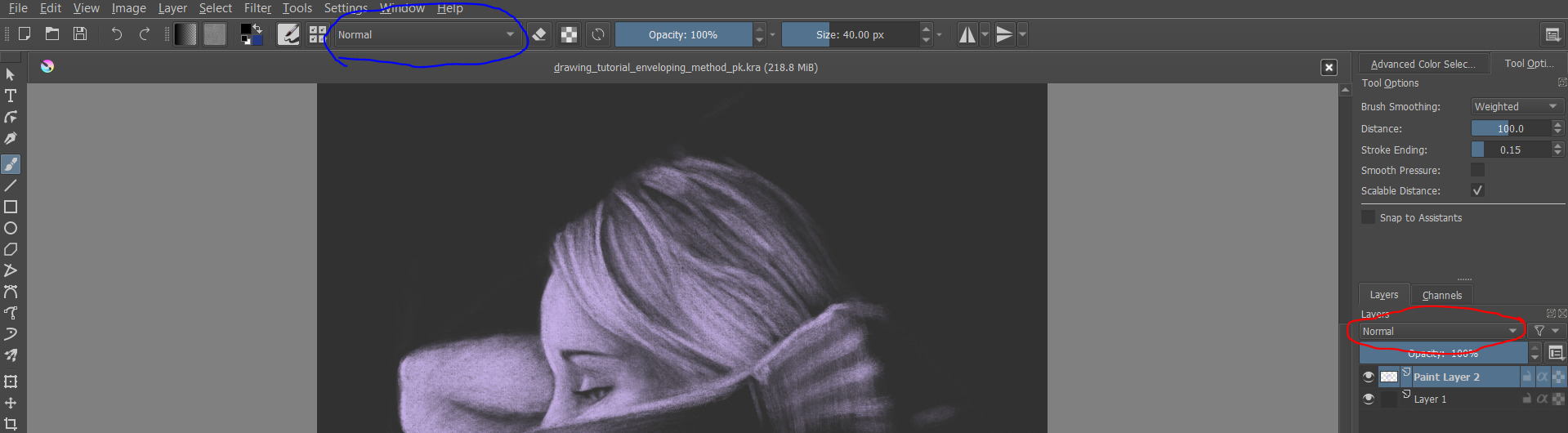
While you are painting on a new layer with your desired blending mode, you could ALSO set the brush to one of those lightening blending modes, so with every stroke you can build up the brightening of the colour/light effect. Just don’t forget that you changed the brush’s blending mode and put it back to it’s default setting if you want to use in it’s default setting afterwards.
screenshot attached. layer blend mode setting circled red, brush blend mode setting circled blue