Thank you!
1 Like

Something that irritates me is that you are writing
“For some reason it keeps showing me this every time without fail”
, does it mean you get the gradient(s) converted, or don’t you get the gradients converted and nothing else than this message?
I tested the site with most of the browsers I have available, so Firefox, Opera, Opera GX, Iron, Chrome, Edge, r3dfox, LibreWolf, SeaMonkey, Supermium, Maxthon, MyPAL, K-Meleon, and even TOR-Browser and none of them throws that error for me. Beside Edge, all browsers are portable versions, and all are up-to-date.
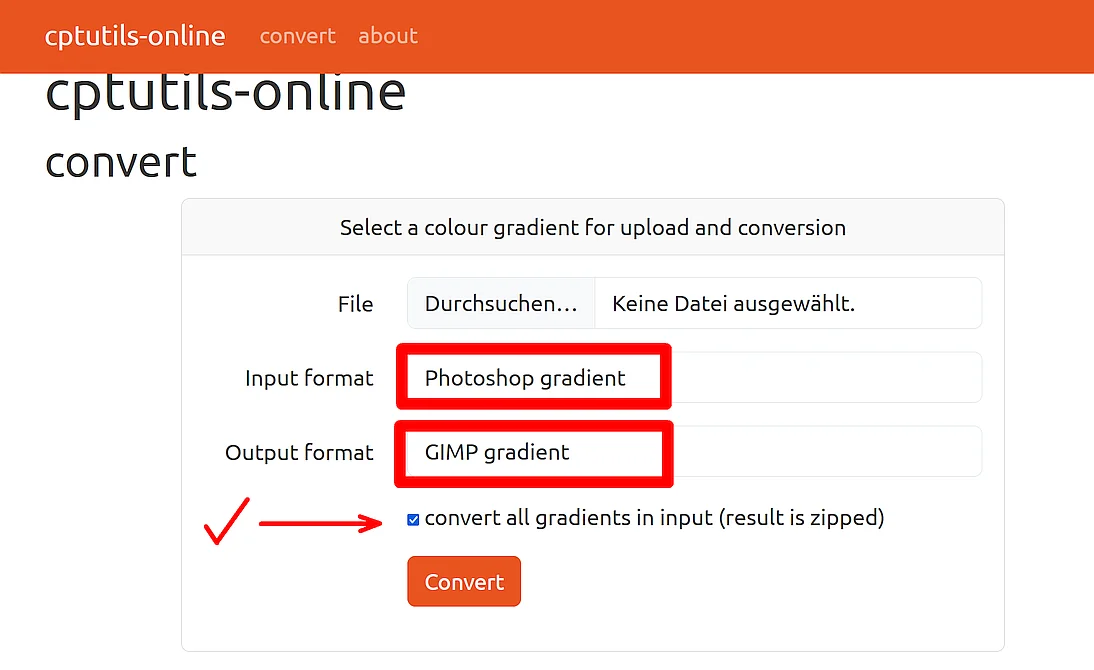
Your error screenshot tells me that you use the correct settings, but just to make it sure for everyone:
The settings shown in the first screenshot are not those you need for the Photoshop gradients from resourceboy.com, you need the following settings when you want to use the converted gradients for Krita, as output format you can also use SVG (that is an old screenshot, but edited today):
Can you try using a different browser? Do you use security software that may interfere with that site, like a firewall, or an internet-security suite? Can you/did you call up that site via a VPN and try it with or without it?
Michelist
1 Like
Hi! Sorry if I’m too late with this reply and you already solved this.
From where I’m standing, as I’m not a developer for the site (or at all, lol,) there’s two possible reasons, assuming you did everything right on your end and/or tried Michelist’s suggestions and got the same result:
- The file is corrupted, or
- The site was acting up at the time you got that error message.
I tested the site a few minutes ago with the same file (I think, the Y2K gradients?) and it worked just fine, for both the GIMP gradient and SVG outputs, so I’m guessing it was a glitch of some sort. I suggest you try again and let me know how it goes!
1 Like
This worked great, thank you!!
1 Like
Thank you! This is exactly what i needed (ノ´ヮ´)ノ*:・゚✧ 
1 Like
do you be able to make a tutorial video on how to get this gradient in krita? i tried… but got corrupted…
Hi, author of cptutils-online here, I found this thread when looking for something else, glad you like it. It was mentioned above that it would be better if the “convert all” checkbox was selected if the uploaded file was capable of holding multiple gradients – that’s a great idea and I’ve now implemented that.
On conversion failures, these usually happen when the uploaded file is not one of the supported formats, or the upload format manually selected is not the same as the actual upload format. Sometimes the files depend on some feature which can’t be converted (a Photoshop noise gradient cannot sensibly be converted to GIMP for example), sometimes it’s a corrupt file, sometimes a bug in my code.
If anyone has issues, do feel free to @ mention me here and I’ll have a look
Cheers!
4 Likes
Oh wow, CELEBRITY NOTICE!!!
Seriously though, thank you so much for this tool. This is my most viewed and liked post here, so that means it’s helped a lot of people!! 
1 Like