Hello, i am new to krita animation, and i like grouping my parts with 2 layers, one for the stroke and one for the coloring, but when i animate the names are super confusing and the ungrouped layers just look off
and also labels like how adobe animate does it would be great
i’m still new to krita animation though so correct me if im wrong
thank you
Hello @MTUnixic and welcome to the forum 
I’m fairly sure that this has been asked for before in other Feature Request topics but it’s difficult to tell because you need to provide more details.
Do you mean the layer names? The layer names are whatever you want them to be because you can change them to anything you want.
Why do they look off? Please post a screenshot to illustrate and explain your point.
I’ve no idea how Adobe Animate does it and I don’t know if anyone else here knows.
Again, please provide a screenshot of Adobe Animate, or a link to a video tutorial about it, so you can illustrate and explain what aspects of the Adobe Animate UI/UX you’d like to see in krita.
2 Likes
thank you!
by this i meant that the animation timeline doesnt show you the group the layers are in, so something like this just looks off
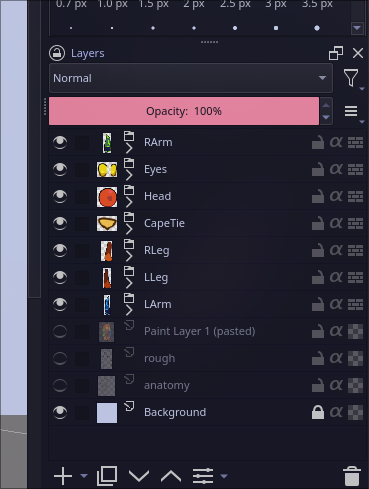
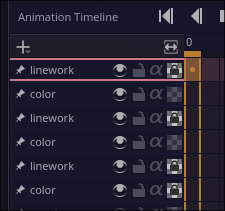
my apologies, I meant aseprite’s label feature, where you can select a selection of frames and then assign it a “label” with whatever name you want, it can be a loop point aswell and also a neat way to organize things
thank you in advance for responding back!
1 Like
Thank you for the more detailed explanation with screenshot illustration.
This situation is well known and has been commented on before.
(What I do is give my layers names such as Head-linework and Head-colour to make them easier to identify but I see your point.)
A screenshot of, or a suitable link to, the Asperite presentation would be useful here.
The developers are few in number and have a lot on their plates and most of them are volunteers who can’t devote themselves full-time to krita. The ones who specialise in animation are well aware of the various ‘shortfalls and paper cuts’ and are aware of what users have been asking for.
It’s a question of time and patience and waiting for them to be able to get around to improvements, after they’ve fixed any existing bugs.
1 Like
Yeah I see your point, it is quite annoying tho since if you want to move the whole object you have to select the whole group in the layer view since you can’t select multiple frames (for example rotating or transforming).
I’m not currently home but they look like this
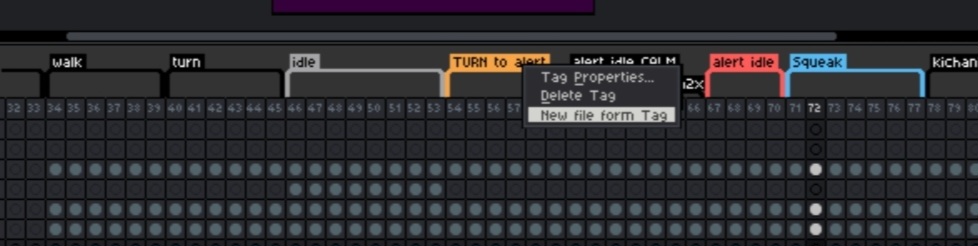

They are kinda like visual groups for frames if that makes sense.
I see, I wish you and the team best of luck in anything, I do not know what I would do without krita, the linux art programs are limited outside of tools like WINE (which doesn’t even have pen pressure supported)
Thought if that’s okay i would like to add something, while animating in krita there’s some things that are frustrating in the animation timeline; the insert keyframe keybind doesn’t really exist there’s only insert keyframe in the next frame or previous frame, when you make a new frame only the layer gets moved you have to select the whole frame for every layer to move all of it, you have to add keyframes to every frame manually before animating, and when I select a frame from another layer it doesn’t automatically select the layer the current frame is in I have to manually select it.
Thank you for responding back!
The Asperite screenshots would be helpful to a developer who’s planning to do work in the area of ‘Groups and label support in animation’.
In a Feature Request topic, it’s not helpful to drift off-topic:
That is a statement of things that confuse and concern you so it really ought to be in a
Support and Advice: Basics and Interface topic with an ‘animation’ tag.
Three of those things are either not actually true or are a result of your lack of detailed knowledge of animation in krita.
But this topic is not the place to discuss them or explain them to you.
1 Like
My apologies you are right, i shouldnt go off topic.
Though I very much thank you for reaching back to me, i still do not know how things mostly work in the site forum just yet, but i will do better
And i apologise for the trouble
1 Like
But regarding the grouping in the animation timeline and labels will those be added per chance?
I’ll stop continuing after this though and im sorry for the trouble
I don’t know because I’m not a developer  You need to wait and be patient or join the development team and write the code for it.
1 Like
I’ll try to move this to bugs.kde.org since gitlab to request features and issues there, tho so far thank you for your help!