Handling MultiLayer EXR and Crytomattes

Background 1
A very prevail workflow in industrial Concept Art is as following:

  1. Build the scene in 3D
  2. Render the scene in multi-pass and create what is usually called ID Pass\Clown Pass.
  3. Post processing the scene and do whatever you want in image editor.
  4. Bc you have Clown Pass, the magic wand is incredibly handy, allow you to do object-based selection in you Image real easy.

You can read about ID pass and other passes on this page: Layers and Passes - Keyshot Manual
It should be easy to see its value as an Instant Selection Mask Creator.

In case this concept (of using passes in 3D-aided works) sounds alien to you, check out the tutorial in: https://express.adobe.com/page/ucLFuLOEKK9Uo/
It serves a good demonstration.

Background 2

Many artists have grown fond of Blender since it has a good community and the development is active. They get comfortable with it and stay with it.

However, Blender’s render engine dose not support direct Clown Pass. Though it can be approximated with Crytomattes's Pick Output and Workbench Engine's Flat + Random Color combination. Above 2 approaches gives a similar result but can have overlapping object with same color. Bc of lack of ways to adjust random settings, once the problem occurs, it is very hard to tweak the result.

But it is a usable solution if you are seeking Clown Pass.

Background 3

As ppl in Dear GOD is there a simple way to render ID passes in Blender yet? - #11 by gtomorrow - Lighting and Rendering - Blender Artists Community mentioned, the above-mentioned Crytomattes is an industrial solution that is better than ID Pass in the world of Render Post processing, it can store object information (Masks) in Multi-layer EXR, which allows you to do fast selections.

Though image-editing software that supports M-EXR is scarce. You can achieve it with Exr-IO 2.06 Update | Exr-IO free Photoshop OpenEXR plug-in and Photoshop.
The Result looks like this:
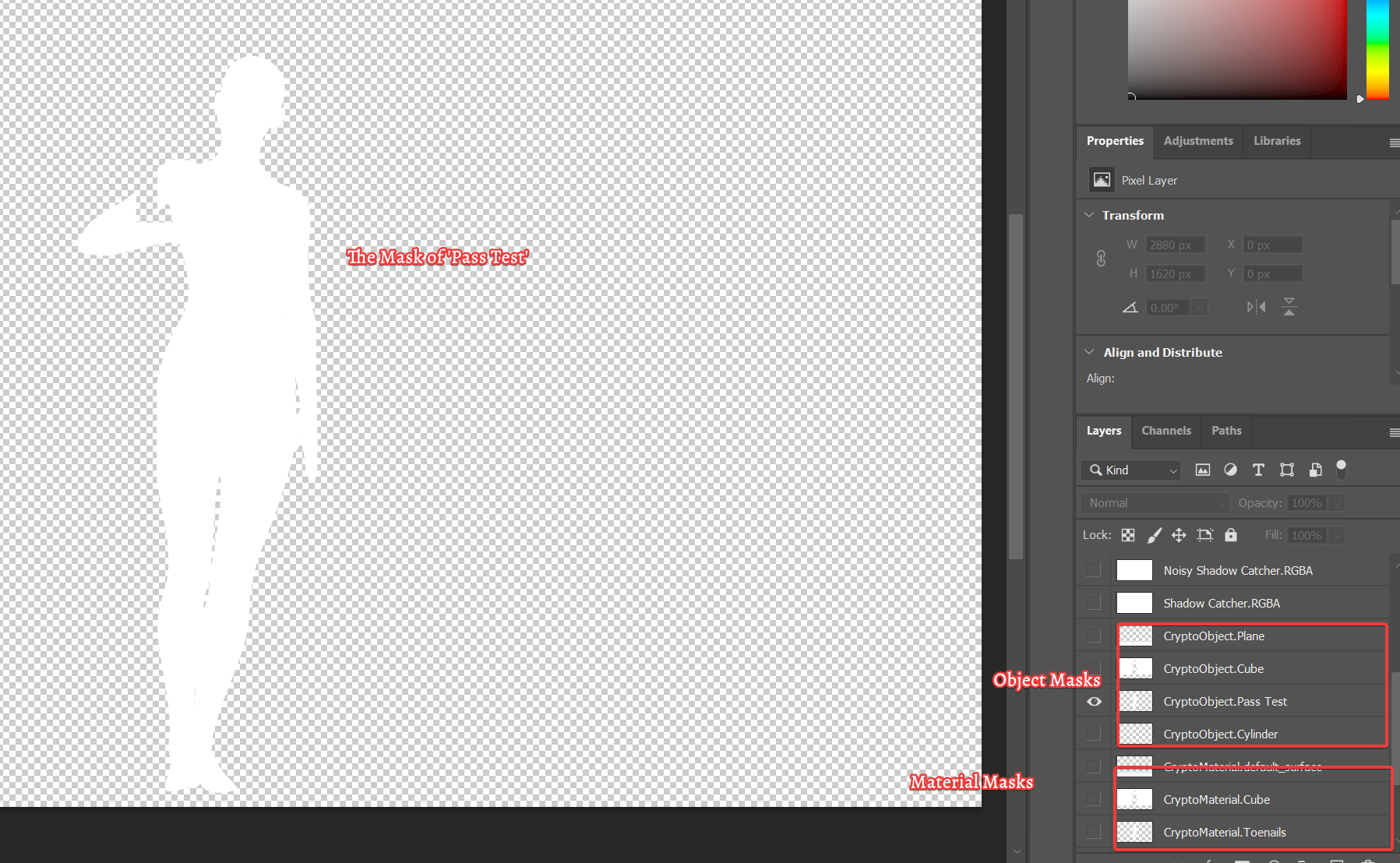
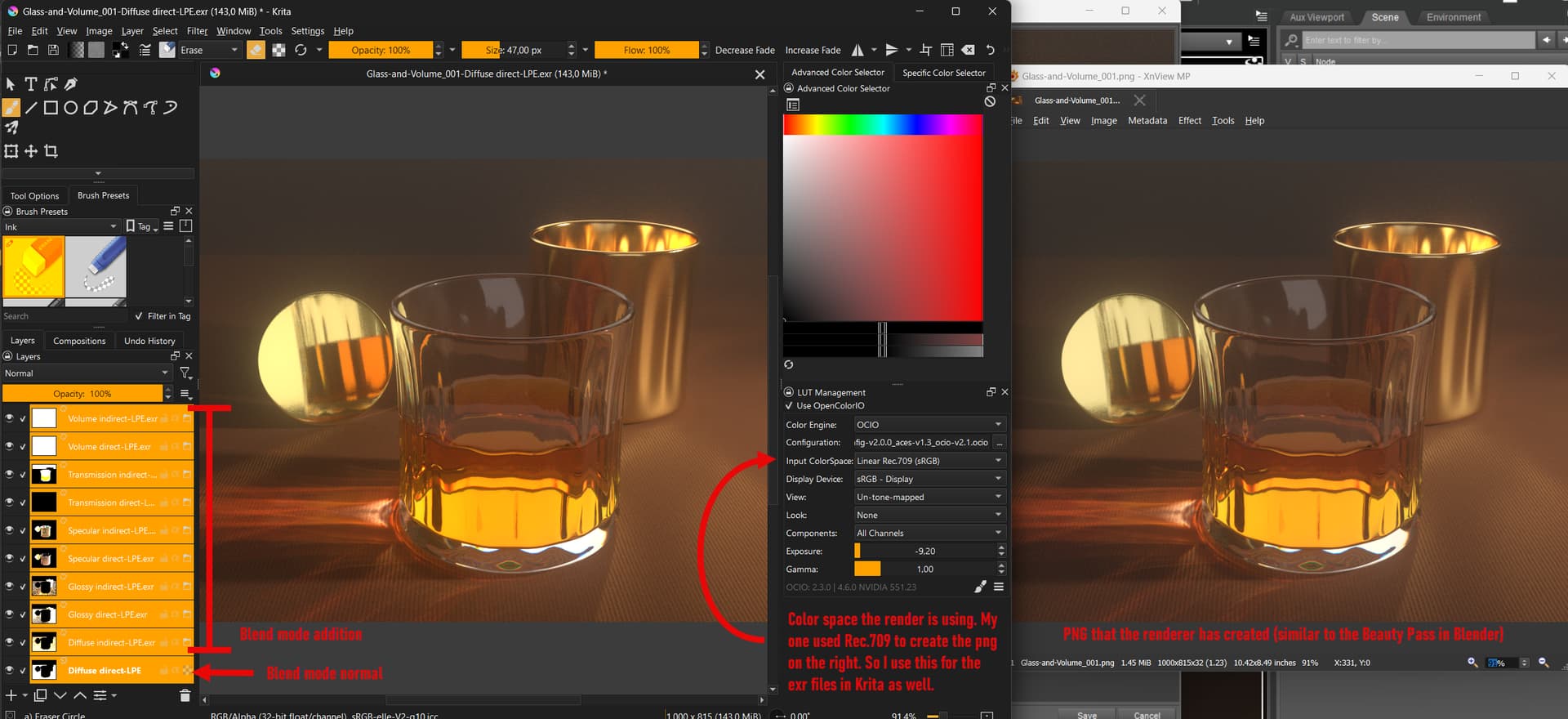
However, open the same exr files gives me different results in Krita:

And thus comes my question:

Will it be possible for Krita to produce a similar result?

Turth is, the current ways to produce ID Pass in blender is no where as good as being able to use Crytomattes. (For example, none support Material Based Selection) Able to use Crytomattes masks in Krita will make thing 1000 times easier for a Blender \times Krita workflow (which I believe many have adopted.)

Though I cloud export layers from Photoshop (somehow PSD files with these masks are unable to open with Krita) and then work in Krita, but it is kindle of troublesome cz you have to manually place many masks (PNG might get trimmed).

I was going to file a ticket for EXR, but unsure it should be categorized as bug or feature requests (I am not sure if Crytomattes is part of standard or not). So I decided to post here.

So what do you guys think? Do you think it is an Overkill or it is actually something worth doing?

Relevant Discussion:Blender EXR Photoshop Mulitpass compositing - #5 by Pi-gor - Tutorials, Tips and Tricks - Blender Artists Community

(Btw, I would love to be educated on how to properly use rendered EXR file in Krita, It seems impossible to get the color right. I checked Openexr Color Managed Workflow - Support and Advice / General Questions - Krita Artists but after several tries, none of the color porfile in Assign color profile create the same image I see in blender render viewer, not even close.)
2 Likes

You should vote for your proposals. Requests for which no one votes do not carry the necessary weight to be considered worthy of implementation. Why develop something that nobody or hardly anyone wants?

Michelist

1 Like

Good Point!
Maybe I should also do a paint recording to showcase it.

1 Like

That is up to you, in case you believe that it will help to carry your message, so others can grasp what you want, and perhaps they can see that they may need it too, then it seems to be a good idea to do it.

The thing here is, I don’t know enough of the things you described above, that is far beyond my needs, especially since I’m hardly able to paint anymore because I can’t precisely control my painting hand because of an illness.

Michelist

1 Like

I voted.
But I think most of the user base might not have such requirements.
And it would take more than cryptomattes to make Krita a 32bit editor.
You can read about it here.

I voted nevertheless because maybe in the future Krita could grow in this area.
Actually it is either Photoshop (not for me) or Affinity Photo. But the latter one is buggy and has some strange, limiting concepts when it comes to ocio (not to mention that the ocio version they use is outdated). And Photoshop is, well, Adobe. Luckily Blender can do compsition and Fusion or Davinci etc. as well. So there are alternatives but not really an easy to use combined 32bit editing / painting solution.

@BhVg0L0VGGs-0x16plAO regarding your question about how to get the look of your renderer in Krita.
Maybe the below example can serve as a hint.

Please note, that the individual exrs are exclusive regarding which data they contain. That means no light pass appears in more than one exr. I.e. diffuse direct does not contain any data about reflection or transmission. I made the passes that way so that I can simply use the “addition” blending to get the final image.

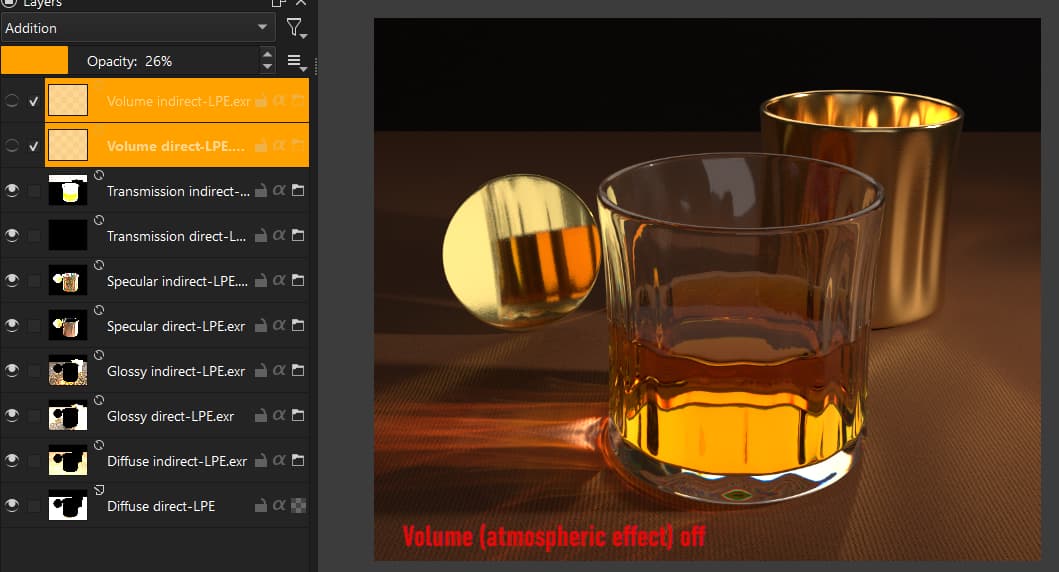
A bit off topic but below is an example of where those passes and 32bit editing come in handy. I.e. if I don’t like the glowy dusty atmosphere, I can simply switch it off or lower the opacity etc.

1 Like

Thx for reply and tips on color correction.

Agreed. If i haven’t invest so much time on Blender already, I will probably go for something like Keyshot (anything with material ID) and forget all about this.

I been using Linear space since the start. I really like Krita’s force SRGB output option. (Save a lot trouble in showing work around.)

Since we are on this topic, do you mind I ask a follow up question?
So I rendered an Image (with passes, just the final result) in Blender with an override color space: Linear Rec.2020. When I imported it in Krita, the color looks over exposed. I tried to assign the color profiles with name “Rec.2020” to them in Krita but failed, the color didn’t change.

I ended up using OCIO (read blender config) to get things right, but I not sure why previous attempts is wrong. Thx for any insight!

I assume your exr is not normalized to 0-1 range, so it has high bright values. Those can look overexposed or simply white in Krita. Converting from one 32bit color space to another 32bit color space does not change this. The color hue / saturation might change but the values are still high. Using ocio can compensate this depending on what transforms you use. I personally have not tried to use HDR BT.2020 in Krita so I don’t have more details. Maybe you can open a new thread in the Support Section and see if somebody can help there?

2 Likes