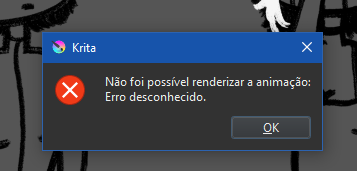
So, i’m pretty new to animation in Krita, and I have tried almost everything I possibly saw on the internet to help me, none of it it’s working, can someone please tell/help me with it? that’s what shows in my screen when I try to save
Brazilian here, any helps or tips in portugues, english and spanish are welcome.
 Hello @RafaDaerier, and welcome to the forum!
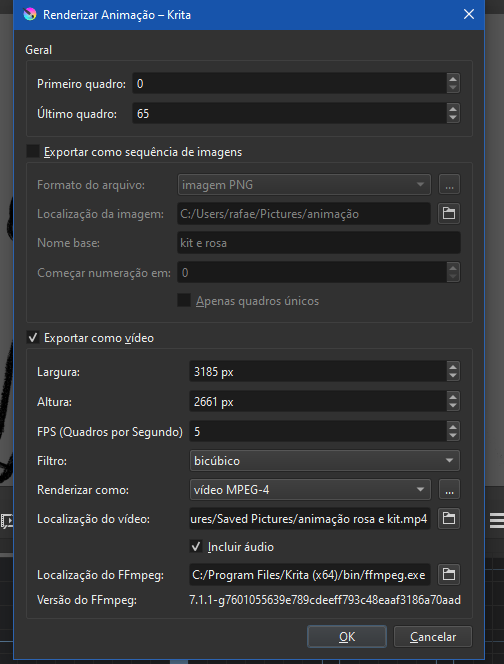
Simply reduce the size of your animation, you are far above the size Krita can render, and, and this is not unimportant, your currently chosen resolution is above the HD resolution used by the DCI (the Digital Cinema Initiative) for their cinemas around the world.
If you go for 2000 by 1671 pixels, you can very probably render it without issues.
And if you really believe you must have this for almost most use cases insane resolution, you need to download the below linked FFmpeg package in 7Z archive format (it is a direct download link, but you need an archive program that can unzip it, Explorer can’t handle that format), unzip it to your drive C:\ and then copy the path to the then unpacked file ffmpeg.exe into the last input line in the dialog where your first screenshot shows currently the entry c:\Program Files\Krita (x64)\bin\ffmpeg.exe.
Traditionally one creates the folder C:\FFmpeg\ to then copy the content of the archive into that folder, but one does not unpack the root folder only everything in that root folder into C:\FFmpeg\ so the folders bin, doc, presets and the two files LICENSE & README.txt, so in the end the usual path is c:\FFMPEG\bin\ffmpeg.exe.
https://www.gyan.dev/ffmpeg/builds/ffmpeg-release-full.7z
Michelist
First try the ‘quick and easy fix’ of reducing the final size as noted by @Michelist above.
There is another possible problem that I can see:
The file paths and a file name contain characters with accents. Sometimes, ffmpeg has problems with those characters.
If reducing the video size doesn’t work then try changing the ‘Exportar como sequencia de imagens’ folder name to one that does not have accents on characters. Also do that for the video file name.
OMGGGGGGGGGG YOU’RE A LIFE SAVER, it was the accents on characters, I sometimes forgot most of apps don’t recognize accents, since my is in my native langague, i didn’t think it would be a problem, thank u so much 
thank u for the welcome. I didn’t knew the size was to big, still learning sizes in animation/draws, so thanks for the tip!
Krita uses FFmpeg to render videos. FFmpeg is created by a separate organisation before being included with the krita installation on your computer.
Hello @Michelist, we meet again
I can not tell which is the exact size from which on Krita fails, but most users get issues when both values, width and height, are above 2000 pixels. We only know that Krita can’t render above a maximum number of pixels. So my hint with 2000 by 1671 was in the definitive safe area.
Hello @AhabGreybeard! 
Michelist