Hy!
I am not sure if I am posting right question on right topis
But anyway, I have been using Krita 4.2.9 (on win 10) for animated short and today this thing poped out
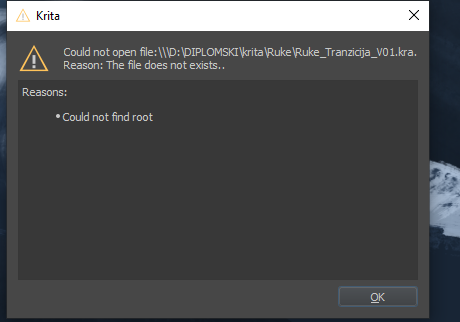
It is really confusing because yesterday when i finished with saving file, everything worked, and oslo when i am trying to open file in the root folder I am keep getting the same warning.
Does anybody have any clue how can I open my file ?
This initially looks like an application file permissions thing which can be confusing on Windows.
Do you remember if there was a Windows update or any change at all after your last successful use of that file?
What is the D: drive, physically? An additional internal hard drive or partition, a USB stick, a network drive, etc?
When you say “open file in the root folder”, do you mean the D: drive or the C: drive?
Can you copy/move the file to your C:\Users-- area, e.g your Pictures folder, and try to open it from there?
What happens if you run krita as administrator?
Note: The latest formal version of krita is 4.3.0 and you should update to that.
Hy, and tnx for welcoming
I had no windows updates, i would say for at least one week.
D: drive is a partition of an aditional hard drive, i was also launching krita on the same disk and I only have a problem with one specific file (which is showing that warning “Could not find root”. So this D: drive was krita`s root folder, if that answers the question?
Today i updated krita to latest 4.3.0. version, removed old one, installed it on C: drive (ssd disk where are usually all of my programs, including windows) and when i run file as administrator, it is showing the same warning.
Two days ago when i finishd with animation the krita file was around 4.6 GB, but when this file was opened in krita it sayed 16 GB. So I am guessing that the size could be a problem?
Since I never had any problems with launching my animations in krita files
If you only have this problem with one particular .kra file then it’s obviously a problem, of some kind, with that file.
What puzzles me is why the error message says that the file does not exist.
If the .kra file is 4.6GB size on the disk then that is a very big .kra file.
When you did last open it in krita, the image content required 16GB of RAM and that may be a probem if your internal RAM allocation is too low.
How much RAM do you have on your computer?
The default RAM allocation is 50% of total RAM so this suggests you have 32GB of RAM, unless you’ve previously increased the Memory Limit in:
Settings -> Configure Krita -> Performance group -> General tab
If you do have 32GB of RAM, it should be ok to increase the Memory Limit to 24GB, or even higher provided you don’t have other memory intensive applications running at the same time.
Given that your .kra file is 4.6GB, it may be neccessary to use Zip64 compression and this can be enabled in:
Settings -> Configure Krita -> General group -> File Handling tab at the bottom, the Kra File Compression options.
However, it may be too late for that.
If your .kra file has been ‘damaged’ in some way by not using Zip64 compression, that will need a developer to give advice.
The tootip for that option does say “Only use this option for very large files: larger than 4GiB on disk”
(This raises the question of what happens if you use it on a file that is less than 4GiB on disk.)
I think you need a developer, such as @halla to give advice for this situation.
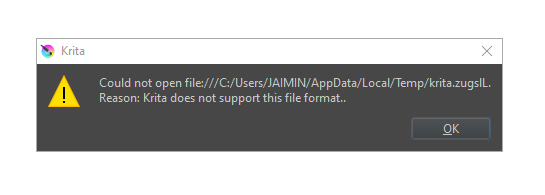
The same error appears when I tried to copy an image from slack and tried pasting in Krita.
in Previous version (4) there was no issue. but in v5 its giving this error.
(note : it works when I copy and plaste image from web page, whatsapp or other clipboard. only slack is having the issue in v5)
The file extension in your screenshot is missing. Because I guess it has its origin from web add “.png” at the end of the filename and try it with that extension first, if it does not work try “.jpg” instead. If that should not work, can you make this file accessible via a file sharing service, or something like Google Drive, OneDrive, Dropbox, so we can see what for a filetype it is, or if it is corrupted?

 ?
?


 Hello
Hello