Greetings.
So, I’d like to replicate a feel and would need some advice/hints regarding this.
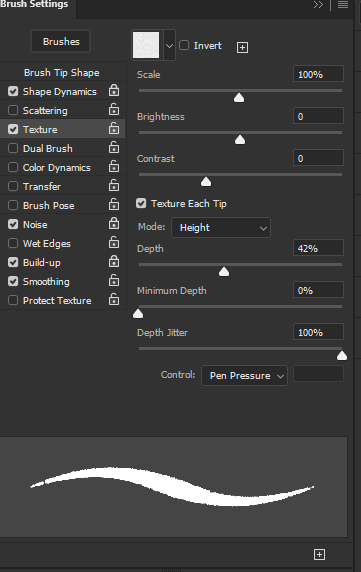
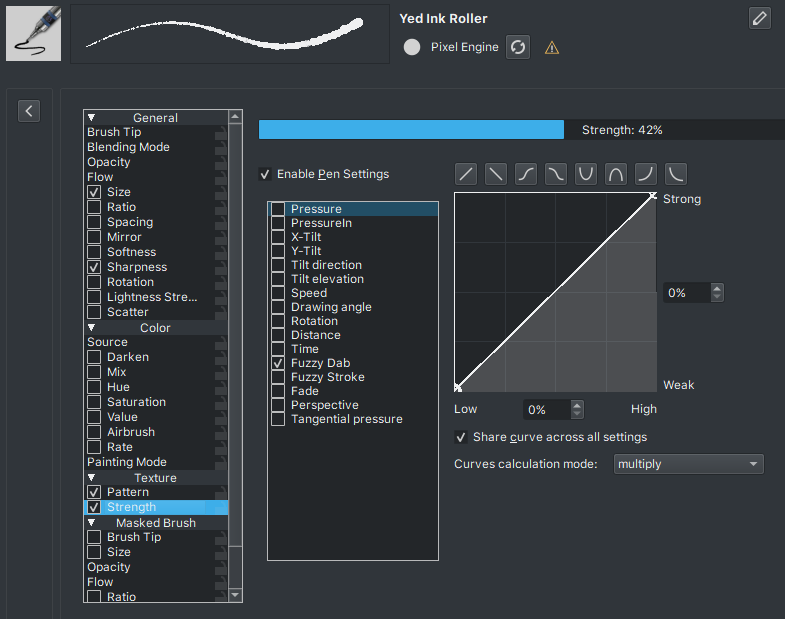
My main focus is the brush pattern settings. This is what I’m trying to copy.
Photoshop has some ‘peculiar’ wording in their settings, or I’m just too familiar with Krita’s, but alas.
Depth in Photoshop Texture tab is the same as Strength in Krita. So that’s right (theoretically).
Minimum Depth is the least the texture parameter can be applied. So is the same as putting any of Krita’s curves in Zero percent. So you were also right there.
Depth Jitter… Now this one is a little confusing, it really gives the felling of a random jitter of the depth. However I don’t think is the case. It is the way Photoshop express how much the depth can ‘jitter’. In this case to 100% of the previously Depth set (42% in this case).
You can assume it is not random because the Texture Control is set to Pen Pressure.
I’m pretty sure Photoshop only allow one parameter to control the texture. Unlike Krita where you can control the texture with multiples parameters (Pen Pressure, Tilt, Random) at the same time.
Theoretically you should set Pressure (and only pressure) to the same linear curve you had on Fuzzy Dab.
Some notes that might help. Are you using Height (Photoshop) in Krita? Because the Height mode in Krita is very different in behavior.
When I created the new Height mode, one thing I remember is that Photoshop’s were ludicrous in that Depth parameter. The Depth should be set to at most 20% for most textures, or else you only got a fully opaque stroke.
While Krita’s is really forgiven with high strength values still showing the pattern.
So I presume you are only interested in that border variation, and the middle stroke isn’t really textured.
Maybe most of the effect is coming from the Shape Dynamics or Noise tabs?
Texture each tip is the default for Krita (I’m 99,9% sure).
The texture per stroke is the one Krita doesn’t have and @Deif_Lou found rather difficult to implement with the new texture modes.