I just started Krita after some time and now my brush is displaced like you see in the video.
At first i thought i was painting on a transform mask but there are no transform masks in the project. It’s also just this specific project, others and in the menu the pen works fine. Does anyone know why that happens and how to fix?
My mistake. I added a screenshot of my interface. I am not using the multibrush, just the casual paintbrush (as in the screen) tool and the bug or whatever it is appears on all selected brushes and layers.
Only the canvas is impacted?
If you use the pen outside (menu, docker, even on “paint” for example) everything is fine?
Does the problem occurs when using the mouse to draw too?
I’m wondering if it could be related to drivers…
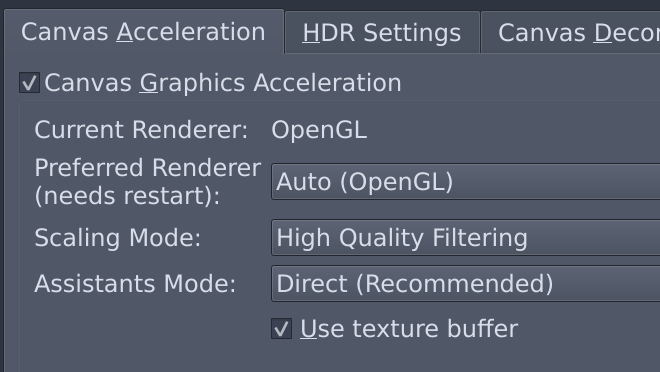
What’s your current Krita configuration settings (Display > Canvas acceleration)?
Does the problem still occurs if activate/deactivate canvas acceleration, or change the settings?
Hey, first off thank you for trying to solve this issue.
Troubleshooting:
Yes only the canvas is impacted, the interface is working fine.
Canvas Acceleration Settings are set exactly as in your screenshot. I tried different options and turning them off and it didn’t change anything.
However, i did update the Wacom Tablet drivers and restarted the computer again and after trying it once now it seems to be fixed.
I hope it stays that way now, i only got two weeks to finish this as a birthday present.
Hi MaxMint,
I also had the same problem TWICE recently. Until now I only used Krita very occasionally. I never got around to working with it much because I usually work in 3D, especially with Blender.
But now in January I took part in the Caricature Resolution 2024. This is a Facebook event in which caricaturists receive 1 caricature assignment every day throughout the month of January. That’s what I wanted to do with Krita. Very intense, if you don’t know the program that well yet. But it worked. To the point where I suddenly came across this problem too! Suddenly, after a few days, my pen started drawing in the wrong place. A few cm more to the right (just like in your video), later more than 5 cm below! Things went from bad to worse.
I finally deleted Krita from my PC, redownloaded it and reinstalled it. Also checked to see if there was a new driver. Nothing helped, the problem kept recurring.
Then I decided to continue drawing in paint.net, because I also use that program regularly, but the drawing options there are much less. Tried again the next day in Krita, but still the same problem there! Tried again after 3 days and from then on Krita worked normally again. I spent the rest of the month drawing in Krita again. Until the 3rd last day of the month, when the same problem suddenly occurred again. Then I continued working in paint.net for the rest of the month.
Afterwards, I tried again in Krita at the beginning of February and it worked well again. A very strange phenomenon! So it happened twice and each time it resolved itself after a few days. Very strange and annoying!..
Okay interesting, it seems to definately be a Krita issue then. Personally i don’t want to change to another Software. Have been doing that before but it only makes me draw even less consistently/often.
What’s the device are you using?
Really weird that this problem seems to be coming out of nowhere and not being reproducable due to it’s random nature. I hope it for you too that it keeps working from now on.