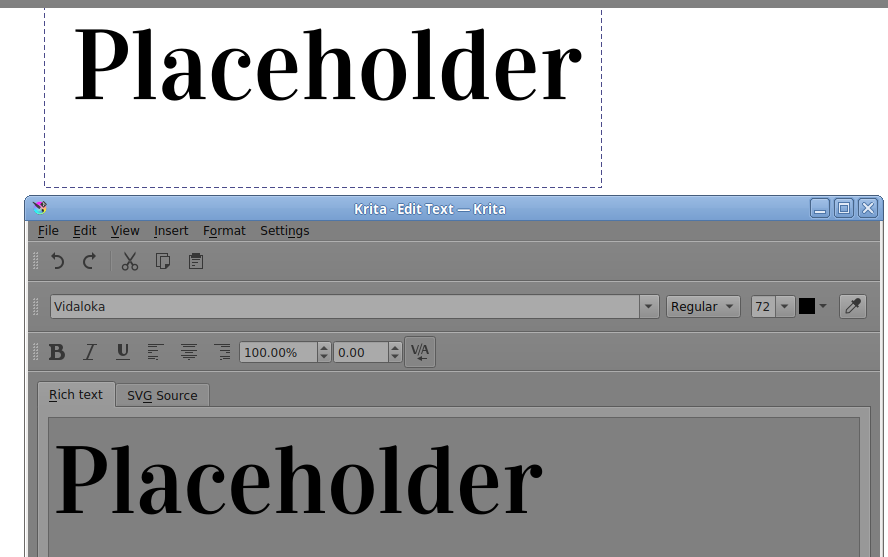
I’ve just downloaded a font that I fell in love with to update my business logo and I can’t get it to work! It’s fully formatted and showing as it should elsewhere, just not on Krita.
It’s a Serif font but is showing up as a blocky sans serif in the app.
Has anyone experienced this issue themselves? Is there a way to solve it or do I just need to find something else?
Which version number of krita and which operating system are you using?
Do you mean that other applications display it in their list of fonts and that it looks as it should when used in those applications?
Font design is complicated and arcane and there are some fonts that ‘go outside the box’. With these fonts, different applications deal with them in different ways.
Some time ago there was a problem with a font that ‘went outside the box’ and GIMP handled it quite well but krita didn’t.
Which font is it that is showing this prolem?
Can you provide a download link for it?
It appears to be showing as is on applications like word.
This is the font that I’ve downloaded;
I’ve seen somewhere (maybe reddit, maybe on here? I’ve looked on so many websites in the last half hour!) that Krita only takes TrueType font files and if it’s not TrueType then that could be the issue but this font does appear to be a TrueType font file so I’m really not sure what could be causing this.
Is your krita installation a ‘normal’ one using either the installer or the portable .zip from the official website?
Or did you get it a different way?
Have you tried restarting krita and also restarting your computer?
Can you try downloading a different font to see if that works, or not?
Unfortunately, I have to confirm that Krita 4.4.8 and 5.0.0 BETA 1 under Windows 10 do not display this font correctly for me either, unlike other tested programs (IrfanView, OpenOffice, AbiWord).
I then converted the font from three different (online) font converters to OTF, EOT and WOFF and from the generated fonts converted six back to TTF from other font converters and also these six work in every program except Krita 4.4.8 and Krita 5 BETA 1.
So Krita doesn’t like something about this font!? That is strange…
Thank you!
I’ve had an experiment with ‘Prata’ and another font I managed to find called ‘Playfair Display’. I’ve ended up going with Playfair. The S on Prata is closer to Vidaloka but I think I prefer the general feel of Playfair.
Font picking is so difficult!
Okay, this is kinda interesting. It is a bug in Qt on Windows for sure. I have tried this font in Kate, a Qt-based text editor. The font sample is rendered correctly in Kate’s font selection widget, but in the document area, it’s replaced by the placeholder font. There’s definitely something weird about this font.