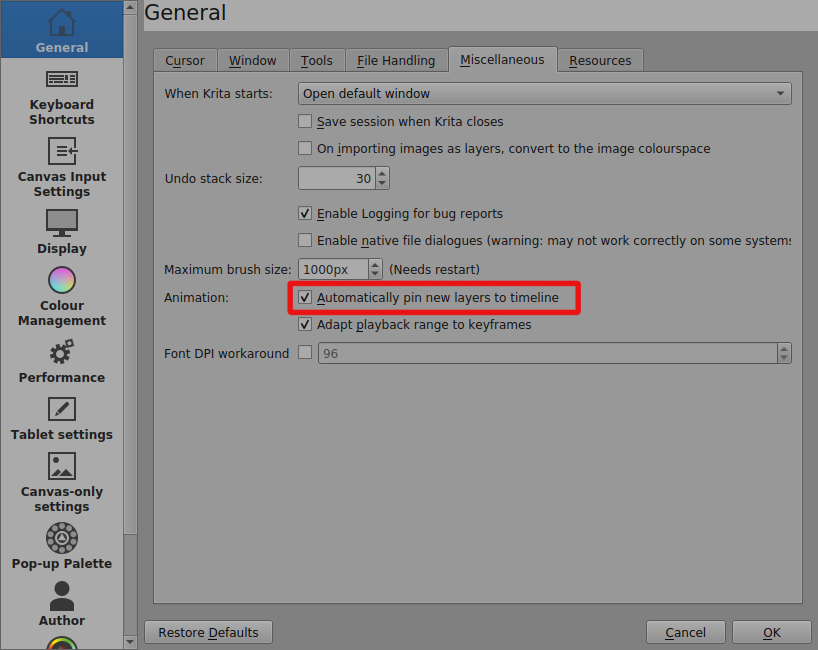
After the update, the layers began to be automatically added to the timeline when you click on them. This is very annoying, because basically these layers are not related to animation and clog the timeline “just that”. Of course, they can be removed from there, but then you have to uncheck the box from each layer, and there are a lot of them. My work involves a quick transition to new and new layers and their quick editing. Therefore, turning off the display of each layer on the timeline slows down the work very much. Makes her more tense.
Because of this decision, the program starts to slow down when there are a whole bunch of layers on the timeline. How to disable automatic addition, I myself cannot understand, since there is no uncombed space left in the settings. It is very strange that disabling a function that depends on user preference is not prominently displayed. And completely desperate in search of the cherished checkmark, I will say as the target user of Krita that it is impossible to disable this feature. However, I still hope that the community will help me and I will sincerely thank you.

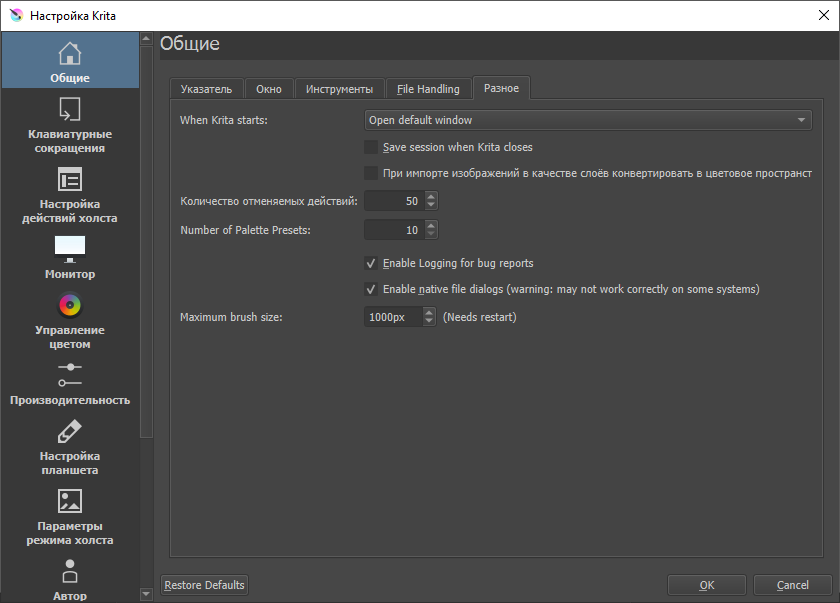
It is very strange. I updated the program not so long ago, but after the “Maximum brush size” parameter there are no settings … There is not even the “Animation” item itself.
When you said, “after the update”, I assumed that you meant that you were trying the 5.0.0-beta1 which is the update that everybody is excited about (with good reason).
That is the version I took the screenshot from.
I suggest that you wait for 5.0.0-beta2 which will be released ‘soon’ and that you run it with the portable .zip package as a different user, to give full isolation from your current installation, until you get familiar with it.
Thanks for the help. I will keep an eye on the next version!
You can try something very close to what the 5.0.0-beta2 will be, from here:
Krita_Nightly_Windows_Build [Jenkins]
Remember to use the .zip package and run it as a different user for isolation.
Either that or make complete backups of your configuration files and your resources folder for later restoration in case of problems.
Thanks!