For adding shadows and highlights, I generally use additional layers with different blending mode settings above the layer with base colors. A few examples with different sets of additional layers:
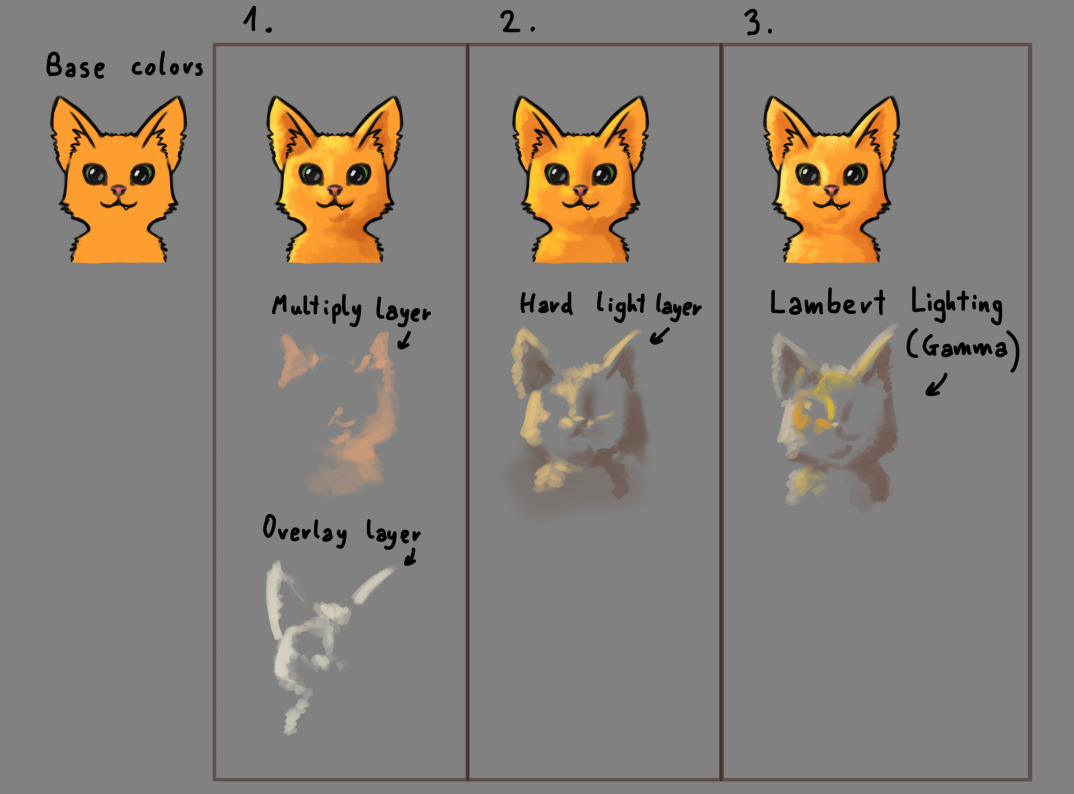
- I used a multiply layer for shadows and overlay layer for parts in light.
- Hard light layer for both shadow and lights (it can make things brighter or darker depending on the color you choose. medium gray wouldn’t change anything).
- “Lamber Lighting (Gamma 2.2)” layer for both shadow and lights. It’s similar to hard light.
Some more info about blending modes:
Blending modes can be attached to a layer in Krita and they can be found in the Layers docker here:
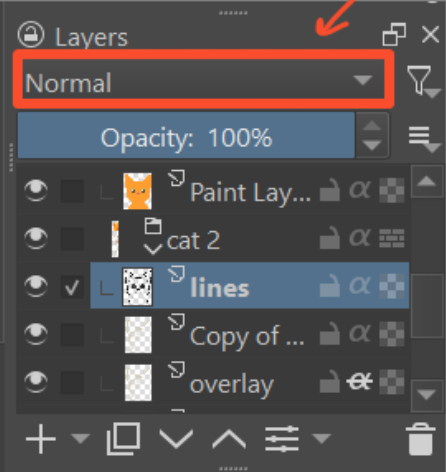
Blending modes change how that layer interacts with other layers below it. By default, it’s set to “Normal” which means it will simply cover whatever’s underneath. Other blending modes do other things, for example “Multiply” makes things darker (and can make them more saturated) in a specific way which makes it good for adding shadows.
Warning: There’s a similar menu for blending modes on the top bar, but that will change the blending mode of your brush, not of the layer. You probably don’t want to modify that unless you know what you’re doing.
When I’m ready to color shadows, I simply use a darker version of the area that I’m coloring. I use a photo for color reference as well. I tend to do it all on one layer because for me, it’s easier to blend the areas needed. I do my digital artwork very similar to what I’m accustomed to with traditional media.
Thanks