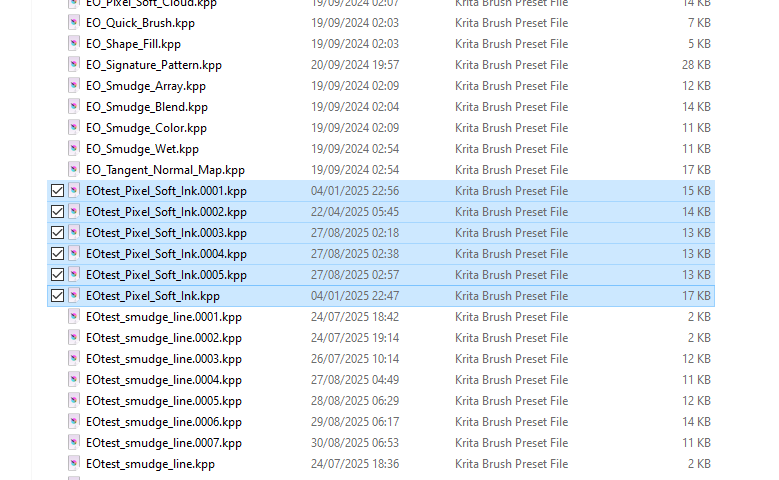
so when I make a new brush and am testing I always end up with a ton of duplicates each time I save. is there a way to erase the duplicates and clean up at the end ?
I find that the following method works but please make a backup copy of the entire krita resources folder just in case you need to restore it after a mistake or failure:
Quit krita, obviously.
The latest preset is the -.0005.kpp one. Delete them all except for that one.
Rename the -.0005.kpp file as -.kpp
Delete the resourcecache.sqlite file which is at the highest level in the krita resources folder.
Start krita. The splash screen will show ‘Loading Resources’ for a long time, depending how many resources you have and how fast/slow your computer is.
As ‘reassurance’, the file resourcecache.sqlite-journal will be very active, it’s size will change up and down and the newly created resourcecache.sqlite file will get bigger and bigger.
Eventually, krita will start and tell you that you have no resources enabled 
Quit krita then restart it. The starup will be quicker and everything will work then.
Hello @Michelist 
Edit:Add: The method described by @Michelist below will work and is quicker but will leave you with a -.0005.kpp file.
The method I described gives you a -.kpp file, i.e. everything neat and tidy as if you never did lots of repeated editing. The choice is yours
2 Likes
Delete all with the same name without deleting the newest one with the highest 5-digit-number-count, while Krita is not active in memory.
To avoid this naming problem, I always assign clear, unique names that do not correspond to the desired name of the “target product,” and when I am satisfied with the result, I save the brush under the desired name and move the rejected ones to a kind of “collection folder for operational accidents.” 
Michelist
Add/Edit: Hello @AhabGreybeard! 
3 Likes
Well i do have the EOtest and EOwip tags instead of just EO. But sometimea i need to clean those too if i tweak. A way to erase the history inside krita would make things so much faster and cleaner. At least now they are numbered. On the times of the blacklist file i was always fearfull to erase the wrong date. I will do it as you say. Thank you.
1 Like
If you only want them to no longer show up in Krita, you can do it via the menu Settings > Manage Resources..., where you select the type of resource in the first drop-down menu, for not bundled resources you let it stay on Local Resources and for bundled resources you use the second drop-down menu to select the bundle a resource to delete stems from, and the third drop-down menu allows refining the search using tags.
After selecting the source-pool from which you want to delete a brush preset in this case, you can select the respective presets in the window below using its icon and for each selected resource Krita shows on the right side the name and a few more information about it.
After selecting the resource(s) you can “delete” them from Krita with the button in the lower right, and Krita will mark them as no longer available in the resource database. They will no longer show up in Krita, despite being not physically deleted (which shouldn’t be an issue, when painting you don’t look what is in your folders, also it allows removing resources from bundles without re-bundling them each time, and most resources don’t need tons of HDD/SSD space).
This can even be reverted if you set the checkmark to show deleted resources, which then also will show the deleted ones that you can select and the button to delete, in the lower right corner, then offers to undelete the selected resources.
Michelist
2 Likes
This topic was automatically closed 4 days after the last reply. New replies are no longer allowed.