So my base layer is already somewhat transparent, now I want to make my clipping layer have less transparency than it, but since by default it carries over the base layer’s transparency due to alpha inheritance, it can only get more see through no matter how much I crank it’s transparency to 0. Turning off the alpha inheritance makes it so that it doesn’t only color on top of the base layer.
Can you upload a screenshot showing the canvas and the Layers docker?
This will make it easier to understand your situation.

Basically I don’t think it’s possible considering how the clipping is supposed to work.
The reason why it ‘clips’ onto the base layer is because it substract/exclude transparency from the clipping layer, which makes it carries over the base layer’s transparency, as you said.
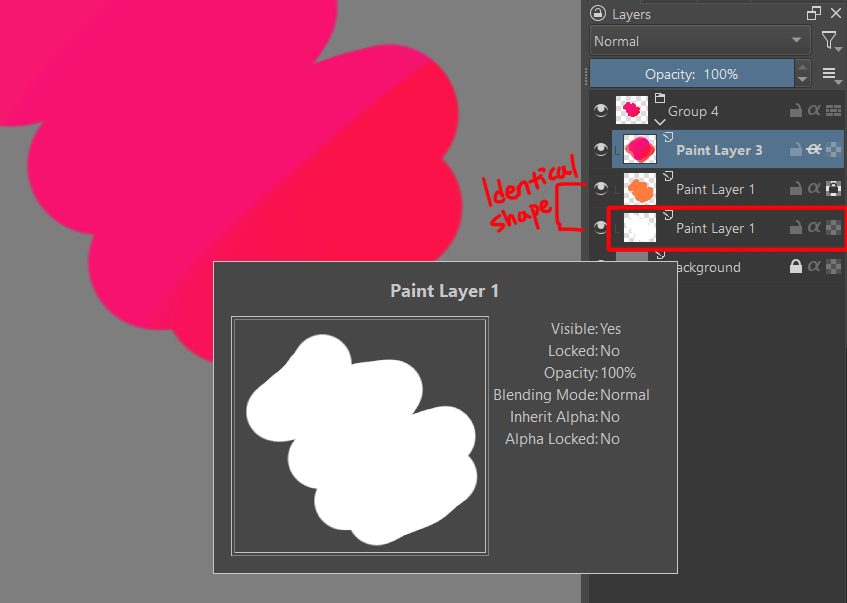
A workaround I’d do is to make a identical white layer inside the group, below the base layer you’re clipping onto. There are multiple ways to do this such as :
- Duplicate the base layer couple of times and merge it > alpha lock > fill it with white.
- Select the outside region of the shape with contiguous selection an invert it > fill the area you need with white.
etc
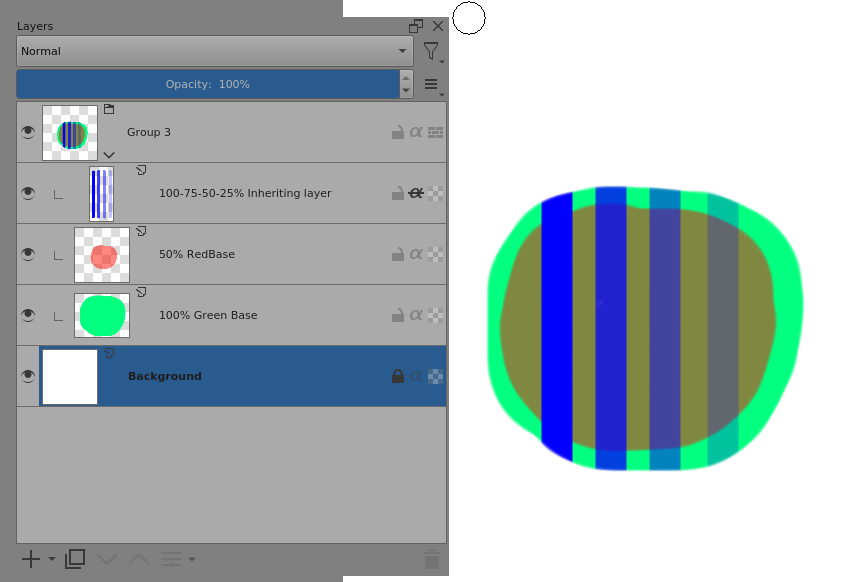
The layer with alpha inheritance effectively has its alpha multiplied by the alpha value of the ‘view’ under it, looking down through the layers, until the bottom of the group.
I suggest that you try something like this arrangement and turn off/on the green layer then toggle the inheritance on/off to see the effect:
This topic was automatically closed 15 days after the last reply. New replies are no longer allowed.