So I installed Krita on my Macbook and I was messing around with onion skin settings I thought I could probably reset it to defaults just like other softwares but when I click on reset to defaults it doesn’t reset onion skin settings to defaults. where can I do a full reset of all settings?
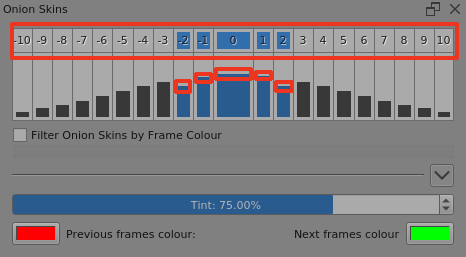
I’d suggest that you get the Onion Skins docker showing and then select the ones you want by enabling them by toggling them in the upper number row.
Then grab the top of the enabled columns to drag their relative opacity up and down:
I forgot the defaults opacity. I find it very odd the software doesn’t reset it the defaults settings.
The purpose of the onion skins docker is to let you adjust the onion skins so that they are the number and opacity and colour that you want them to be. It should be easy to adjust them to how you want them.
I think that the screenshot I showed is at the initial settings.
This topic was automatically closed 15 days after the last reply. New replies are no longer allowed.