Hi all, is there an easy way to add special characters in the text box, such as accents like Ê, without copying from the character map?
I will need to use accents often in a future project. I also realised that my font doesn’t have accents even in the character map. I appreciate any suggestions.
That is an easy task, just use ALT Key-Codes, for your example open a text editor, or like me type it in the forum editor, and do the following:
Hold down your left ALT-Key and enter 0202 into the Numpad of a full-size keyboard and release the ALT-Key after you entered all numbers, this will put out your Ê.
This works with any char you can imagine, you just have to know the code to use. There are tons of lists on the web, unfortunately are most of them only excerpts showing the fraction the author of the presenting article found interesting or worth to be mentioned/shown.
Another unfortunate thing is that some keyboards and operating systems seem to have smaller issues with some kind of these codes, but the most common ones are usually supported.
Here you’ll find a list with a good amount of codes, and don’t miss the thematically sorted code-tables offered on the right:
Michelist
2 Likes
For normal accents with Latin letters you don’t even need alt-codes or something. Normally when you press ^ one time and then e (or any letter) immediately after, it should make an ê. Same for other things like é or è. It kinda depends on your keyboard settings though, if your have deactivated accents or they’re treated as dead keys they will pop up immediately and not get combined into a single character. You have to change some keyboard settings in that case (depending on the operating system)
2 Likes
Thank you! I kept searching online for the codes but eventually found it easier to keep the character map open and copy from there.
That sounds good, I will try it. Thank you.
It is not working for me. I checked the keyboard settings, but I can’t find any related options. Google suggests pressing Ctrl + Shift + ^ + letter, but that’s not working, either. Thank you for taking the time to help; it’s much appreciated!
Yeah, no, that is nonsense. CTRL (as well as alt and Super (also known as Windows key)) are for program and system shortcuts only. And pressing shift + ^ will make the ^ an °. You also don’t press them at the same time, this is important. Normally it goes like this (I assume you are on Windows with US keyboard layout?):
Let’s say you want to make an Ô. Then you first press the ^ key (don’t keep it pressed, only press it once and let go). Nothing should appear yet because the system doesn’t know if you want to put it above a letter. Then you type a letter, for a upper case O that would be SHIFT + o for a lower case o … simply o. Same for things like á and so on.
However you need to set up the keyboard so the accent keys are “dead keys” (to prevent them to appear immideately before you even have a chance to type a letter).
So basically you want the Keyboard profile to be “EN - US - Dead: grave, acute” or it’s called something similar like this. I’m not on a US Windows right now, so I don’t know. But it’s called something like this on Linux.
Alternatively you can try to get the compose key working again, but I belive Windows doesn’t support it anymore without installing additional software. There is also the possibility to create custom keyboard layouts and intall them in WIndows, but I didn’t do this in years and I’m not sure it is still possible in Windows 10 and newer. Microsoft is putting a lot of effort in to prevent users from doing anything, nowadays. If you are on Apple, I can’t help you but perhaps my posts gave some hints for what to look for.
Generally this is not a Krita issue and you might be better off asking the Support for your specific operating system.
One thing: I noticed that windows sometimes “remembers” keyboard layouts for different applications. This has caused some annoyance for me at work too. In the left most corner of the task bar, where the tray icons are, it then should show a keyboard symbol usualy with a language code to it (like EN - US), then you can click on it and change it to something else.
A workaround could be to install a additional keyboard layout of a different language that normally makes use of accented characters but has otherwise a similar keyboard layout to what you normaly use. On Windows you can do this from the control panel.
It is not a Krita issue, of course, but I was wondering if there is a way to insert symbols easily, just like we can insert them in a Word document, or if it could be done in the future.
As I wrote, you can just type them, just like you can in word by pressing the accent then the letter. However you need the correct keyboard layout active. I believe for US in Windows it is called “US - International”. I was just able to type them like I was here (or in Word)
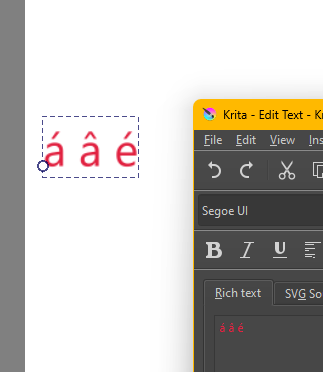
but, as mentioned, I have a keyboard layout for a language that makes use of accents, and you need that too in order to do so.
There are fonts that do not support accents. If you want fonts that support this feature, just mention this in your search. On Dafont , you do this:
-
Select a category (Comics, Groovy, Decorative, etc.) closest to the type of font you want;
-
Options will appear where you can sort the fonts (by popularity, for example). Click on “More options”;
-
In these additional options, you can select open-source or free fonts, among others… and on the bottom line, you select the option: Only fonts with “accents”;
2 Likes
I used the font while writing in English without thinking about translations, that is a lesson learned! I will check to see if I can find a similar font to what I have already used. Thank you.
1 Like
While some fronts don’t support accents or diacritics that doesn’t normally prevent you from typing them but they perhaps don’t show correctly. Best case is they are just rendered in a different font (called a fallback font), worst case is they get replaced by a white square □ , a boxed question mark �, or some gibberish of ascii symbols.
3 Likes
This topic was automatically closed 30 days after the last reply. New replies are no longer allowed.