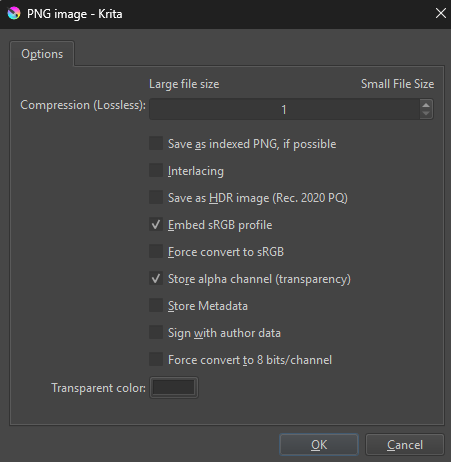
Since we can set export parameters in code:
export_params = InfoObject()
export_params.setProperty("compression", 1)
export_params.setProperty("forceSRGB", False)
export_params.setProperty("alpha", True)
Is it possible to create a custom exporting script that automatically exports an image, skipping the settings window?
Takiro
August 21, 2025, 7:20pm
2
In principle you can read the data directly from the canvas and make your own image saving/exporting function that completely bypasses all of what Krita does. You would be in total control but also maybe have to do program some things Krita could perhaps do. PIL is an image library that can handle several image formats, so you at least wouldn’t have to that part.
You can take a look at some existing plug-ins that do similar stuff (like the Export Layers plug-in Krita has by default) and see how it is done in there, perhaps you get some inspiration from it.
1 Like
Where exactly is Krita’s Export Layers plug-in? It’s not in the typical krita/pykrita folder.
1 Like
Pretty sure they meant the Resources
1 Like
I figured out something for me, digging into the export layers code.
The quick answer is, instead of:
doc.exportImage(path, export_params)
use:
bounds = QRect(0, 0, doc.width(), doc.height())

doc.rootNode().save(path, doc.resolution() / 72.0, doc.resolution() / 72.0, export_params, bounds)
from krita import *
import os
from PyQt5.QtWidgets import QMessageBox

def export_image_to_doc_dir(filename):

    # Settings
    png_info = InfoObject()
    png_info.setProperty("alpha", True)
    png_info.setProperty("compression", 3)
    png_info.setProperty("forceSRGB", False)
    png_info.setProperty("indexed", False)
    png_info.setProperty("interlaced", False)
    png_info.setProperty("saveSRGBProfile", False)
    png_info.setProperty("transparencyFillcolor", [0,0,0])

    # Directory
    doc_path = doc.fileName()
    if doc_path:
        export_path = os.path.dirname(doc_path)
    full_path = os.path.join(export_path, filename)

    os.makedirs(export_path, exist_ok=True)
    doc.waitForDone()

    try: # Export
        bounds = QRect(0, 0, doc.width(), doc.height())
        root_node.save(full_path, doc.resolution() / 72.0, doc.resolution() / 72.0, png_info, bounds)
    except Exception as e:
        QMessageBox.critical(None, "Error", f"Save error: {str(e)}")

export_image_to_doc_dir("exported_image.png")
1 Like
system
August 26, 2025, 4:49am
6
This topic was automatically closed 4 days after the last reply. New replies are no longer allowed.