I see that I can expand and resize a vector comic panel and also move it, but how do I reshape one corner into a diagonal shape ? As in, take one corner and stretch it to a diagonal shape rather than just a square or rectangle ? It’s not a feature in the manga comic so I am wondering if it’s possible to do that or do I have to make my own panels ? And also, can I delete a vector comic panel and make a new in its place or do I have to keep the manga panels as is ?
A lot depends on what you have at the moment and what form it’s in.
You can make a vector shape any shape you like by using the Edit Shapes Tool and converting it to a path first.
e.g. This used to be a rectangle:
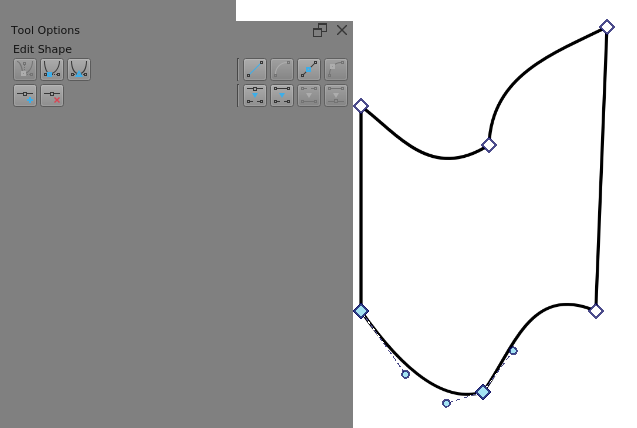
I suggest that you experiment with the Edit Shapes tool to learn what it can do and how to use it. Then consider how you could modify your existing panels shapes and layout.
If you want to make ‘extreme’ changes, you may need to hand craft your own panel structure.
If you need ready-made geometric shapes, see this topic. A ready-made shape can also be modified in Krita, depending on what you want to achieve…