How to make a multicolored gradient, in Krita 5.
Click on the Fill Gradients icon on the Toolbar to get the gradient chooser.
Click on Add at the bottom of that to create a new gradient called ‘unamed’.
Type a new name in there:

Click inside it on the coloured gradient bar to add new stops.
Drag a stop to change its position.
Click a stop to select it for the purpose of changing its colour or opacity or deleting it.
Press OK to save the result of your edits.
Do it again and keep on doing it to get practice 
I’ve changed the category of this topic to what it should be. Please be careful to select the correct category in future.
Also, a more descriptive title would be a good idea, instead of just “How to”.
3 Likes
@AhabGreybeard Thanks you for your explanation. As for the proper category, to me it made sense to choose the Tutorial, as that is what you explained to me and made sense. I guess each person, see’s what category, is appropriate for each topic. Again thank you, I will copy the info, to a text app and save it.
Hi @Sydney, this might help.
After you click the button to start a new topic, the system asks you for the category. When you click the down arrow in the category section and scroll through all the category choices, there is a definition on your screen for each and every category. That is how we are able to keep things so well organized in this forum.
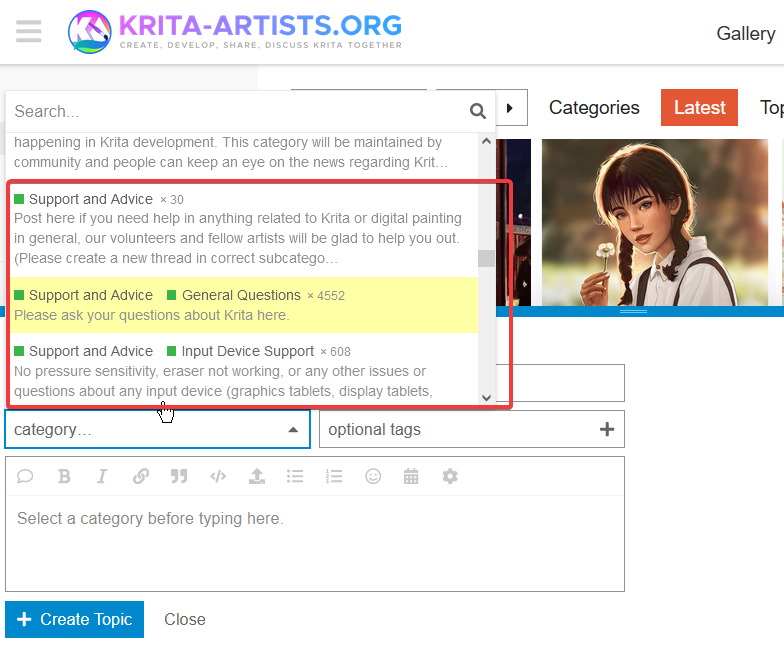
1 Like
It’s a question of what people would expect from a topic.
If a topic has a title of “How to do something” and has a “Tutorial” category, I’d expect it to be written as a tutorial by the author and might not even look at it if I already knew how to do that something.
If you need any kind of advice then the Support and Advice categories should be used.
3 Likes
This topic was automatically closed 7 days after the last reply. New replies are no longer allowed.