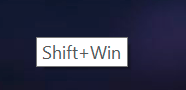
When pressing keys like Alt, Ctrl, and
Shift, a small box of text appears to signify it has been pressed. Can this be toggled?
This doesn’t happen to me with the 4.4.5 Linux appimage or the 4.4.5 installed package on Windows 10 and I don’t know of anything in Settings → Configure Krita.
Is it an obscure system level setting/option? Maybe Windows Ink which has some strange ‘help/advice’ facilities.
this is Windows Ink, and i never found an option to desactivate it, i ask in MLicrosoft forums and it seems there is no solution, so i stay with wintab. It happen everywhere, not only in Krita 
Apparently, it’s a Windows problem…
I need to disable it in gpedit.msc but it doesn’t work.
EDIT: “In fact, the Windows 10 Home edition is not shipped with Group Policy Editor…”

i’ve just check on Windows 11 (on my surface pro) and they’ve add an option for it, so we will have to wait for the update to windows 11 or maybe it will be added on Windows 10 too
1 Like
Thanks for telling! That would make it easier for future Windows Krita users.
That’s interesting, either I’m totally blind or on my Windows 10 these pop-ups don’t show up. Is there a specific place where the pop-ups show up or are they tied to the cursor, where do I need to look? Or can’t I see them because I’ve disabled all Windows-Ink options in Windows?
Michelist
it happens when you activate Windows Ink in the stylus driver and use a modifier key (win-ctrl-alt-shift) and the stylus => a tooltip pop with the keys pressed
Ah okay, Windows-Ink fortunately does not work with my Tablet, so I will not see these Pop-Ups. 
Michelist
I never saw these pop ups before. I am on windows 10 also.
This topic was automatically closed 15 days after the last reply. New replies are no longer allowed.