Hello everyone,
first of all, I’m an absolute newbie to Krita and I’m trying to design a logo for a promotional lanyard. As the title says, I don’t know how to set 100% K in CMYK for anything (especially straight lines). It is important to get this CMYK exactly, otherwise the company will not be able to print my logo correctly.
Hello @RoshiXD and welcome to the forum 
The Specific Colour Selector controls colours with slider values and can be configured for CMYK use:
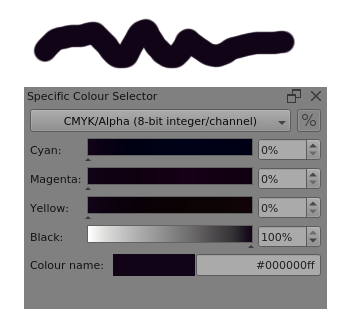
The ‘%’ button switches between percentage and digital integer display.
You can enable the Specific Colour Selector docker with Settings → Dockers then tick its selection box. Then dock it where you want it to be.
2 Likes
I’m doing just that but unfortunately when I’m trying to set a specific numbers ( 0 0 0 100 %) they slightly change, and don’t stay at their original values. I forgot to mention that I’m working on vector graphics, and by this color selector I’m not able to choose color for straight lines tool, and edges for squares, circles ect only the filling of this shapes.
The details are often important
You can use the Specific Colour Selector for selecting the colour of a shape you’re about to draw. You can’t use it when you try to change the stroke or fill colour using the Tool Options docker when editing the shape.
That’s a limitation of the current UI for the Tool Options docker.
However, there is a more fundamental problem related to how CMKY works in association with the colour profile for printing.
If you choose ‘pure black’ and draw a shape, the colour picker shows that as mostly black with some C,M,Y added.
I believe this is how printers get the ‘best black’ for a given colour profile as a workaround for the limitations of real world inks and papers and printers.
Someone with far more knowledge of this than me may come along soon to explain it better.
If you’re using a printing service, and paying them for it, you need to contact them and explain your situation and get their advice.
I’d have thought that if you give them an sRGB colour profile image with ‘black’ as RGB = 0,0,0 then they would be able to print the ‘best black’ using their extensive experience with their own printing process.
1 Like
Another thing is that SVG doesn’t really support any other color model than RGB. And vector objects are SVG objects internally.
So, the colors are always slightly off when checking them because they’re sRGB on the object even when the Krita document is set to something else.
However a specialized vector editing software may be capable of doing it, like inkscape.
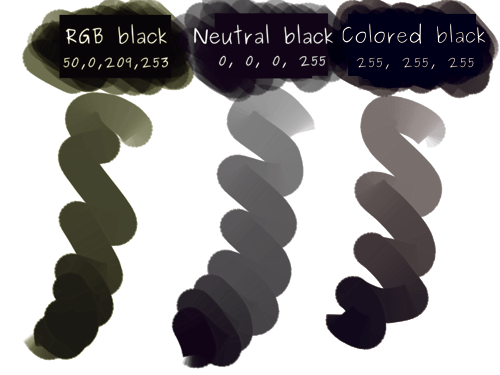
Still, CMYK still has some quirks when it comes to black mainly that there’s no pure black
4 Likes
This topic was automatically closed 30 days after the last reply. New replies are no longer allowed.