I’m new to Krita. I used a different application, but Krita’s brushes drew me in. However, I’ve been trying to figure out how to color under the lineart. I usually use the bucket tool to color under, but in this case, the color doesn’t stop at the line art, it just paints the whole canvas.
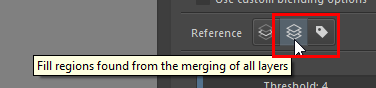
I can’t find the ‘sample’ option where you can select all layers and most of the tutorials are from years ago, so it’s not updated. I don’t want to fill everything by hand :')
The settings for the fill tool are in tool options. I never use the fill tool so I’m not sure exactly which settings you’ll need but I think you need it set to ‘all layers.’ Here’s the page in the manual.
Like Sooz mentioned, use the sample all layers option in the fill tools tool option but you might have to turn all other layers that are not lineart to invisibale first.
Alternatively you can set it to use only layers with a specific color label (the little label/tag icon next to the stack icon)
If you are not afraid to use a more advanced flat coloring technique, I recommend using the Colorize Mask tool.
It does a better job on filling shapes that have gaps and generates a preview that can be converted into a paint layer, when you’re satisfied. It also works better on outlines that is not fully opaque or has texture, like when drawn with a pencil. The Colorize Mask is my tool of choice when I have to color complex line art and have to fill more than just a few shapes.