how to use HTML?
Hello and welcome to the forum 
Do you mean to use HTML in general (for websites) or do you want to use HTML in your posts for layout/formatting of text and images?
1 Like
I mean color HTML
ex) #000000
Via the foreground/background-color-selector in the toolbar, if you click on it, it will open a dialog where you can enter HTML-Values.

Michelist
This site has an html color chart, in case it’s useful.
Thanks
do you know how to change
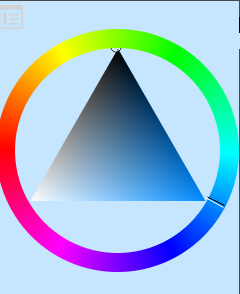
to RGB
Yes, I know how to do that.

And now, before I’ll try to answer your “question”, a few tips for more satisfactory answers than the one above. You are new here and obviously still need to find your way around, to familiarize with the forum.
You should not phrase your questions in telegram style, nor should you assume we are standing next to you or can even read your mind.
It was not necessary with your previous questions, but it often helps the helpers if you give them as much information as needed to answer a question. Most of the time we need your OS, the Krita version number, and very often screenshots of the entire program window, including title bar and status bar, will be beneficial.
Furthermore, it has become customary here to create a separate topic for each question. This has the advantage that further help seekers can more easily come across already found solutions.
Now back to your second question, which actually belongs in a new topic. But, as said, you are new, and so I’ll try to answer it here.
I wonder, do you want to change the color space of the color selector, or do you want to change the color space of the document?
For the former, you have to click on the icon under the padlock symbol in the upper left corner of the ACS and you will arrive at the correct dialog box. In that box you’ll find the option to choose a different colorspace under ‘‘Color Selector Uses Different Space than Image’’.
For the latter, in Krita, click on ‘‘Image’’ >> ‘‘Convert Image Color Space’’ in Krita.
Michelist
1 Like
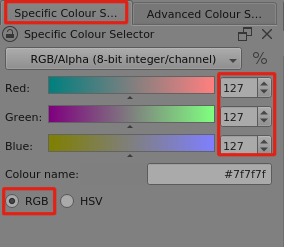
The Specific Colour Selector docker can accept colour codes as RGB or hexadecimal.
You can show it with Settings → Dockers → enable Specific Colour Selector.
Here is mid grey, RGB = 127,127,127. Hex = #7f7f7f
1 Like
This topic was automatically closed 15 days after the last reply. New replies are no longer allowed.