I don’t know the Huion tablets at all but that pressure transfer curve is just wrong.
Before you do anything, if the Huion tablet setup utility has the ability to create separate profiles for different applications then you should create a profile for krita and always use that when making any changes or adjustments in there.
Also, always close the tablet utility (after pressing OK or whatever) to finalise any changes you’ve made.
That behaviour can be predicted from the transfer curve.
The blue square control handle should be dragged to the left, to the 0,0 point.
The yellow and red handles should be adjusted to give a straight line up to the top right corner.
Then, in krita, use Basic-2 Opacity and Basic-5 Size, with dark saturated colours such as red or blue to test the ‘feel’ and behaviour of the brush with pressure as you draw.
You can then go to Settings → Configure Krita → Tablet settings and make adjustments to the Input Pressure Global Curve to make it more suited to your personal preferences.
Here’s mine as an example:
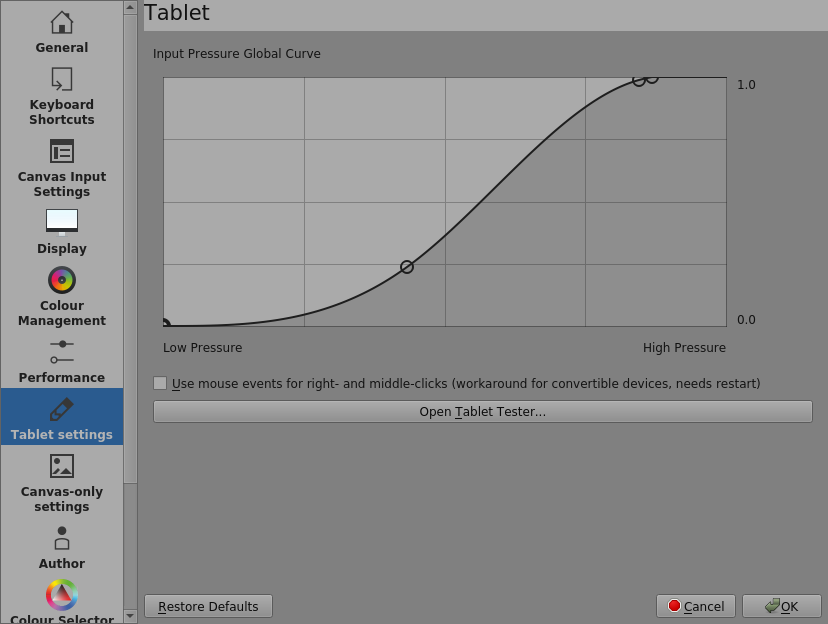
My fingers don’t like applying high pressure so I brought the maximum output down to about 80% of maximum applied pressure.
I’m not at all good with fine control of low pressure so I flattened that region out to give me more pressure range over the low output area.
If you have doubts about the actual level of the pressure signal coming from the stylus/tablet, you can use the Open Tablet Tester button in that same adjustment area to get a grid you can draw on with a live output record of the pressure being sent from the tablet