Hello,
I did some research work myself.
As I wrote, I downloaded the templates in my Imac at a specific location in Finder.
Then in Krita/preferences/general/ressources, I placed the link to the templates in Finder in my iMac.I hoped that if I started Krita again, I would see the templates, but that was not the case.
If I then I did go to Open sources as indicated by Takiro (Settings/Manage Ressources/Open Resource Folder), I found Templates there, but if I click on that I see nothing.
If I try to copy Finder’s templates to the templates that Takiro designates, I get a message: “The “Fine Arts Papers Templates” (from Ramon) cannot be copied to itself.”
And as mentioned, in the meantime I lost all my settings (both brushes, personal workspaces, patterns, favorite brushes…) Everything, whoops away,…
I was looking for another topic that deals with replacing settings. I found one and tried what it recommended, but that doesn’t make any sense either. So, okay, all my settings are gone.
And, I also see that you don’t immediately know what to answer to this topic. But that’s not so bad. I think Krita is a fantastic program and I give a big compliment to all the people who help Krita evolve!
Therefore: I am going to close my question. Not because the problem has been solved, but I have given enough information about what the problem was. The specialists who have time can quietly check what it has to do if they want.
Meanwhile, I’m going to try to download a new version of Krita. I now have 5.2.10. I believe the latest version is 5.2.15. And I will try to parameterize all my favorites and the like again. But I’m not going to try to download Ramon’s templates anymore. In any case, thank you very much for the attention you wanted to pay to my question.

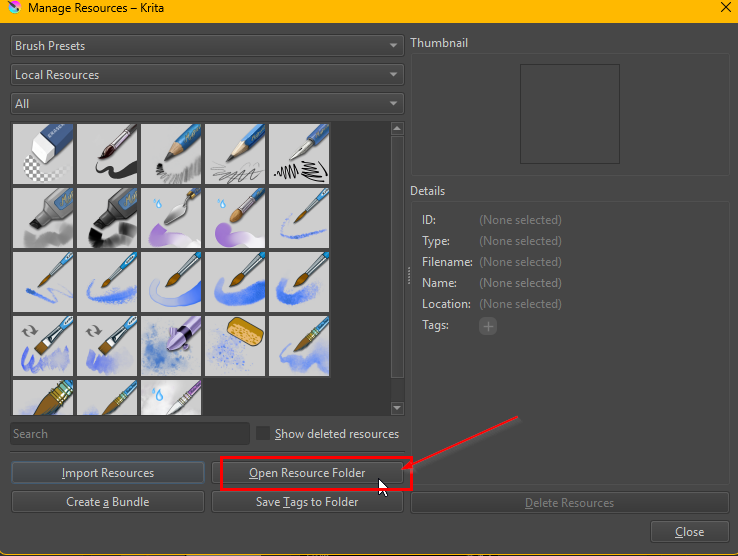
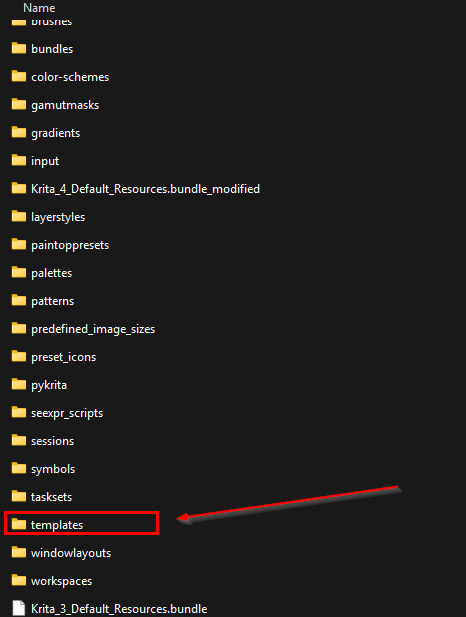
 I’ve seen that before.

