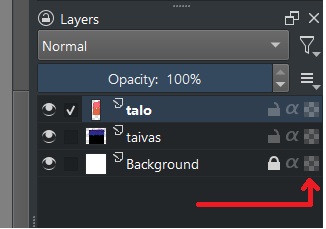
What is the meaning of “brick wall” symbol after the layer name in layer list?
I managed to change the normal “cross” symbol to this “brick wall” somehow, and that layer was totally inactive since then. All normal attributes (visible, locked, opacity, blending mode, inherit alpha, alpha locked) were the same as in other layers, but nothing happened when I moved my brush across the layer.
Solution was to remove that layer, and luckily I didn’t lose much work.
You point at the checker board icon of alpha lock (the icon represents what you see when all layers are turned off), there is an actual brick wall icon at this place for group layers that is for the “pass through mode”, more abut it here: Introduction to Layers and Masks — Krita Manual 5.2.0 documentation
So you probably had a group layer and yes, just like you noticed you can not draw directly on a group layer.
As hinted at by @Takiro, you seem to have changed a paint layer into a group layer, probably by accidentally pressing Ctrl+G, the keyboard shortcut for ‘Quick Group’.
That would still display the original paint layer in the layers docker with its original name and content, but shown as inside (under and indented) a new group layer.
For a more detailed discussion and explanation. you need to provide a screenshot.
Have you done much work using group layers or don’t you normally use them?
If you delete a group layer, you also delete all the layers inside it. It’s like throwing away a box that has many photos/drawings inside it. (Other analogies are available on request.)
Edit:Add: If you’d selected the group layer and pressed Ctrl+Alt+G then that is the keyboard shortcut for ‘Quick Ungroup’. That would have removed the group but left all the layers inside it still in the layers docker. It’s like taking photos/drawings out of a box then throwing away the empty box. (Other analogies are available on request.)
Ok, so it was an accidental group layer without any group members. Have to keep in mind that Ctrl+Alt+G for future endeavours. Haven’t actually thought of using group layers, but you never know
LOL, and I wondered why you pointed in your screenshot at the alpha lock and thought you misinterpreted its symbol as a brick wall symbol, since, because of the missing group, there was no grouping icon.
Although from the description you gave in the initial post it was not empty, since you lost parts of your progress. Group layers can be collapsed to hide their contents to better manage huge projects, this would hide the sublayers from the layers docker (until expanded again). Groups are one of the most important layers in Krita and are much more than just for organizing layers. You can read about it in the manual page I linked earlier.