hello. I have such a problem that I calmly drew a picture, and then krita closes. for the first time it happened to me that I really liked my drawing, and usually when krita is turned off, it offers to continue working. but this time the application did not offer me anything. I only saved what I saved at the beginning. I understand that this is partly my fault, but how was I to know that the application would turn off. I want to know if it is possible to restore the drawing. I hope that my efforts were not in vain, and hysteria too.
Look in your folders to see if you have a file that ends in .kra~
The first part of the filename will be whatever you named your artwork when you saved it.
Make a copy of this file. On the COPY, change the file ending to .kra (in other words, erase .kra~ and replace it with.kra). Hopefully this will work.
You will get a lot more help with this issue if you change the topic title to reflect what you need. "I’m very very very upset (with capital letters signifying yelling) will not attract as many helpers as something like this would: "Forgot to save my work - Any way to get it back after crash?
(edited to fix typo in file name)
This is so relatable ;w;‘’
I had made a bunch of emotes and got to a point where all the line work was finished, thought I had saved (turns out I didn’t), and suddenly it crashed and I lost all the hours I had spent on it
Now I’m in the habit of saving more ;w; and set up krita’s auto save feature to work every like 6 minutes or something  *(if you don’t know where it is go to configure krita, general tab, and its under
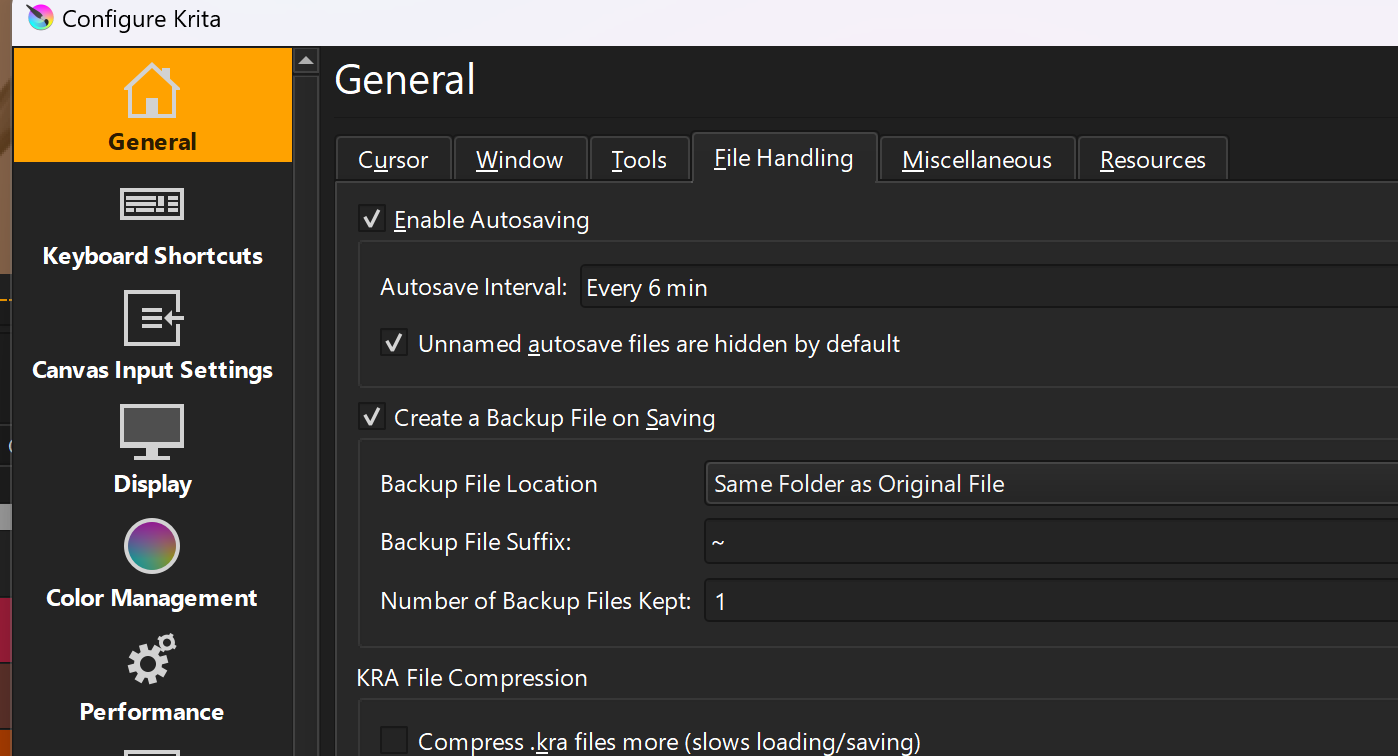
there is also an option under the miscellaneous tab to save session when krita close .3.
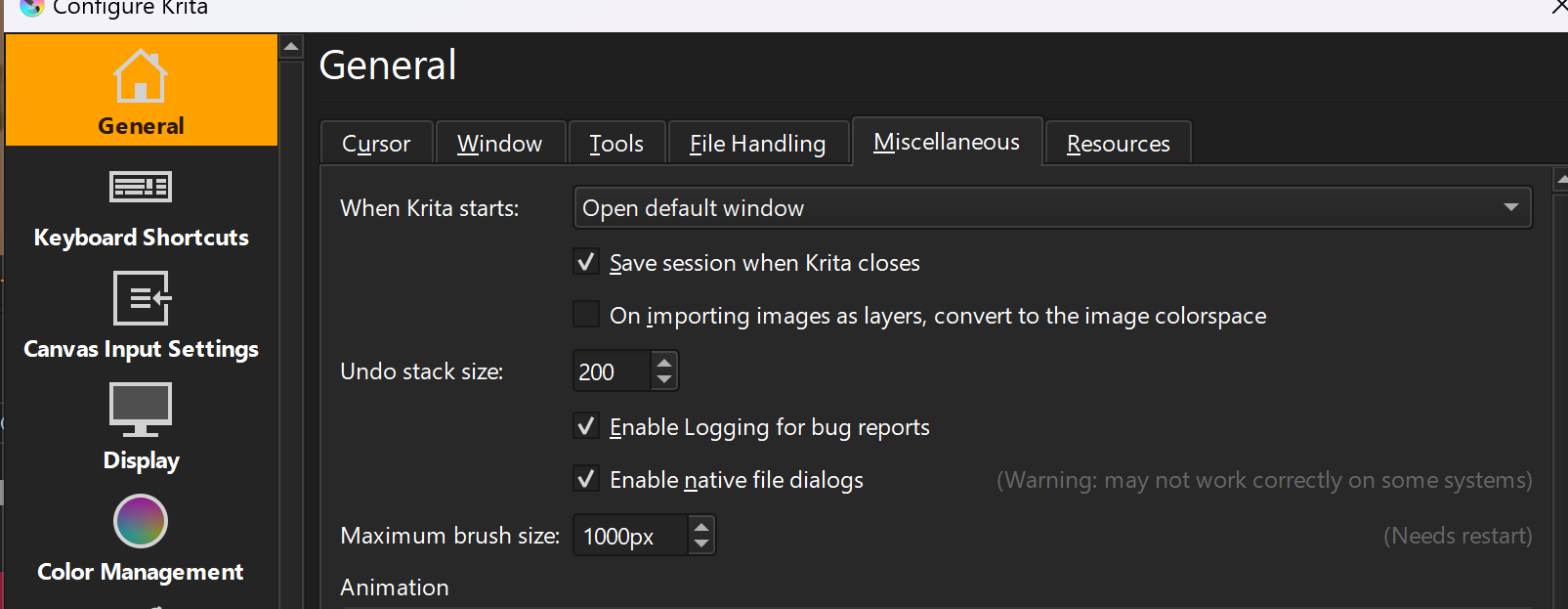
idk If it helps but would be good to enable for future use ;w;
A ‘session’ is a workspace/monitor arrangement and those are stored in the resources folder in -/krita/sessions.
If there is a crash and you haven’t Saved, then all you have is the last autosave, assuming autosave is enabled. If autosave isn’t enabled then you have the .kra~ backup file, assuming you did a previous Save.
Hello @Michelist 
nice :3 learn something new everyday 
thank youuu
Hello @myak_pezza and welcome to the forum!
I hope you were able to find your file, or at least an older version of it. If not, please report back, maybe I have a last idea (even if it is very similar to @sooz’s idea, because it is an extension of it)
@myak_pezza; @ArtsySock: You should additionally increase the “Number of Backup Files Kept”, which can also be found on the “File Handling” tab. I, for example, keep 5 backups via this setting.
Also, consider regularly using the F4 key for incremental backups, which you can also find in Krita in the ‘‘File’’ >> ‘‘Save Incremental Backup’’ menu, or, if you like the other option better, ‘‘File’’ >> ‘‘Save Incremental Version’’
STRG ALT S
. This way you build up a stack of editing states to return to when you need to, and you have the security of knowing that you won’t lose much work in case of a crash.
Michelist
Hello @AhabGreybeard 
I found an old version that I saved almost at the beginning of my work, so I understand that it is impossible to restore what I drew on that canvas and did not save?
By “turned off”, do you mean after krita has crashed?
If autosave was enabled and an autosave had been made then that offer would be made when you restart krita after a crash.
Since you were not offered a chance to continue from an autosave, then an autosave file can’t have been present on your hard drive.
If you didn’t Save it, your work in that session will not be written to the hard drive (unless there was an autosave).
okay thank you
Had encountered a situation before, but only one or two times:
Krita crash and the autosave file is there, but krita forgot to provide an option after restart to open the autosave file, so I opened it manually.
@Lesqwe56 Was your document a ‘Not Saved’ image when this happened?
Situations can be tested by killing the krita process then looking for autosave files and running krita to see what happens.
Yes, and the autosave file is next to the xxx.kra name like xxx-autosave.kra which is a hidden file, I’m sure it’s not a backup file like xxx.kra~
Edit: Not that sure if it was a hidden file…
It is actually quite rare and hard to reproduce. Most of the time krita will remember to bring up the resume autosave pop-up, and I can’t recall why krita crashed back then.
I don’t understand why that is a hidden file.
The situation you describe is very difficult to reproduce and investigate 
I check krita setting again, seems only un-named autosave is hidden.
Maybe having a false memory about it was hidden or not…more than 6 months ago 
Sorry for the confusion.
Un-named-autosaves are saved in a different place, on a Windows-PC somewhere in ‘’\local\temp\‘’, maybe because of that >> no see?
Michelist
It should only happen in a new unsaved document, opening a existed .kra file should have autosave in the same dictionary 
Correct.
Michelist