I use an XPpen tablet, so I always use the scrollwheel to zoom and dezoom.
Problem, I can only dezoom now. If I turn the scrollwheel to zoom in it wont work, but if I zoom out then it works. This is a Krita issue because I use to scrollwheel to zoom and dezoom on other applications and sites and it works juste fine.
It’s very annoying and I dont know how to turn it back to normal again. I got the update around a week ago, it worked fine, then I didnt use krita for a few days and now I have this problem.
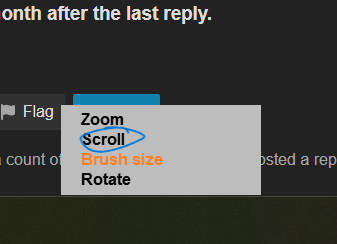
Exact same issue here. I see you’ve seen my own post. To help narrow down what’s going on, let me ask: does the brush size programming work for you? For me, the wheel works fine when using it to change brush size, and only malfunctions for zoom.
Have you already searched our forum and found this not working:
Although it is for the remote, it is somewhat connected to your zoom function.
And if it’s not that, did you already check if Krita’s shortcut settings for your zoom fit those of your tablet? You’ll find these under ‘‘Settings’’ → ‘‘Configure Krita’’ → ‘‘Keyboard Shortcuts’’
there it is found under the menu →
Action
→ Menu
→ View
Zoom In
Zoom Out
Thanks a lot, I was quite near to left Krita behind but your suggestion works very well, I arranged zoom, rotate, brush size ext. via Xp-Pen remote control perfectly.

 Hello
Hello 