Ive been very outdated Krita wise for quiiite some time now. Ive mentally promised myself to fully finish another WIP i had and then update it and today is the day.
Is there options to choose which versions you can update to (kinda like musescore) or do i just stick with whatever’s newer like on the site?
Also, do i just download it from the website? Hows that going to affect my current .kra files? Ive seen that apparently the old version gets deleted but what happens to the .kra files? Do they get corrupted since they arent new?
I have them all saved as image files just in case but am curious.
Is the layout wildly different? I dont like big changes and itd be nice to get a heads up. From yt vids ive seen of 5 point whatever it is now, it looks more or less the same but still.
Any new features i should be moreorless excited for? Im a very half inexperienced artist so i barely can grasp all of what 4.4.1 has to offer (just learned how to stabilize my brush today), im curious if there are more dodads added that ill hve to figure out. Or features that make my life easier but my lack of artistic experience wont let me discover them
Anyways, i feel weird for not being with the newest update (not my fault that no one tells me when the new updates drop, ive assumed there was no update all these years). Hopefully i can catch up finally?
Hi @A_User - You can safely update your version of Krita by downloading the Windows installer version from krita.org. All of your artwork from older version will be completely compatible.
One thing, though. You will lose any tags you may have on brushes. You won’t lose your brushes, just the tags. It’s because they rewrote the database function. Normally you don’t lose anything when updating so this is an exception to the norm.
There are many changes moving from your version to the newest, too many to enumerate in this post. One thing I’ll mention is the timelapse recorder. You might enjoy having that.
Once you’re on 5.x, you will be able to use all the new brushes that require 5.0 as a minimum. Right now, you can’t really use any of the beautiful watercolour, crayon and pencil brushes that Krita released.
One tiny thing which may not affect you is if you’ve used vector text in your artwork.
Version 4.x vector text is internally converted by version 5.x and then can no longer be edited using version 4.x if for any reason you want to go back to using version 4.x.
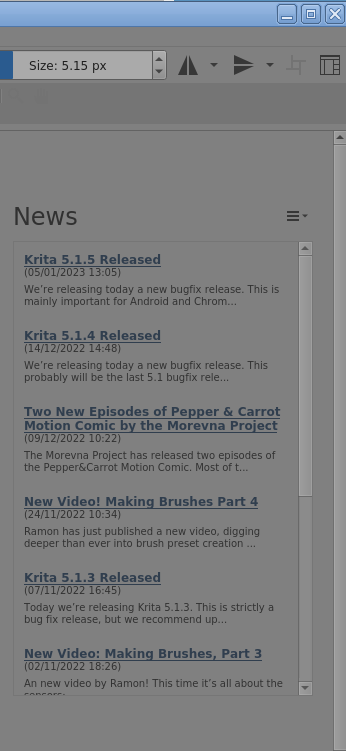
Version 5.1.5 has many bug fixes and new facilities compared to 4.4.1.
is there a way to make the font less… jagged? if there isn’t i can get used to it but a softer font would be nice
like arial, or literally anything softer
also unlike whatever yall have said to me it seems like my tags for brushes still are there and are safe lol
there are a LOT of fancy new brushes
i like that there’s a lil circle that controls the angle of ur page (rotation), that’s neat!
In Krita under ‘‘Settings’’ >> ‘‘Configure Krita’’ >> ‘‘General’’ in the Tab ‘‘Window’’ you can change the font to any font your OS has installed.
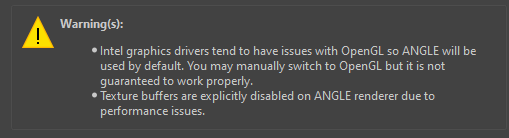
In Krita under ‘‘Settings’’ >> ‘‘Configure Krita’’ >> ‘‘Display’’ >> ‘‘Canvas Acceleration’’, you can try changing your renderer to the one that is NOT used currently. After the change, you have to confirm it with the OK-Button and restart Krita. BTW, don’t try “Software Renderer”, it will slow down everything as much as possible.
what does the renderer do?
the settings say that i shouldn’t change it bc if i do change to smth not “ANGLE” then my app will slow down (i have windows)
Theoretically, you should have ANGLE, OpenGL & Software Renderer, whereas the last is the option you won’t want to choose.
May I ask you what graphics-card or on-board-graphics your PC has?
Michelist
Add: In most cases ANGLE is said to be the most performant option, but for me OpenGL works best.
That is your main-processor or CPU, I hoped you knew what your GPU (G)raphics(P)rocessing(U)nit or in other words your graphics-card is, or has your CPU the graphics-processor in-build?
… found it!
Google says, an i5 has or can have inbuilt graphics, and this has both options available. So, in case you depend on the onboard-graphics your processor offers, what would be no issue for Krita, than you have both of these options available. But I don’t know if you have to enable OpenGL explicitly.