Hello! I adore the artist crumb on Tumblr and they shared the brush they use for lineart a while ago. It seems to be one of the default brushes, but it behaves a bit differently? At least i can’t get it to work the same way in the video. When i make fast/short movements the lines…seperate? What can i change to make it more like theirs/ more suitable for lineart? heres the program and brush i have been using for my rick and morty comics, as well as how i draw them for those who have asked!... – @crumb-crumblet-s-crumbington on Tumblr
Hello @Rin3 and welcome to the forum 
v) Sketching-3 Leaky is one of the default brushes that is in the Krita_4_Default_Resources bundle. It seems to work fine for me.
It uses the Curve Engine (not the Pixel Engine) so making adjustments/changes to it would be unfamiliar to people (like me) who are more used to the majority of other brushes.
Can you post a screenshot showing what you mean by that?
(post deleted by author)

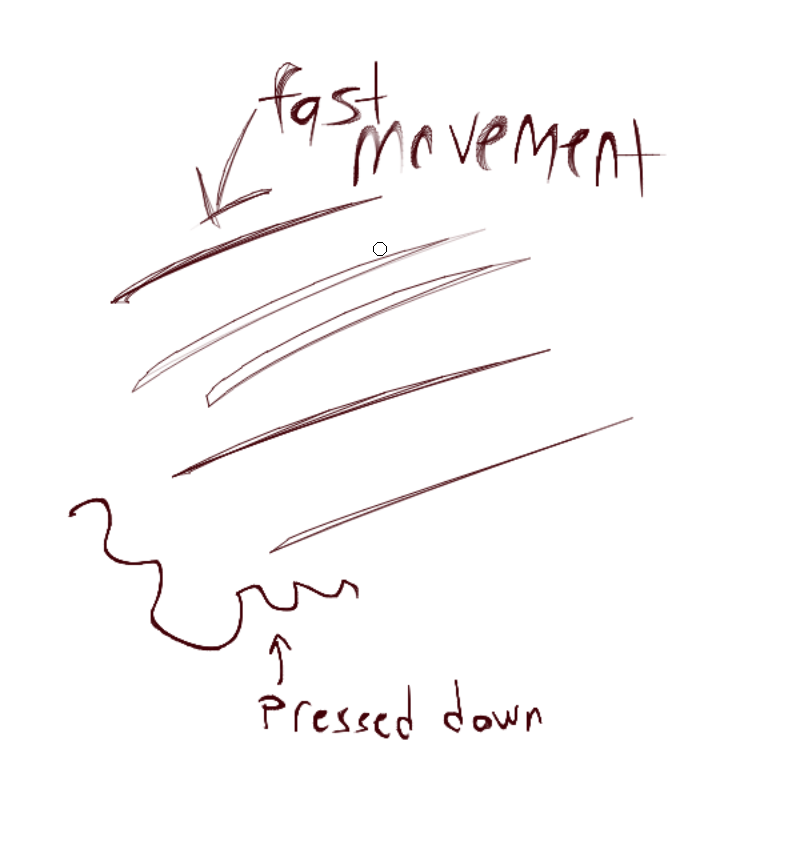
At high speed and small size, there is line separation because of how the Curve Engine constructs strokes.
It may be that in making a fast stroke you are also not pressing down on the drawing tablet.
At low pressure, the opacity of the brush is reduced to zero but that doesn’t seem to be a factor in producing separation of a painted stroke because even at high pressure there is separation.
All I can suggest is using a slow drawing speed because it seems to be how the Curve Engine works.
Someone else may come along who knows more about this.
It looks like of i press down REALLY hard it works better  I havent changed the pressure curve(?) thing ever since i got this tablet, maybe adjusting it will help?
The pressure characteristic of that brush preset is that its opacity reaches maximum value with a pressure input of 50%.
So changing the pressure curve won’t make any difference with high pressures.
You can try it. You can try anything but I think it’s just the way that brush is.
It’s the only brush preset I know of that uses the Curve Engine so it can’t be easily compared with other Curve Engine brushes,
Aww shucks. Well, thank you for the info 