I have done a quick search in the manual but it does not mention in the short description that there is a way to enable showing cursor current coordinates. Maybe there is a measure tool but i would like the coordinates to always show.
Hello @Andreas_Vader and welcome to the forum 
That is not available. It has been suggested a few times but that requires the developers to make it high up on their priority list.
In the meantime, there is View → Show Rulers that can be used with the addition of View → Rulers Track Pointer which is an ok but not perfect way of knowing where the cursor is.
Whether the following information helps, will depend on why you need to find the coordinates, I suppose. Though in case it helps, here are a couple of work arounds I’ve used (apart from the guides AhabGreyBeard noted).
Method 1:
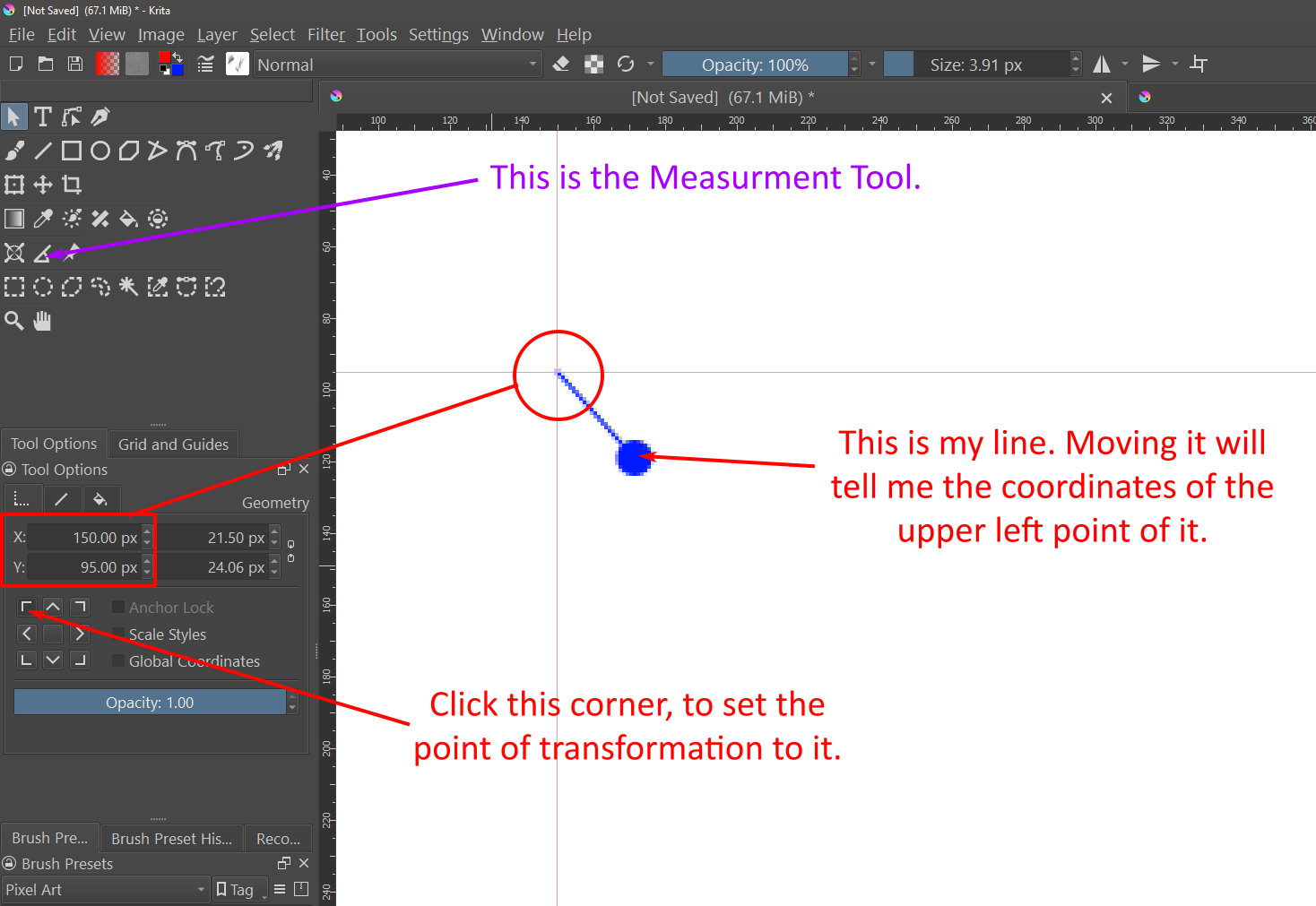
There is a tool for Measuring in Krita (icon looks like protractor of sorts; see purple note in screen shot) that you can measure the distance between two points. So, if you start from the edge of the canvas and drag it over the canvas, you’ll be given the distance of the line in the Tool Options window. Unfortunately, the line you draw with it won’t remain on the screen should you try to use another tool and getting the end point to be an exact number can be fidgety. So, I wouldn’t say it’s really meant for precision work.
Method 2:
The better option, in my opinion, is using a vector layer and a vector object. The steps would be as follows (see red notes in screen shot for visuals):
1 - Create a Vector Layer.
2 - Use the line tool to make a thin (1px wide) line of any length, starting from the upper left and dragging to the lower right.
3 - Select the line with the Select Shapes Tool and, on the Tool Options Panel, set the point of transformation to the upper left corner.
You now have a cursor, of sorts, that you can use to locate your x/y coordinates. By moving the line, you’ll note that the X and Y pixel positions will update to match the lines upper left point, providing you with the coordinates you need. Further, you can move the line to the exact point by typing in the coordinates.
I have some code to fetch the document coordinates. If plugins are available for you, it can probably be adapted for your use. Document pixel position under cursor position
Now it seems working without an error when i open up the py file explicitly named .py extention with and running then the script
Using the plugn works so that the first line must be selected and then clicking on the run button.
If you need any specific features, let me know. I can make a proper plugin for you.