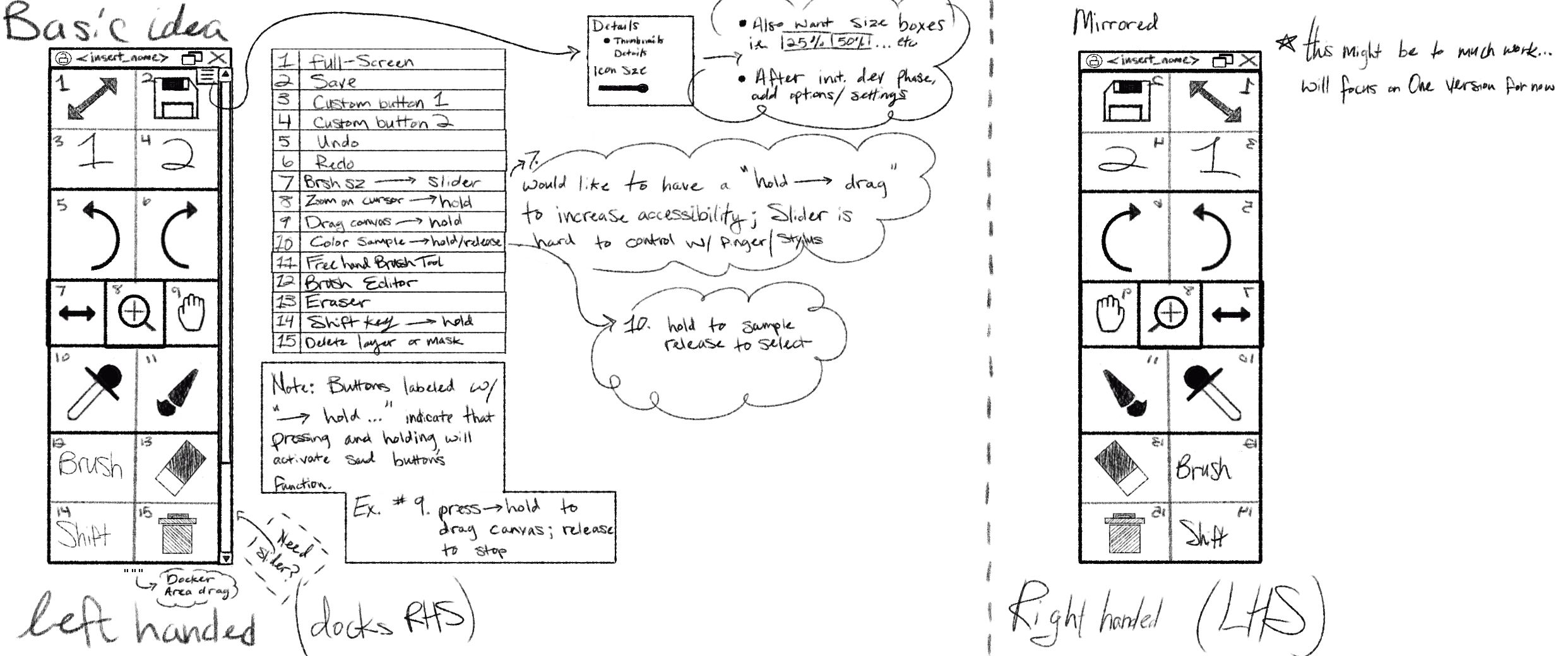
Hello, I’m an.octopus  I was encouraged by a very nice person to just go ahead and post what I am working on here since I am looking for feedback anyway. More specifically, I am hoping for feedback about the general layout/design of the plugin.
DISCLAIMER:
- I was informed that plugins are not currently available for Krita-Android. This is something I would like to attempt to rectify in the future; however, my primary concern is to get this up and running. Later on, if I have a good working version and people like it… then I can think about expanding accessibility to more platforms.
- I’m not 100% sure about Krita’s plugin platform compatibility (in terms of Linux/AppleOS), but I plan to iron some of that out come time for testing.
- Please keep in mind that I am in university and have a lot going on. This is a passion project and may take some time to complete.
So, here goes.
TLDR: I am currently starting over just a bit. Right now I am focused on setting up a better foundation/scaffold for the project. Please tell me what you think of the basic layout design! Questions, comments, or concerns are welcome! This is something I really want to do. I also want it to look nice, make sense and for everyone possible to be able to use it.
Please ignore bad grammar/typos in this picture… 
If you want more details
Short story of how I got to where I’m at in the process:
I was working on an extended version of the touch docker for Krita 5.2.3.1 and I had the right ideas in my head, but once I started trying to implement it I quickly got overwhelmed. Then I saw that Krita is working on switching to Qt6, so I got a bit discouraged. Needless to say, I took a few months off working on it. But I am back!
I’m starting over on the design process and have started switching over to Qt6. I have some of the bones in place, but I need to make sure I have a good roadmap and am making good design choices so that I don’t get lost in the future. I would love to get a little feedback, but I am not ready to share this with the public quite yet. It’s going to take me a long time to dig through all the KDE and PyQt6 Documentation.
This turned out to be much bigger than I initially expected, so I’m particularly focused on requirements, analysis, and design at the moment.
Note: Please keep in mind, that most of the things mentioned as features are currently more so aspirations. I have a very rough working version, but that’s it. And when I say it’s working, I’m using that term very loosely… it works in that it opens in Krita, but most of the functionality is still a work in progress.
Bellow you can find some of what I currently have on GitHub. I will make the repo public when it comes closer to testing or if it becomes necessary to do so at an earlier date. I am willing to share it’s via temporary keys.
Anyway… this will give you a better idea of what I am going for here.
README
Touch Docker Extended
Touch Docker Extended is an open-source Krita plugin that enhances the usability of Krita’s built-in Touch Docker.
Status
Development (v0.1.1)
Features
- Custom touch docker
- Improved usability/accessibility
- Extensive support for button customization and layout
Compatibility
Tested on:
Installation
Coming soon…
License
MIT License
AI Disclaimer
A small amount of AI was used for very minor things such as:
- An occasional alternative to a search engine.
- Infrequent formatting.
I am a Computer Science student and I also like computers because they extend my ability to help people. If, and, or when AI was used, at no point did it have the last say in the process. I firmly believe that if AI is used, then a Human Being should be the one to review and approve its input/output. With that being said, I do not allow AI to ever meddle in anything that truly matters to me, i.e. the actual programming process. If my code looks terrible, it’s because I am bad. If I have a million commits to GitHub, it’s because I am learning and also have ALOT of ADHD.
Features Roadmap (hierarchy of importance is top-to-bottom)
Features:
Note: A main feature is one that denotes a major version change. A bullet point underneath indicates an optional addition to main feature.
[x] Custom touch docker
[] Button customization
- [] jpeg import or custom icons outside of API
[] Save/load layouts
- [] default layouts with option to overwrite or revert to default.
[] Import/export layouts
[] multiple profiles
CHANGELOG
v0.1.0 for Krita v5.3.2.1 - initial commit (31 August 2026)
The docker opens and closes successfully
- Initial plugin architecture
- Extension registration (in Krita)
- Docker registration (in Krita)
v0.1.1 for Krita v6.0.0-Beta1 (13 October 2026)
- Switched to the beta version of Krita 6.0.0 - Beta1 that supports Qt6
- Update plugin functionality to be compatible with PyQt6.12
Sources/Notes
Dev Notes:
Lib for Icons: https://www.svgrepo.com/collection/variety-duotone-filled-icons/
Links:
Journal:
-
12 October 2026 6:36pm:
I really need to figure out how to access the correct log file because the way I am doing it currently is NOT working. This needs to happen before moving on to the next phase in workflow to prevent future headache.
Please feel free to reach out to me here or in dm’s if you have any questions, concerns or comments relating to this project.
Thanks!!
an.octopus
I dont use the touch docker but left hand and right hand versions seem like over engenering. Just one layout seems suficient.
Thank you, makes sense and I agree. I have a tendency to do that haha. Luckily it’s easy to cut. The way it’s set up now is how dockers are currently handled in Krita - i.e. it can go anywhere Krita allows dockers.
Can you pitch this plugin to us? At the moment I see it as a duplicate functionality to the custom toolbar, where I can put any action available into a toolbar and customise it to my hearts content, though I do not have my brushes in there, I use the popup pallet for that. Or are you doing it, to learn how to program a plugin? I am curious.
That’s a great question and thank you for pointing that out. I definitely could have done a better job explaining it in the documentation.
You’ll have to forgive me for rephrasing what you’ve just said, but I think the best way to explain this is by asking two more questions: What is the point and why am I doing this?
-
This project isn’t meant to replace any of those things you mentioned, it’s meant to extend those functionalities. The goal is make them easier to access for people who primarily use touch based devices, those with limited access to shortcut devices, and people who need more modularity from the interface. In the future, I want to have more customization options for people. But, right now I’m focusing on the basics.
-
I am doing this for two reasons:
i. When I first started using Krita, I was on a surface pro (I am now on desktop w/ a drawing tablet). I felt overwhelmed with the amount of options and just wanted the basics for painting all in one place. I just wanted to start painting, without having to learn a million intricacies first. I feel that it would be nice to give people the option to spend a few minutes to install a plugin in order to get to work painting. My goal is to offer ease-of-access by providing basic preset(s) with common use-cases. The problem that I experienced, as being new to digital art, is that accessing the toolbar and learning all of the customization options felt time consuming and cumbersome (even with all the wonderful people and resources out there). If I’m on pc, no problem, but touchscreen is another story; misclicks happen often and certain systems (like the slider) are rather difficult to operate via finger or stylus. I’d like to make that experience better by localizing the necessities in a way that is more newbie/user-friendly.
ii. You are correct to point out that there is a selfish reason for doing this and I’ll be completely honest. I need practice. I’m learning everything about computers but very little about real world applications. Logic, math, algorithms, philosophy, art, design, hardware, you name it… but all of this is meant to supplement the real thing. So I am forcing myself to spend hours digging through documentation and Krita source code to get some extra hands on experience. I do make things as part of my degree-path, but it can be a bit limited in scope. So I’m going to do this either way, but since I plan on publishing it… I’d like it to be something people would like/enjoy using.
Thanks!
If you say it like that, it looks to me, as if it would be better to directly jump into the krita code instead of using a plugin to develop that docker you mentioned.
Because those touch devices most likely do not have access to a plugin, as you know. And krita onboarding is a topic in itself. But if you really want to do those things to help touch display users go directly into the code. More work but more reward.
It’s funny you mention that, because that is my long term goal. I’m using this as a way to become familiar with a subset of Krita’s framework. This allows me to focus mostly on python and Qt documentation. Luckily the syntax for KDE stays mostly the same when utilizing Qt - obviously C++ implementation requires a little finesse, but that’s not too bad. I’d like to prove to myself and the community that something like this is even possible and then I want to join the dev team. But yes, I didn’t know that certain devices don’t permit access to plugins when I started this, so I’m debating on finishing. But, like I mentioned, I think this would be a good way to show that I’m capable/trustworthy. 
Thank you for your thoughts, they’re very helpful 
Very small update, and thank you to @BeARToys for suggesting I dig into the Krita source code for a permanent solution.
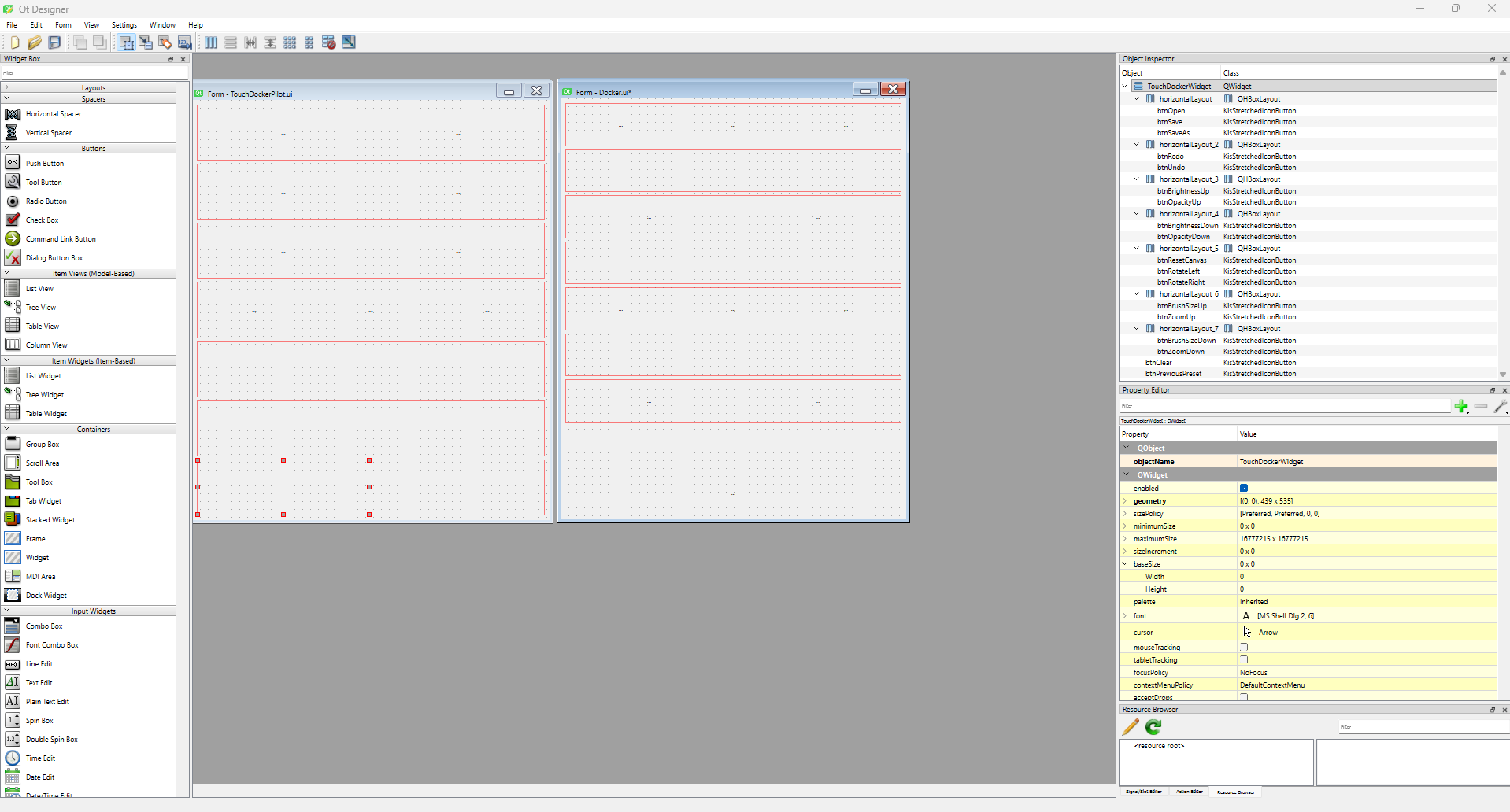
I have recently learned that you can easily design layouts for the docker UI - using Qt Designer (AND ITS FREE). It’s pretty intuitive to use and I recommend it for anyone else trying to make a docker of something that requires a UI. This saved me a lot of time! Not having to hard code every single thing about the UI is a life saver for me.
Essentially, what I am trying to figure out first is if I can steal some functionality from existing files to get this up and running. I need to understand the class hierarchy because this is a very robust and well designed codebase, so I will either need to implement isolated modules or refactor existing code.
I haven’t figured out how to access native icons and functionality yet. Well, at least via the scripter… I will try editing the source code and building that, I have a feeling like that will actually be easier since most of the functionality of this seems operate at compile time.
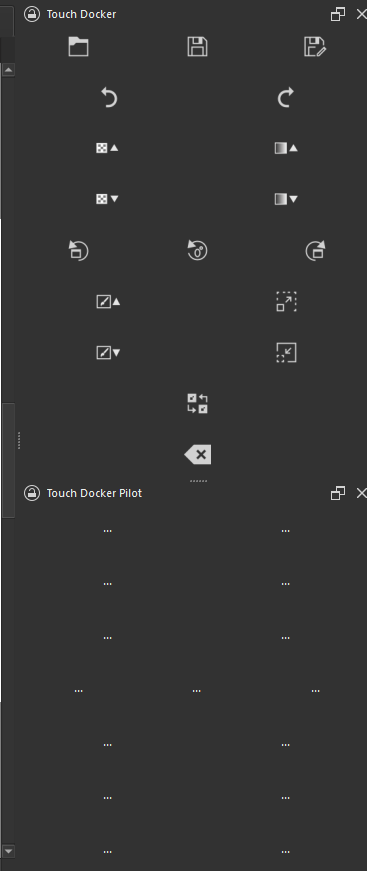
Anyway, my buttons don’t do anything, but they show up… which is good!! I’m so excited. The buttons work so far as in that they can have interactions. Now, those interactions are empty… BUT you can interact with them… so cool.
edit: I forgot to mention that the pilot is just to see if I can load a UI that I designed into Krita. I would have liked for more things to have worked, but I’ll take what I can get. I will add more things as I progress further.
This is the current version and my pilot version of the touch docker.
This is how it looks inside Qt Designer
Bye for now.