I have noticed that the plugin works a bit slow with some images.
1 Like
this would probably be a no go. I do stuff exclusive for Krita I can help ease the access in and out but I am exclusive open source so if the other program is payed to use I will be avoiding it.
that is made since it came out I do need to update the manual but I am doing a rework with more options so I will be shifting things around but currently:
None - Active select
DoubleClick - Image zoom
Shift - Multi select (incomplete)
Ctrl - Pixmap Operation. this works by nodes points to select the operation. the edges marked with a Triangle will scale the image while the others will move the image.
Alt - Drag and drop
Shift+Alt - Pan everything (camera)
Ctrl+Alt - Scale everything (camera)
yes I have been noticing that too. not sure how to fix that but the idea I have now needs testing. I have tested this with KRA work files that have very large formats and it is quite demanding for reference mode. what are the resolutions of those images by the way?
Both have dimensions of 2480 x 3508,
And yes I think it’s because of the resolution.
I should have been clearer; I was doing a +1 for not adding stuff in, for keeping things fully open source. I was saying an idea about if others want to make their own add-ons, outside of IB, that could keep IB clean.
I didn’t see a manual, but thanks for information.
Just to feed back that a glitch happens if then shift to using the antoine-roux traditional reference plug-in for detailed work/large zoom … the reference plug-in starts to behave the same as IB ie image will only zoom to window size. Disabling IB was the only way to fix that.
So the glitch is another plugin not zooming because of IB…?  What is this “antoine-roux traditional reference plugin”?
I must say it is NOT my goal to disturb other plugins from their normal working behavior. my code is fully open if there is a issue it is not intentional and it is verifiable at any time.
Also I should say not all plugins are inherently compatible because of the things they are handling, like too many chefs in one kitchen.
Also I do not make keyboard focus to steal keys from others plugins my keyboard inputs are inside modules and then inside a mouse widget event too, this means everything outside IB will be ignored as is normal. Also my shortcut actions come in with no keys set so the install has no conflict either and conflicts are solved by the user.
I have no idea without looking at this plugin how am I blocking their inputs.
P.S. - I found this plugin and their zoom is working correctly despite “IB” and “krita-plugin-reference” being open to the same image. I took a look at the other commands everything seems to be workable at first glance. Also this plugin has a similar setup with keyboard shortcuts so I cant see any problem from both being installed. you will have to explain your glitch better.
The reference plugin is on the krita resources page: Resources — Krita Manual 5.0.0 documentation. Otherwise, I have no idea, as am not technical … just reporting something I noticed and had thought it would be helpful. Earlier in the day, I’d asked here about being able to zoom without resizing the IB window, then I shifted to the antoine plugin, which does that, then suddenly it started to behave like IB, restricting the image to the window. I disabled IB, rebooted krita, and that fixed things. There’s so much stuff bundled into krita now, frankly anything could have caused the glitch. No idea.
That’s all I know, as am not at all into the tech side, or some accusatory bitch for reporting a bug. Done the donatings eg to you yesterday, done the reporting bugs, done the support, done the rare polite posting into what ends up 99% being into vacuums where there’s no response, and encountered enough snotty unpleasant responses, if there are responses, to last a lifetime and also eg art removed from inclusion due to choosing a normal license, criticised when mentioning anything about privacy, etc etc etc … sick of the attitudes over the last few years. I’m done with this. Takes all the joy out of art. And there’s no point reporting a bug if am then told that I’m basically lying, and should do better. I’m not lying, the glitch did happen as described, and it happened after painting for a while. Maybe you need to do better in how you respond, and if we’re talking about explaining better, there was no response about where on earth the manual for this plugin is, just in case anyone else needs to know too.
Unsubbed from topic.
By all means my account can be closed. No craps do I give.
I appreciate the gesture deeply but I should refund it whole. I can’t accept it with unhappiness and dissatisfaction towards me or my work, it will not bring you nor me any joy alike. I am sorry for the situation.
As for the other plugin, my issue is that I can’t replicate the issue on it. I need more information so to speak. I am in Windows and sometimes the operating system gives a very different experience and showing me the glitch happen (video, screenshots, something) or the steps to replicate it helps me locate the problem inside the code. Many times I fix issues for Linux users and honestly it is all invisible to me, the before and after are same, because of how Krita is behaving on my end. The reverse situation also happens.
The location of the manual:
I have noticed this when I enter the canvas only mode if the docker is in floating mode, there is a type of flicker, if it is in panel mode there is only delay, this happens with both small and large images.
Other than that the plugin works pretty well 
That is good to know but I don’t think I have control over that. IB is a docker and krita is the one handling the dockers to clear up the space.
maybe IB is getting heavy to update fast for the switch or the canvas update is too heavy?
I took the canvas update, it might influence but I have no idea if it will affect your performance. to me it is the same still. other than that I don’t know.
Regardless I cant update now because I working on the next version and I am WIP. what I am doing might take a while as I need to read papers to code it.
1 Like
update:
- new features
- quality of life
mostly on going work on the reference board to improve usability
pack in a line or column. selection clean.
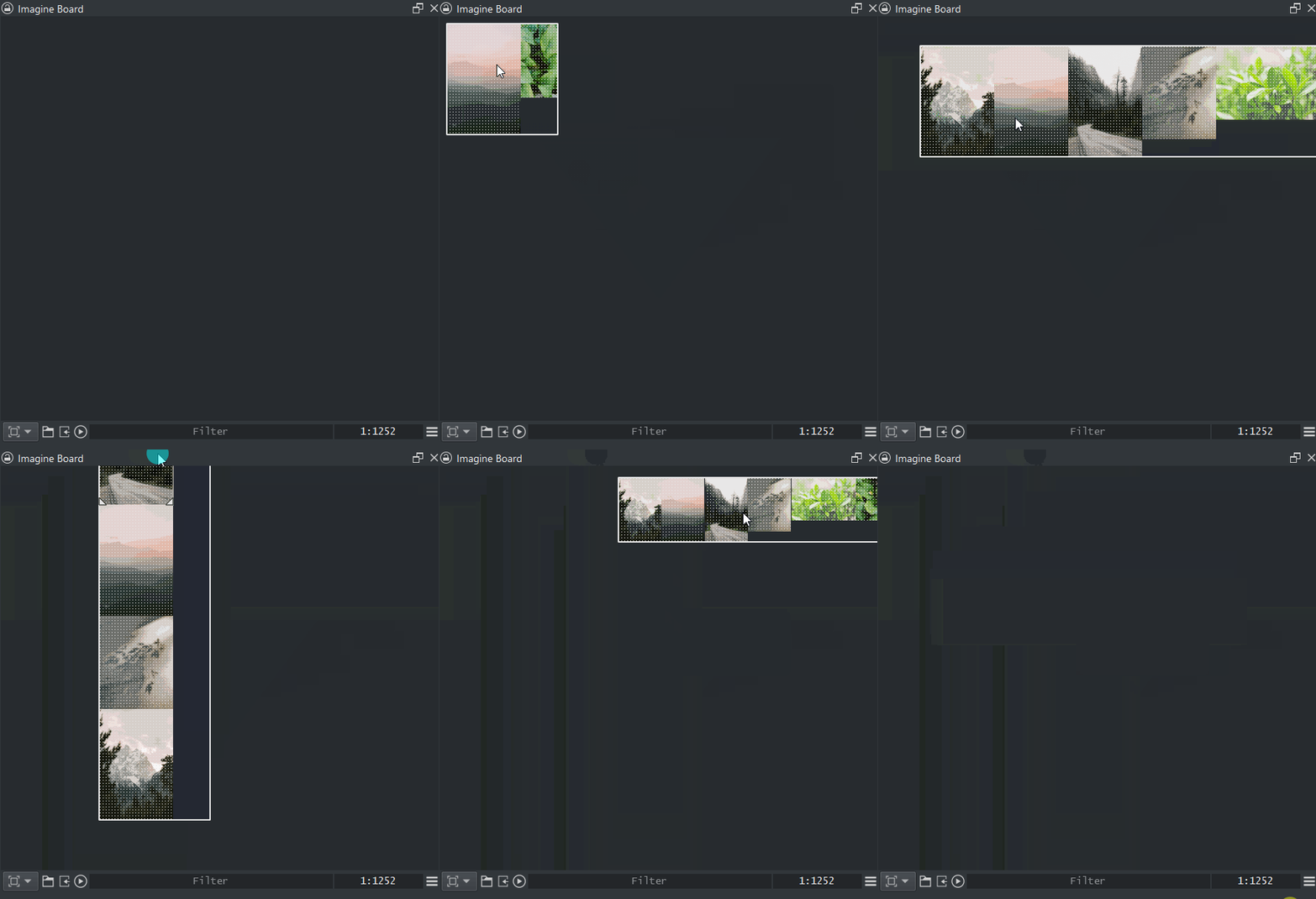
multi selection by dragging a box or clicking with SHIFT.
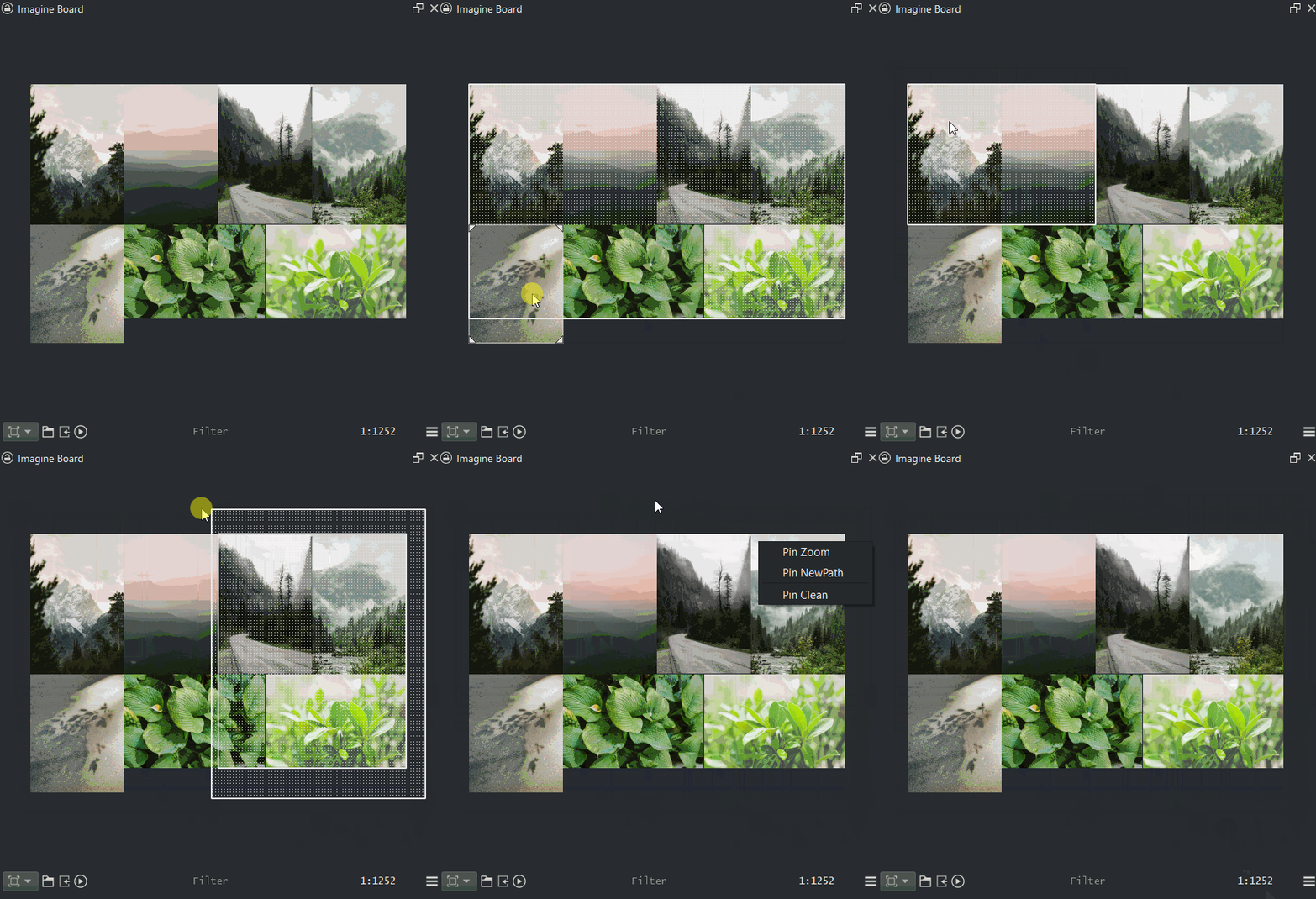
Snapping with move and scale of the Pins to do manual packing.
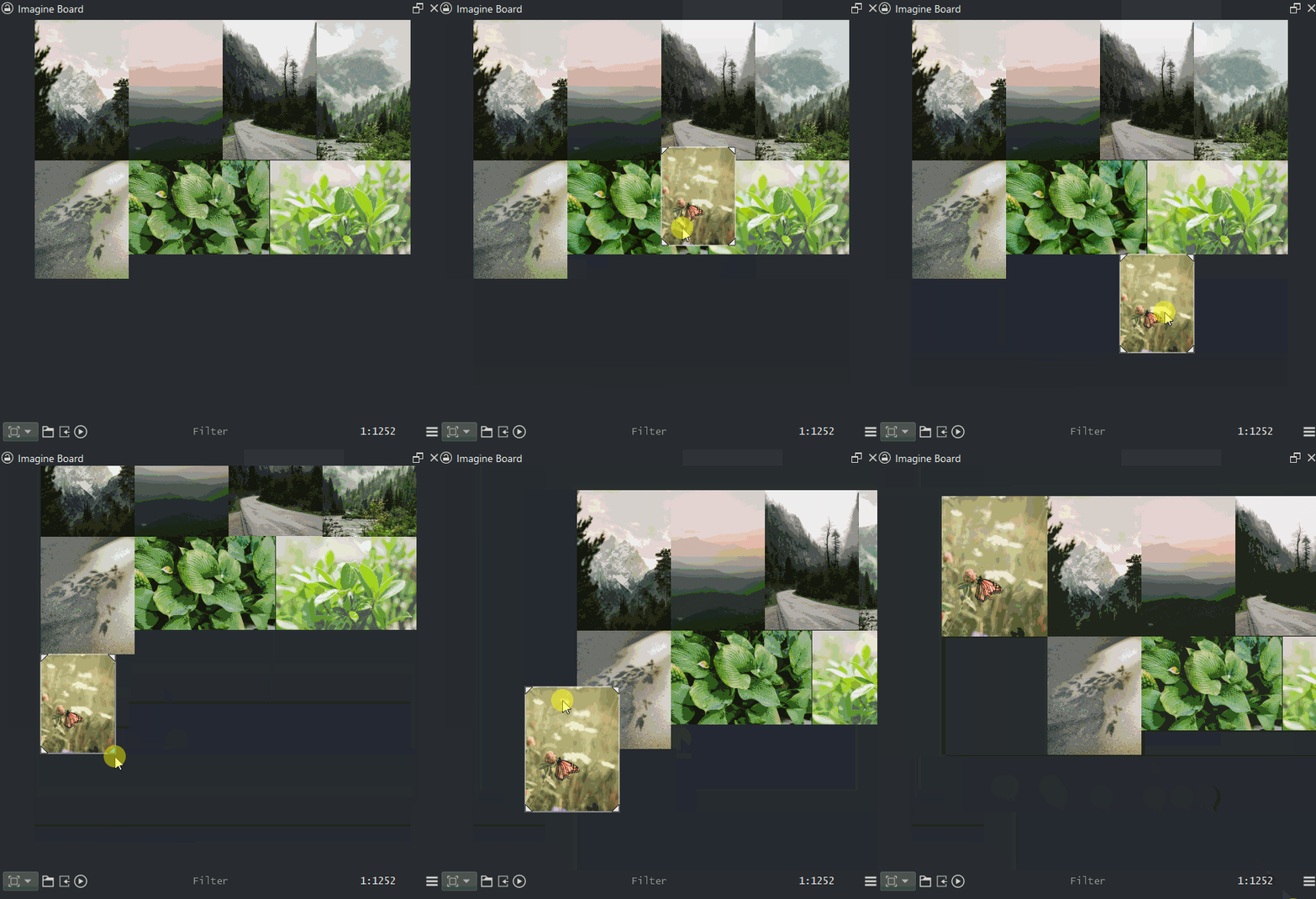
Pin Move snapping happens automatically. However Scale snapping is inactive unless you approach the mouse a given distance to the triangle your pushing or pulling and then it will start to snap, this is to reduce scale flickering. Any reviews on this behaviour will be taken into account to improve interaction.
Pin Move of a selection is possible but the snapping will only happen to the active Pin and that is the one you click on to move. Active Pin and a selection of Pins are independent of each other and you can identify selections by the dotted pattern over them.
Middle mouse press pans and mouse wheel zooms for when using the mouse.
Settings have a option to import images as their real size, however this size has a maximum acceptable size in which images bigger than it will be scaled down to the given size. Default limit size is 2000px.
@SchrodingerCat
I deleted the update on canvas changed. check if that makes any difference for you when activating full screen mode.
3 Likes
There really is no difference but the update is appreciated
1 Like
update:
- Features
- Quality of life
- Warning (kritarc)
This version will create Kritarc issues and the following versions might too. I am exploring new options and previous saves of the reference board will cause missmatch when loading old version saves. If Krita does not boot just create a new Kritarc file or delete all entries of “Imagine Board” inside it and boot up again with it clean and it will recreate itself too. Considering the nature of “lore” in references used I am not sure how to make it happen when upscalling to a new version without ignoring it by version but that would be even worse. You can try and delete all your reference boards and install this version, that should work also. Either way Reference board is still work in progress.
This version of Reference Board might feels a bit heavier to operate because I keep in memory the image and changes done to them until they are cleared out of memory. Saving remains untouched as it is pure text still and light. This was the compromise I choose. This will cause a lag issue that changes done to the files on the file system will not be reflected instantly on the reference board until a bigger update to the Pin is done to reflect this change.
Another way I could solve this versioning issue for the reference board is to only hold edits on the Preview mode alone. Food for thought.
Either way now the new stuff:
Mode context menus. This will display the icons that are the most relevant for each mode.
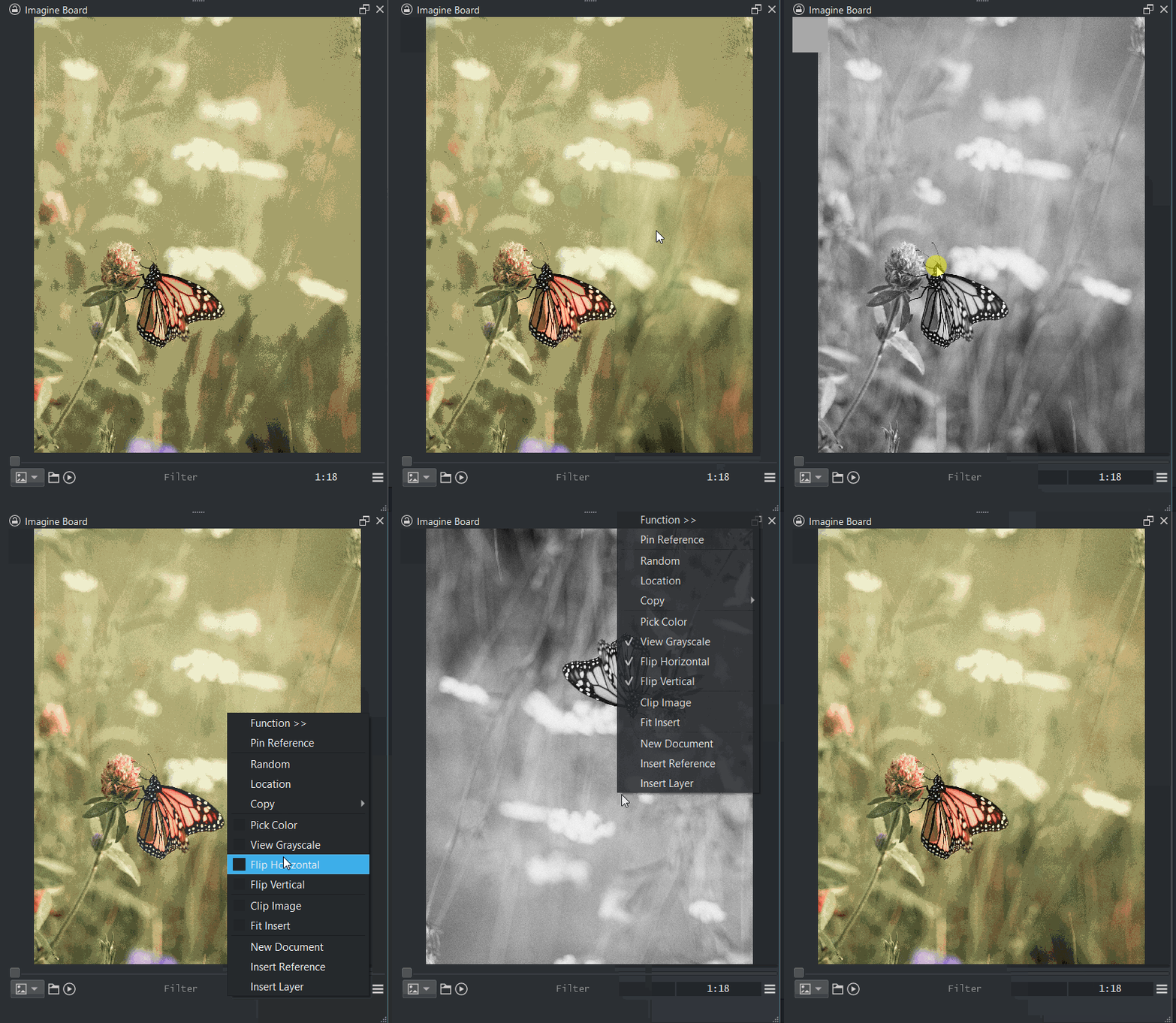
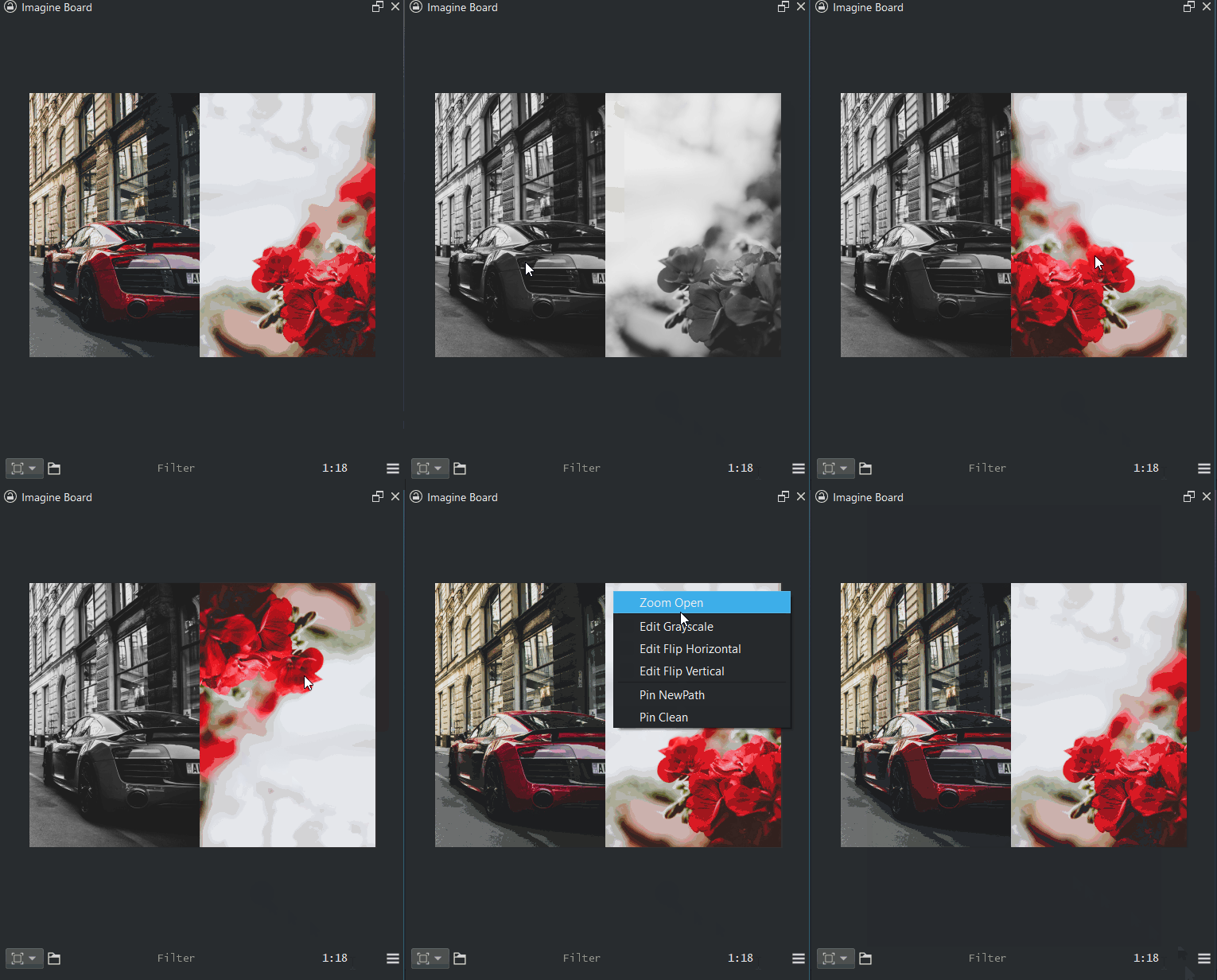
Preview/Reference Edits. Right clicking the images will give access to options to toggle display for Grey-scale or to Flip Horizontal and or Vertical.
Lists References. Activate the Reference list to display the pins in the preview and grid mode. Reference mode can actively be viewed as a container of images from several sources and not be locked to a single folder workflow even though that is more efficient by nature.
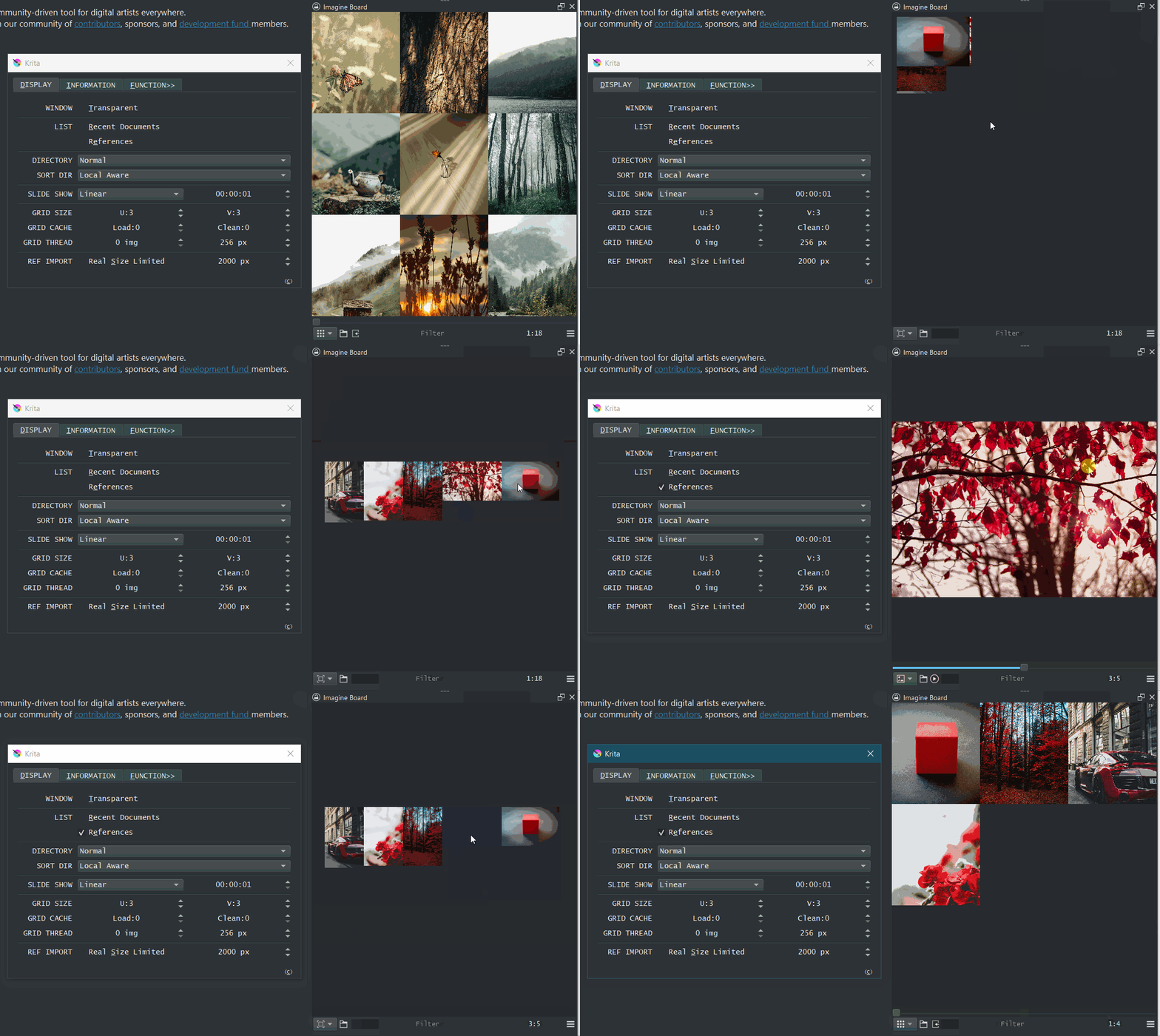
Window Translucent. This will make the window semi transparent in order to not have gray or white over areas wasting space on the canvas. Note that the header ceases to be and will be in a sort of lock there until you deactivate the option again to regain the header.
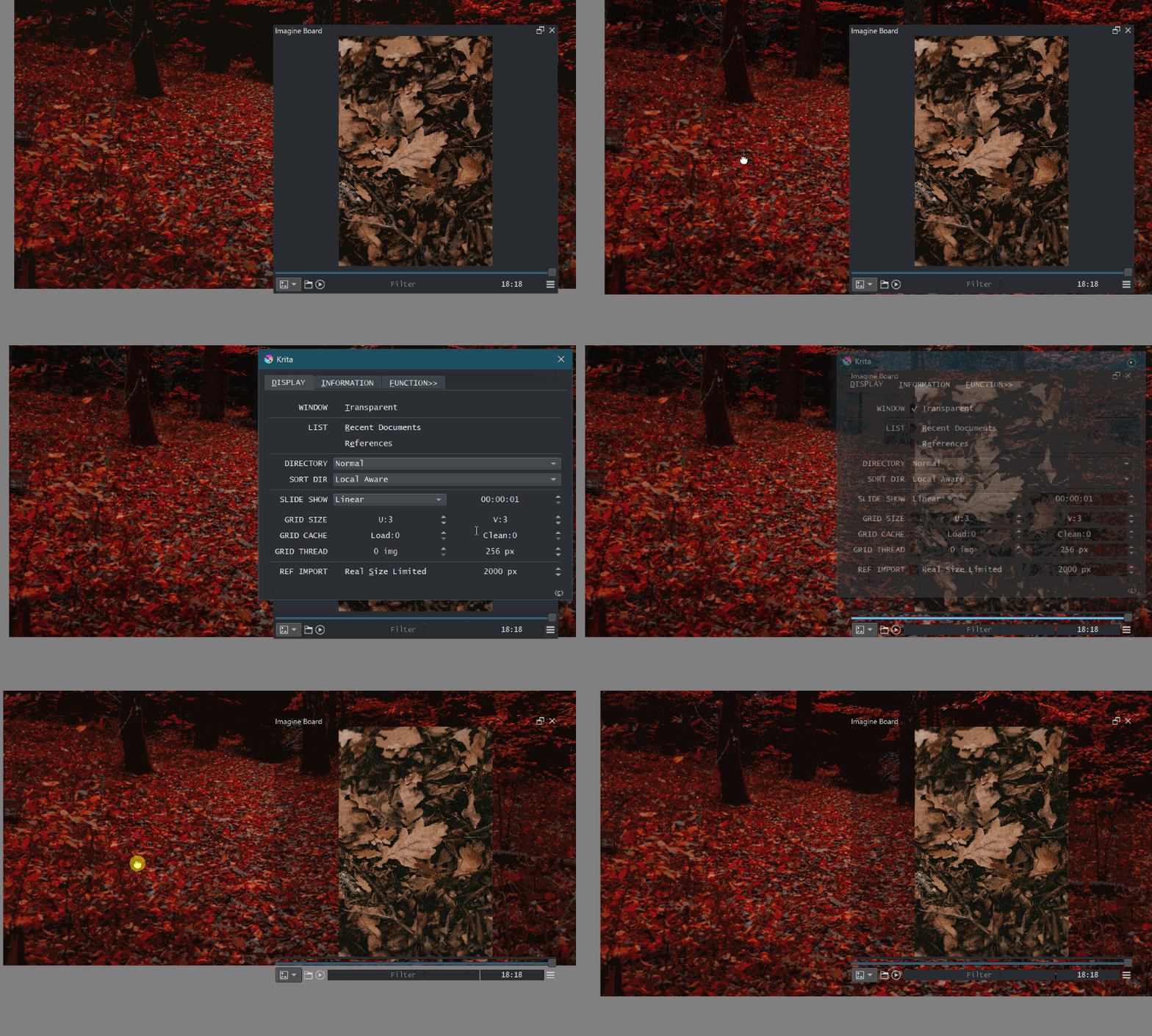
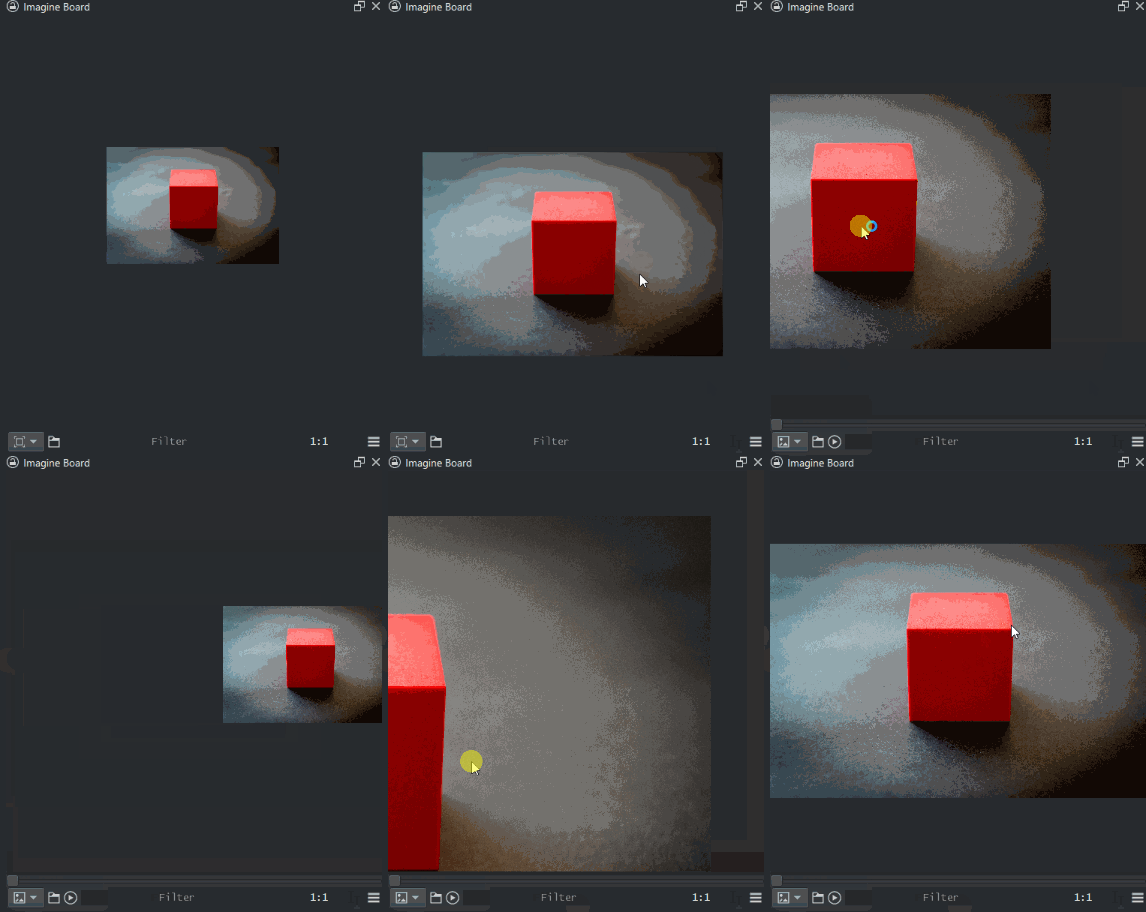
Panning camera has similar controls on both Preview and Reference mode now to have consistent controls within.
5 Likes
Great time to try 
1 Like
Hi,
i have a problem
> IndexError
> Python 3.8.1: /usr/bin/python3
> Sat May 14 22:44:10 2022
>
> A problem occurred in a Python script.  Here is the sequence of
> function calls leading up to the error, in the order they occurred.
>
>  /tmp/.mount_krita-JyU5gA/usr/lib/krita-python-libs/krita/dockwidgetfactory.py in createDockWidget(self=<krita.dockwidgetfactory.DockWidgetFactory object>)
>    14         super(DockWidgetFactory, self).__init__(_id, _dockPosition)
>    15         self.klass = _klass
>    16
>    17     def createDockWidget(self):
>    18         return self.klass()
> self = <krita.dockwidgetfactory.DockWidgetFactory object>
> self.klass = <class 'imagine_board.imagine_board_docker.ImagineBoard_Docker'>
>
>  /home/i/.local/share/krita/pykrita/imagine_board/imagine_board_docker.py in __init__(self=<imagine_board.imagine_board_docker.ImagineBoard_Docker object>)
>    94         self.Style()
>    95         self.Extension()
>    96         self.Settings()
>    97
>    98     def Variables(self):
> self = <imagine_board.imagine_board_docker.ImagineBoard_Docker object>
> self.Settings = <bound method ImagineBoard_Docker.Settings of <i...imagine_board_docker.ImagineBoard_Docker object>>
>
>  /home/u/.local/share/krita/pykrita/imagine_board/imagine_board_docker.py in Settings(self=<imagine_board.imagine_board_docker.ImagineBoard_Docker object>)
>   496         else:
>   497             self.list_references = eval(references)
>   498             self.imagine_reference.Board_Load(self.list_references)
>   499
>   500         #//
> self = <imagine_board.imagine_board_docker.ImagineBoard_Docker object>
> self.imagine_reference = <imagine_board.imagine_board_modulo.ImagineBoard_Reference object>
> self.imagine_reference.Board_Load = <bound method ImagineBoard_Reference.Board_Load ...gine_board_modulo.ImagineBoard_Reference object>>
> self.list_references = [['.', -132.73251499999998, -389.2786699999999, 0.0, 0.0, 0.0], ['.', -132.73251499999998, -389.2786699999999, 0.0, 0.0, 0.0], ['.', -132.73251499999998, -389.2786699999999, 0.0, 0.0, 0.0], ['.', -132.73251499999998, -389.2786699999999, 0.0, 0.0, 0.0], ['/home/r/Téléchargements/téléchargement (7).jpeg', 749.2520499999999, -344.16436999999996, 338.3572499999999, 225.57149999999996, 33.690067525979785], ['/home/t/Téléchargements/téléchargement (4).jpeg', -202.2393492885702, 1185.2104, 879.3085192885702, 514.2155083558891, 30.31889620075734], ['/home/a/Téléchargements/téléchargement (6).jpeg', 68.22568749354306, 756.8148608780748, 339.03889634359933, 226.02593089573284, 33.690067525979785], ['/home/bTéléchargements/277521136_5257369370991522_5731786575984714496_n.jpg', 331.08712795463344, 209.01202187417363, 195.12474005929215, 195.12474005929212, 45.0], ['/home/r/Téléchargements/téléchargement (5).jpeg', 290.26820676930436, 613.7186361792872, 238.92062769605585, 191.13650215684467, 38.65980825409009], ['/home/c/Téléchargements/téléchargement.jpeg', 290.6391121879609, 406.2545339734592, 207.04851977902726, 207.04851977902723, 45.0], ['/home/pTéléchargements/téléchargement (1).jpeg', 6.225687493543063, 3.1213185719149408, 181.89070330225871, 181.8907033022587, 45.0], ['/home/r/Téléchargements/dadada.jpeg', 54.718256406267585, 32.02657115940829, 319.4775039896426, 214.41443220781383, 33.867179108725864], ['/home//Téléchargements/dada).jpeg', 19.551899999999932, 457.25671808864945, 189.64038694253927, 160.71219232418585, 40.279863068956445], ['/home/d/Téléchargements/téléchargement (8).jpeg', -38.53006244474659, 281.3067992967535, 278.34601430727747, 157.25763520185168, 29.465221384766682], ['/home/r/Bureau/téléchargement.jpeg', -18.2817435937324, 644.6513953984556, 216.27344635311883, 222.7616497437124, 45.84667402386151]]
>
>  /home/r/.local/share/krita/pykrita/imagine_board/imagine_board_modulo.py in Board_Load(self=<imagine_board.imagine_board_modulo.ImagineBoard_Reference object>, references=[['.', -132.73251499999998, -389.2786699999999, 0.0, 0.0, 0.0], ['.', -132.73251499999998, -389.2786699999999, 0.0, 0.0, 0.0], ['.', -132.73251499999998, -389.2786699999999, 0.0, 0.0, 0.0], ['.', -132.73251499999998, -389.2786699999999, 0.0, 0.0, 0.0], ['/home/r/Téléchargements/téléchargement (7).jpeg', 749.2520499999999, -344.16436999999996, 338.3572499999999, 225.57149999999996, 33.690067525979785], ['/home/r/Téléchargements/téléchargement (4).jpeg', -202.2393492885702, 1185.2104, 879.3085192885702, 514.2155083558891, 30.31889620075734], ['/home/r/Téléchargements/téléchargement (6).jpeg', 68.22568749354306, 756.8148608780748, 339.03889634359933, 226.02593089573284, 33.690067525979785], ['/home/r/Téléchargements/277521136_5257369370991522_5731786575984714496_n.jpg', 331.08712795463344, 209.01202187417363, 195.12474005929215, 195.12474005929212, 45.0], ['/home/r/Téléchargements/téléchargement (5).jpeg', 290.26820676930436, 613.7186361792872, 238.92062769605585, 191.13650215684467, 38.65980825409009], ['/home/r/Téléchargements/téléchargement.jpeg', 290.6391121879609, 406.2545339734592, 207.04851977902726, 207.04851977902723, 45.0], ['/home/er/Téléchargements/téléchargement (1).jpeg', 6.225687493543063, 3.1213185719149408, 181.89070330225871, 181.8907033022587, 45.0], ['/home/r/Téléchargements/dadada.jpeg', 54.718256406267585, 32.02657115940829, 319.4775039896426, 214.41443220781383, 33.867179108725864], ['/home/r/Téléchargements/dada).jpeg', 19.551899999999932, 457.25671808864945, 189.64038694253927, 160.71219232418585, 40.279863068956445], ['/home/r/Téléchargements/téléchargement (8).jpeg', -38.53006244474659, 281.3067992967535, 278.34601430727747, 157.25763520185168, 29.465221384766682], ['/home/r/Bureau/téléchargement.jpeg', -18.2817435937324, 644.6513953984556, 216.27344635311883, 222.7616497437124, 45.84667402386151]])
>  1243         self.ref.clear()
>  1244         for i in range(0, len(references)):
>  1245             self.Pin_Add(references[i])
>  1246         self.update()
>  1247     def Board_Save(self):
> self = <imagine_board.imagine_board_modulo.ImagineBoard_Reference object>
> self.Pin_Add = <bound method ImagineBoard_Reference.Pin_Add of ...gine_board_modulo.ImagineBoard_Reference object>>
> references = [['.', -132.73251499999998, -389.2786699999999, 0.0, 0.0, 0.0], ['.', -132.73251499999998, -389.2786699999999, 0.0, 0.0, 0.0], ['.', -132.73251499999998, -389.2786699999999, 0.0, 0.0, 0.0], ['.', -132.73251499999998, -389.2786699999999, 0.0, 0.0, 0.0], ['/home/r/Téléchargements/téléchargement (7).jpeg', 749.2520499999999, -344.16436999999996, 338.3572499999999, 225.57149999999996, 33.690067525979785], ['/home/r/Téléchargements/téléchargement (4).jpeg', -202.2393492885702, 1185.2104, 879.3085192885702, 514.2155083558891, 30.31889620075734], ['/home/r/Téléchargements/téléchargement (6).jpeg', 68.22568749354306, 756.8148608780748, 339.03889634359933, 226.02593089573284, 33.690067525979785], ['/home/r/Téléchargements/277521136_5257369370991522_5731786575984714496_n.jpg', 331.08712795463344, 209.01202187417363, 195.12474005929215, 195.12474005929212, 45.0], ['/home/r/Téléchargements/téléchargement (5).jpeg', 290.26820676930436, 613.7186361792872, 238.92062769605585, 191.13650215684467, 38.65980825409009], ['/home/r/Téléchargements/téléchargement.jpeg', 290.6391121879609, 406.2545339734592, 207.04851977902726, 207.04851977902723, 45.0], ['/home/o/Téléchargements/téléchargement (1).jpeg', 6.225687493543063, 3.1213185719149408, 181.89070330225871, 181.8907033022587, 45.0], ['/home/r/Téléchargements/dadada.jpeg', 54.718256406267585, 32.02657115940829, 319.4775039896426, 214.41443220781383, 33.867179108725864], ['/home/r/Téléchargements/dada).jpeg', 19.551899999999932, 457.25671808864945, 189.64038694253927, 160.71219232418585, 40.279863068956445], ['/home/r/Téléchargements/téléchargement (8).jpeg', -38.53006244474659, 281.3067992967535, 278.34601430727747, 157.25763520185168, 29.465221384766682], ['/home/r/Bureau/téléchargement.jpeg', -18.2817435937324, 644.6513953984556, 216.27344635311883, 222.7616497437124, 45.84667402386151]]
> i = 0
>
>  /home/r/.local/share/krita/pykrita/imagine_board/imagine_board_modulo.py in Pin_Add(self=<imagine_board.imagine_board_modulo.ImagineBoard_Reference object>, pin=['.', -132.73251499999998, -389.2786699999999, 0.0, 0.0, 0.0])
>  1181         }
>  1182         qpin = [
>  1183             pin[0], pin[1], pin[2], pin[3], pin[4], pin[5], pin[6], pin[7], pin[8], pin[9], # Recieved
>  1184             edit, QPixmap(pin[0]) # Created
>  1185             ]
> pin = ['.', -132.73251499999998, -389.2786699999999, 0.0, 0.0, 0.0]
> IndexError: list index out of range
>     __cause__ = None
>     __class__ = <class 'IndexError'>
>     __context__ = None
>     __delattr__ = <method-wrapper '__delattr__' of IndexError object>
>     __dict__ = {}
>     __dir__ = <built-in method __dir__ of IndexError object>
>     __doc__ = 'Sequence index out of range.'
>     __eq__ = <method-wrapper '__eq__' of IndexError object>
>     __format__ = <built-in method __format__ of IndexError object>
>     __ge__ = <method-wrapper '__ge__' of IndexError object>
>     __getattribute__ = <method-wrapper '__getattribute__' of IndexError object>
>     __gt__ = <method-wrapper '__gt__' of IndexError object>
>     __hash__ = <method-wrapper '__hash__' of IndexError object>
>     __init__ = <method-wrapper '__init__' of IndexError object>
>     __init_subclass__ = <built-in method __init_subclass__ of type object>
>     __le__ = <method-wrapper '__le__' of IndexError object>
>     __lt__ = <method-wrapper '__lt__' of IndexError object>
>     __ne__ = <method-wrapper '__ne__' of IndexError object>
>     __new__ = <built-in method __new__ of type object>
>     __reduce__ = <built-in method __reduce__ of IndexError object>
>     __reduce_ex__ = <built-in method __reduce_ex__ of IndexError object>
>     __repr__ = <method-wrapper '__repr__' of IndexError object>
>     __setattr__ = <method-wrapper '__setattr__' of IndexError object>
>     __setstate__ = <built-in method __setstate__ of IndexError object>
>     __sizeof__ = <built-in method __sizeof__ of IndexError object>
>     __str__ = <method-wrapper '__str__' of IndexError object>
>     __subclasshook__ = <built-in method __subclasshook__ of type object>
>     __suppress_context__ = False
>     __traceback__ = <traceback object>
>     args = ('list index out of range',)
>     with_traceback = <built-in method with_traceback of IndexError object>
>
> The above is a description of an error in a Python program.  Here is
> the original traceback:
>
> Traceback (most recent call last):
>   File "/tmp/.mount_krita-JyU5gA/usr/lib/krita-python-libs/krita/dockwidgetfactory.py", line 18, in createDockWidget
>     return self.klass()
>   File "/home/r/.local/share/krita/pykrita/imagine_board/imagine_board_docker.py", line 96, in __init__
>     self.Settings()
>   File "/home/r/.local/share/krita/pykrita/imagine_board/imagine_board_docker.py", line 498, in Settings
>     self.imagine_reference.Board_Load(self.list_references)
>   File "/home/r/.local/share/krita/pykrita/imagine_board/imagine_board_modulo.py", line 1245, in Board_Load
>     self.Pin_Add(references[i])
>   File "/home/name/.local/share/krita/pykrita/imagine_board/imagine_board_modulo.py", line 1183, in Pin_Add
>     pin[0], pin[1], pin[2], pin[3], pin[4], pin[5], pin[6], pin[7], pin[8], pin[9], # Recieved
> IndexError: list index out of range
The error message arrives at this time (Krita exits once the error message is closed:
!
)
I am under the prealpha, but the problem is the same under Krita 5.0.6.
However, I can use version 5.0.2 in the snaps store
I’m on Ubuntu 22.04 LTS
I don’t know how to sup or modify the Kritarc file.
Sorry for the inconvenience
This is the location of the file.
Editing is just like any text file. Make a backup of the file save it elsewhere in case of need. On the file that stays Search for imagine board and you will find a “[Imagine Board]” entry. All variables directly under it belong to imagine board. Just delete them and save the file then boot krita and it will start fresh.
1 Like
Thanks you, it’s works.
Update:
- refactoring for bad loads (experimental)
- Performance
- new Function
- UI docker unlock
- Bug Fixes
Refactor Reference
Considering the issues with the board loader with past versions and future versions. I did some changes to the object type being used as it permits me some other moves. Usually I am a big fan of Lists but for this case I think Dictionaries really are the way to go. If this works there should not be any more problems loading previous versions. And so even if I add more keys for more options in the future I should be able to construct something and not block Krita from booting. Considering the new object type I can load previous image edits done to images with much less effort so it should load up now.
Performance
While refactoring I changed some little details on the way it handles things and I noticed a good boost in speed at least for my old computer. I always change everything I think that is wrong when i pass through it and I never warn about because it is so minute, but this sounds a big enough change to be note worthy.
New Function
the new Function is called “Rename Age”. this will grab all the items on the list / folder calculate the age for each one and then sort them out from Older to Younger. then rename the files accordingly as “Rename Order” would. This is actually pretty dope because when your saving reference images into a folder you are searching by topic, and so when your searching hair, all the hair are clumped together and all the poses are clumped together next and so on and so forth. Random just mixes all around with no sense and by age you can have a cascading of different topics in transition making it easier to find and place keys on the images.
UI Docker Unlock
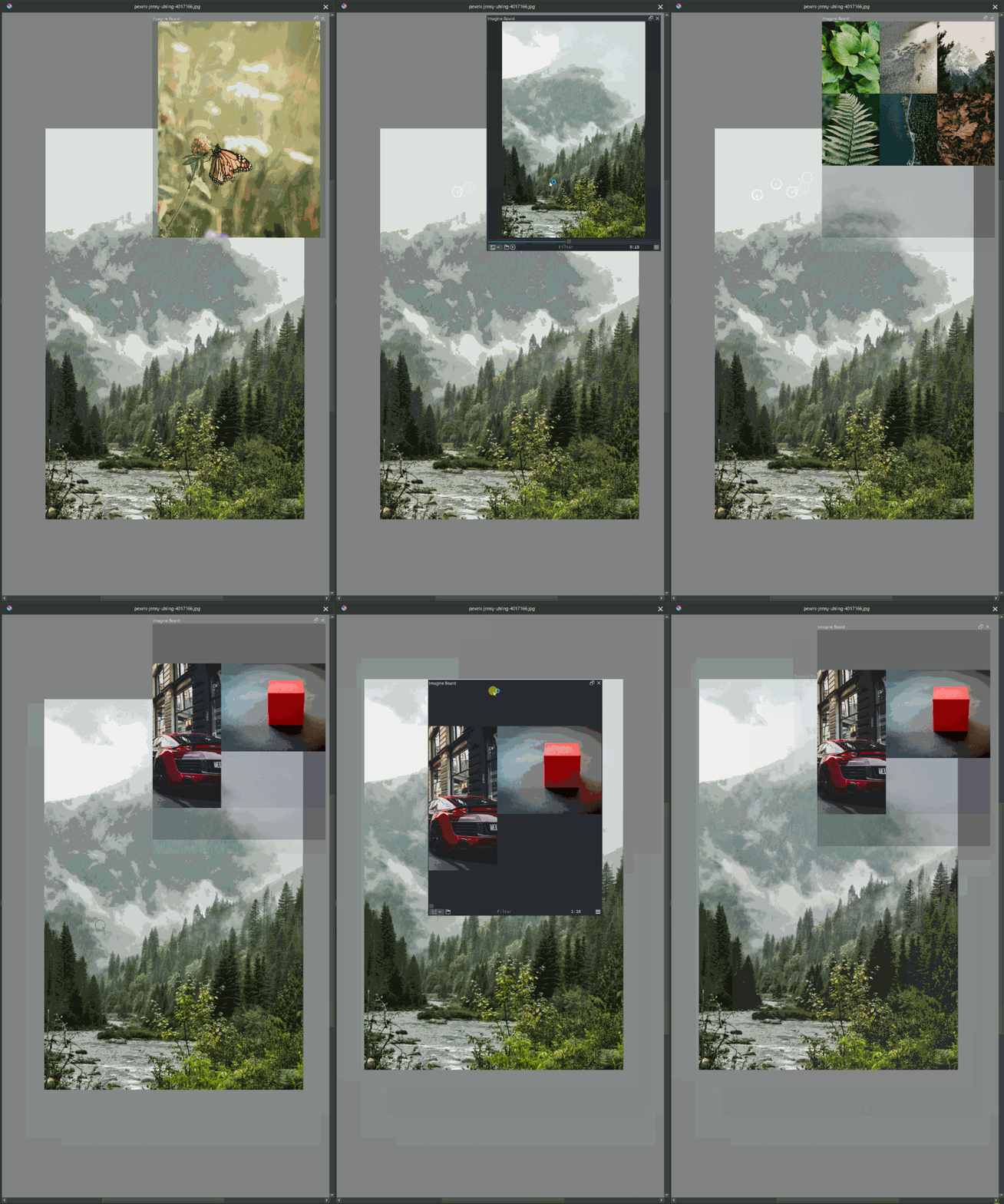
When activating Window>Transparency now it will act like a toggle instead of being constantly transparent. When the docker is floating and your over IB it will be opaque, but when your outside IB it will be transparent blending in. Also when your transparent it will hide all controllers on the footer to be super minimalist. This means you can move your window around freely even while your in transparent mode and not be forced to switch mode constantly to move a simple docker. This was harder to pull off than it should have but if a weird behavior is detected tell me about it.
5 Likes

thank you,
1 Like