OS : windows 10
krita version : 5.2.6
Hi there,
I just started python scripting with krita but i cannot use the debugger from the Scripter windows.
It popups a script Error windows with the following text.
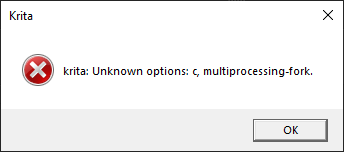
Right after the script error occurs another windows dialog appears :
TypeError
Python 3.10.7: D:\Imaging\Krita (x64)\5.2.6\bin\krita.exe
Fri Dec 13 18:22:54 2024

A problem occurred in a Python script.  Here is the sequence of
function calls leading up to the error, in the order they occurred.

 D:\Imaging\Krita (x64)\5.2.6\share\krita\pykrita\scripter\ui_scripter\actions\debugaction\debugaction.py in debug(self=<scripter.ui_scripter.actions.debugaction.debugaction.DebugAction object>)
   33         if self.scripter.uicontroller.invokeAction('save'):
   34             self.scripter.uicontroller.setActiveWidget(i18n('Debugger'))
   35             self.scripter.debugcontroller.start(self.scripter.documentcontroller.activeDocument)
   36             widget = self.scripter.uicontroller.findTabWidget(i18n('Debugger'))
   37             widget.startDebugger()
self = <scripter.ui_scripter.actions.debugaction.debugaction.DebugAction object>
self.scripter = <scripter.scripter.ScripterExtension object>
self.scripter.debugcontroller = <scripter.debugcontroller.DebugController object>
self.scripter.debugcontroller.start = <bound method DebugController.start of <scripter.debugcontroller.DebugController object>>
self.scripter.documentcontroller = <scripter.documentcontroller.DocumentController object>
self.scripter.documentcontroller.activeDocument = <scripter.document_scripter.document.Document object>

 D:\Imaging\Krita (x64)\5.2.6\share\krita\pykrita\scripter\debugcontroller.py in start(self=<scripter.debugcontroller.DebugController object>, document=<scripter.document_scripter.document.Document object>)
   23         self.setCmd(compile(document.data, document.filePath, "exec"))
   24         self._debugger = debugger.Debugger(self.scripter, self._cmd)
   25         self._debugger.debugprocess.start()
   26         loop = asyncio.get_event_loop()
   27         loop.run_until_complete(self._debugger.start())
self = <scripter.debugcontroller.DebugController object>
self._debugger = <scripter.debugger_scripter.debugger.Debugger object>
self._debugger.debugprocess = <Process name='Process-1' parent=3952 initial>
self._debugger.debugprocess.start = <bound method BaseProcess.start of <Process name='Process-1' parent=3952 initial>>

 D:\imaging\Krita (x64)\5.2.6\multiprocessing\process.py in start(self=<Process name='Process-1' parent=3952 initial>)


 D:\imaging\Krita (x64)\5.2.6\multiprocessing\context.py in _Popen(process_obj=<Process name='Process-1' parent=3952 initial>)


 D:\imaging\Krita (x64)\5.2.6\multiprocessing\context.py in _Popen(process_obj=<Process name='Process-1' parent=3952 initial>)


 D:\imaging\Krita (x64)\5.2.6\multiprocessing\popen_spawn_win32.py in __init__(self=<multiprocessing.popen_spawn_win32.Popen object>, process_obj=<Process name='Process-1' parent=3952 initial>)


 D:\imaging\Krita (x64)\5.2.6\multiprocessing\reduction.py in dump(obj=<Process name='Process-1' parent=3952 initial>, file=<_io.BufferedWriter name=3>, protocol=None)

TypeError: cannot pickle 'ScripterExtension' object
    __cause__ = None
    __class__ = <class 'TypeError'>
    __context__ = None
    __delattr__ = <method-wrapper '__delattr__' of TypeError object>
    __dict__ = {}
    __dir__ = <built-in method __dir__ of TypeError object>
    __doc__ = 'Inappropriate argument type.'
    __eq__ = <method-wrapper '__eq__' of TypeError object>
    __format__ = <built-in method __format__ of TypeError object>
    __ge__ = <method-wrapper '__ge__' of TypeError object>
    __getattribute__ = <method-wrapper '__getattribute__' of TypeError object>
    __gt__ = <method-wrapper '__gt__' of TypeError object>
    __hash__ = <method-wrapper '__hash__' of TypeError object>
    __init__ = <method-wrapper '__init__' of TypeError object>
    __init_subclass__ = <built-in method __init_subclass__ of type object>
    __le__ = <method-wrapper '__le__' of TypeError object>
    __lt__ = <method-wrapper '__lt__' of TypeError object>
    __ne__ = <method-wrapper '__ne__' of TypeError object>
    __new__ = <built-in method __new__ of type object>
    __reduce__ = <built-in method __reduce__ of TypeError object>
    __reduce_ex__ = <built-in method __reduce_ex__ of TypeError object>
    __repr__ = <method-wrapper '__repr__' of TypeError object>
    __setattr__ = <method-wrapper '__setattr__' of TypeError object>
    __setstate__ = <built-in method __setstate__ of TypeError object>
    __sizeof__ = <built-in method __sizeof__ of TypeError object>
    __str__ = <method-wrapper '__str__' of TypeError object>
    __subclasshook__ = <built-in method __subclasshook__ of type object>
    __suppress_context__ = False
    __traceback__ = <traceback object>
    args = ("cannot pickle 'ScripterExtension' object",)
    with_traceback = <built-in method with_traceback of TypeError object>

The above is a description of an error in a Python program.  Here is
the original traceback:

Traceback (most recent call last):
  File "D:\Imaging\Krita (x64)\5.2.6\share\krita\pykrita\scripter\ui_scripter\actions\debugaction\debugaction.py", line 35, in debug
    self.scripter.debugcontroller.start(self.scripter.documentcontroller.activeDocument)
  File "D:\Imaging\Krita (x64)\5.2.6\share\krita\pykrita\scripter\debugcontroller.py", line 25, in start
    self._debugger.debugprocess.start()
  File "multiprocessing\process.py", line 121, in start
  File "multiprocessing\context.py", line 224, in _Popen
  File "multiprocessing\context.py", line 336, in _Popen
  File "multiprocessing\popen_spawn_win32.py", line 93, in __init__
  File "multiprocessing\reduction.py", line 60, in dump
TypeError: cannot pickle 'ScripterExtension' object
Note, the log displays some paths which doesn’t exist in my krita installation directory :
like this path that is referenced multiple times :
D:\imaging\Krita (x64)\5.2.6\multiprocessing\process.py in start(self=<Process name='Process-1' parent=3952 initial>)
D:\imaging\Krita (x64)\5.2.6\multiprocessing\ direcory doesn’t exists nor that process.py file.
I had uninstalled krita and clean up the appdata/local and appdata/roaming, cause i noticed it kept some old files from previous version of krita, thought it could be the issue, but once reinstalled completly the issue is still there.
My python script is simple, it has no class and is not yet register as a plugin here is the code.
it just create a new document, add a filelayer and load up an image.
import sys
import os
from krita import Krita, qDebug
#from krita import Extension, InfoObject, Krita, QRect, qDebug
from PyQt5.QtWidgets import QFileDialog, QInputDialog, QMessageBox
from PyQt5 import QtCore

imagepath = 'd:/temp/krita/puppet-master-logo-desktop.jpg'
width = 1920
height = 1080
app = Krita.instance()

EXE_MENU_ENTRY = "Adding File Layer"

def openfile():

    newDocument = app.createDocument(width, height, "Document name", "RGBA", "U8", "", 72.0)
    app.activeWindow().addView(newDocument) # shows it in the application

    doc = Krita.instance().activeDocument()

    if not doc:
        QMessageBox.information(None, EXE_MENU_ENTRY, "No active document found")
        return

    doc.setBatchmode(True)

    # Load the image
    if os.path.exists(imagepath):
        qDebug("action_triggered: retrieving modified file")

        newLayer = newDocument.createNode("temp", "fileLayer")
        newDocument.rootNode().addChildNode(newLayer, None)


    activeLayer = doc.nodeByName("temp")
    activeLayer.setProperties(imagepath, "None", "Bicubic")

openfile()
Note : The script is saved in d:\temp\krita\run.py
Hope i can get this debugger to work, i might need it at some point.
Best Regards,
Nicolas