The Touchify plugin already does this marking of activated tools:
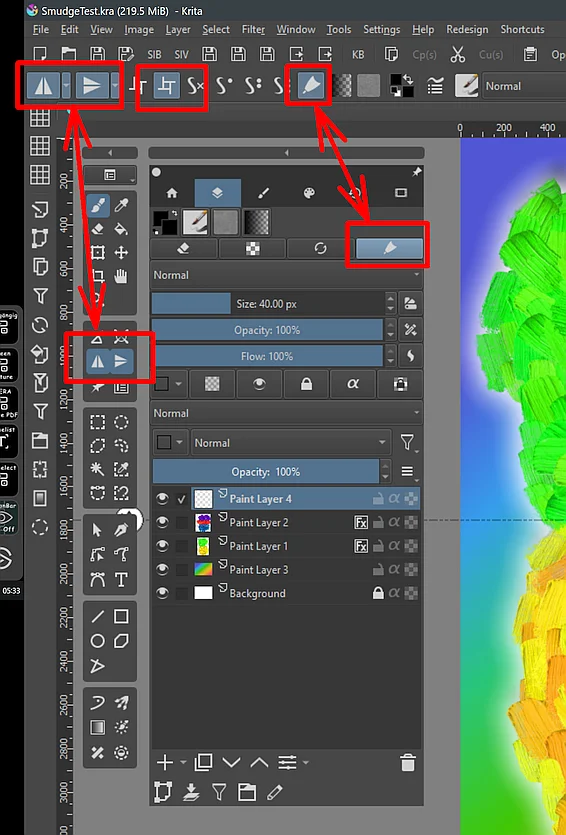
Michelist
I just use tela toolbar to see the mirror state on the menu.
Right, there are ways to make it somewhat visible and it’s not a problem for the experienced users. But I think it’s a valid point to cater to newcomers to Krita. Having an icon on the toolbar is less visible than a “popup” over a canvas, and being able to just click off the feature that you activated accidentally with a shortcut (e.g. softproofing) is of great value, too.
Is there any good reason to NOT have these new UI features for this? I don’t think so, especially if it could be disabled in the settings if it bothers the veteran user.
In fact I was thinking of requesting that Krita’s default workspace be changed as I find the current one quite confusing, the best thing is that by default after installation you have a more familiar interface, similar to SAI or CSP.
It is easy to see why features like this are difficult to add to the default Krita. Almost every person in here is requesting the mirror to go in a different spot. No matter what we pick, there will be people that won’t be happy with whatever we choose.
The easiest/quickest thing coding wise would be to add it by default to the toolbar…where people could turn it off if they don’t like it. The status bar, is a neat idea but that will need more discussion since it sounds like there are more things than the mirror action that need to be monitored.