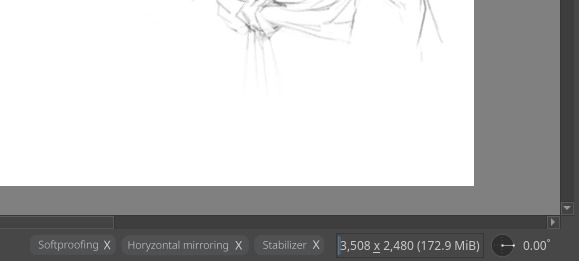
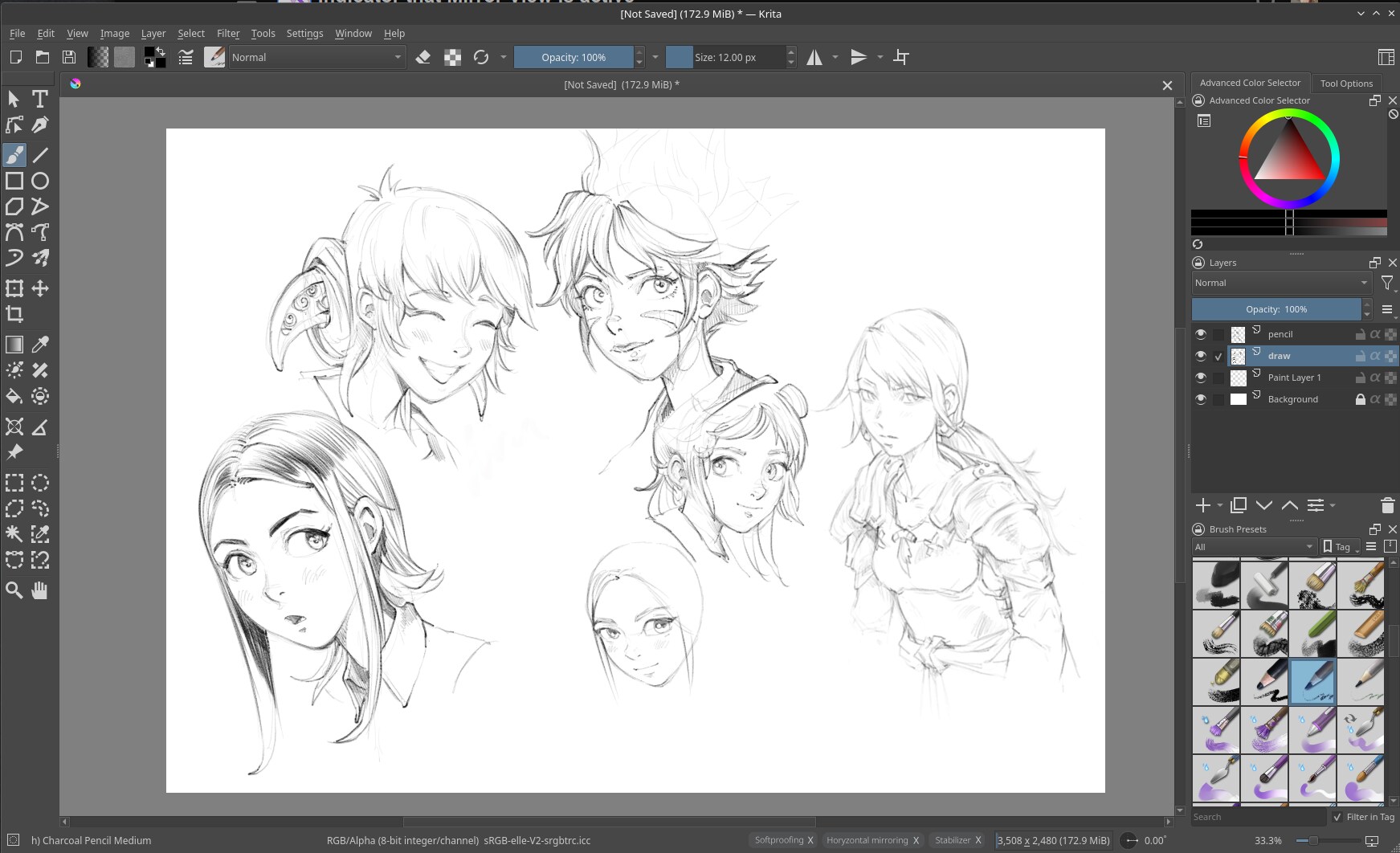
It can easily happen that you turn Mirror View (M key by default) on while drawing and then forget that you did so and only later you find out, when you open the document again, make an export of the file or take a look at the overview docker (if its used).
I propose having a little icon floating at one of the corners of the canvas view to indicate that the view is currently in mirror mode, to help prevent this from happening accidentally.
While most of the time it is simply just annoying and can be reverted by simply mirroring the whole file through Image → mirror vertically it gets complicated with some projects, like when they have handwritten text or comic panels then being in reverse order. So it would be a good idea to help users to not even get in the need to fixing it.
To make this clear because it often gets mistaken or the name used interchangably: I don’t mean the mirror mode of the brush or multibrush tools, but the one that only mirrors the viewport.
Another place where an indicator could be added (after code modification), is the bottom bar with canvas view props, it seems like a “natural” place. Although, it’s a bit out of the way, so that may defeat the purpose of it being noticeable:
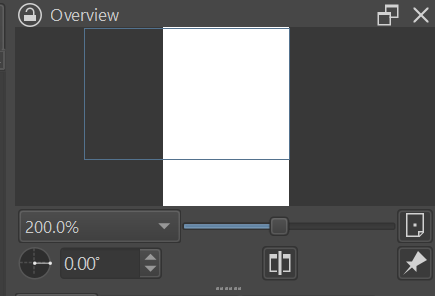
Ah, and lastly, the indicator exists in the Overview docker too:
I thought of the same before but the Mirror View button is not part of the tool bar by default. That means the user first has to know that they can edit the tool bar and that there is a button for it they can add. Additionally that button would also take up space when it’s not actually needed.
The overview docker is also not part of the default workspace and it’s also kinda hard to tell if it is active or not. I don’t understand why the button is not highlighted blueish like the other toggle buttons on the tool bar, but that’s an issue of its own. (I guess it’s okay you because you still see the image in its original view).
I thought about a small icon with text like the small floaty “layer is locked” popup that shows when you try to draw on a locked layer. And it only shows when the view is mirrored and completely disappears when its not, of course.
I agree a dedicated UI for this would be nicer than the workarounds I mentioned. There’s a tiny chance someone will be bothered by this new floating element but to me it sounds like it would be an UX improvement.
I never had an issue with forgetting the mirror mode, but caught myself at least a few times wondering, “wait, is mirror still on”? So it can absolutely happen.
I think there should be a persistent indicator on screen to let you know if the image is flipped in Krita. Currently when you do it, you get an onscreen indicator that fades away.
Sometimes when sketching I forget that the image I’m drawing on is flipped. It’s not a big deal since I can flip it back with the Transform Tool, but it would be nice if this was a thing.
I mean, there’s the button on the toolbar, right? Aside from making it visibly togglable(?)… All I can image is maybe pop up like the saving one, but smaller (and at the corner of the canvas ofc) and maybe either persistent or stay longer on the screen…
Those aside… I can’t think of other options
No need to rely on Dockers when overview is there, or either a way to put an indicator on either the document/window bar/title
After my recent video about common issues in Krita, I thought about something. Maybe it can solve multiple things.
The idea, a list of buttons on the bottom bar that appears only when the user enter in a mode like that. (eg. Softproofing, Using a stabilizer, Horyzontal Mirror, but can be also Wrap around mode or anything that alter the viewport). The idea is to have a little X for closing it. So, if someone accidentally get into one of this mode, they can exit without knowing how they went there.
A very important aspect. Often enough there are forum posts of people who accidentally activate those things with a shortcut without knowing which it was and what they activated.
I believe it is one of the few things that can not be hidden (except when in canvas only mode). It is where Krita shows a lot of important stuff like your memory usage or progress of saving/exporting/rendering or when filters have to update.
You CAN remove the status bar actually, somewhere in the view tab if I’m not mistaken
But now that you mention it… If those tabs WERE actually persistent at the bottom (like the floating tools of the redesign plugin)… Then it’s perfect actually!
Yes, I like this idea a lot! I think it will work even better if these label-buttons would float directly over the canvas (to make them highly visible), like so:
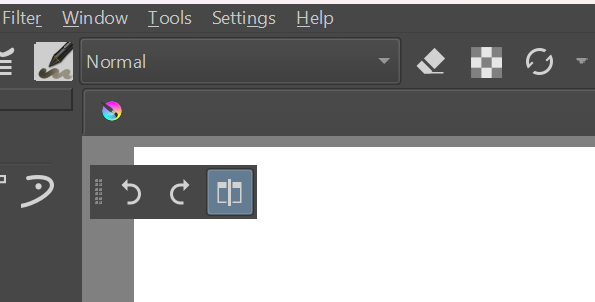

 but to me it sounds like it would be an UX improvement.