I disabled that long ago.
I will take a look at this when im home and let you know if there is a difference.
1 Like
I changed Vsync from the Global to On and Adaptive for Krita and the stutter is still there with no difference in the stutter duration.
Hello and good day,
I’m sure no one here is dismissing your problems or concerns. Others are either:
- Just unsure if it is a bug that has to be reported, and thus trying to replicate on ‘any’ machine so it can be fixed.
- If it is your perception that caught a ‘flaw’ in the normal behavior of the stabilizer, and again are trying to fully comprehend so it can be improved.
The second possibility is an important one, and lead to some length inquires about what your are experiencing. We are trying to see by your eyes. I ask you to be a little patient with us.
Talking about the second point above. Can it be that the stutter (I’m pretty sure I saw it in your video) is the normal behavior of Krita stabilizer?
I didn’t looked how to enable that ‘visual ping’ when the mouse clicked / pen touch, but choose to hide the brush outline when painting, while leaving the cursor visible. This might have visually masked the same stutter you experienced.
This part is important
Here is a comparison, frame by frame, of your latest Krita video and mine.
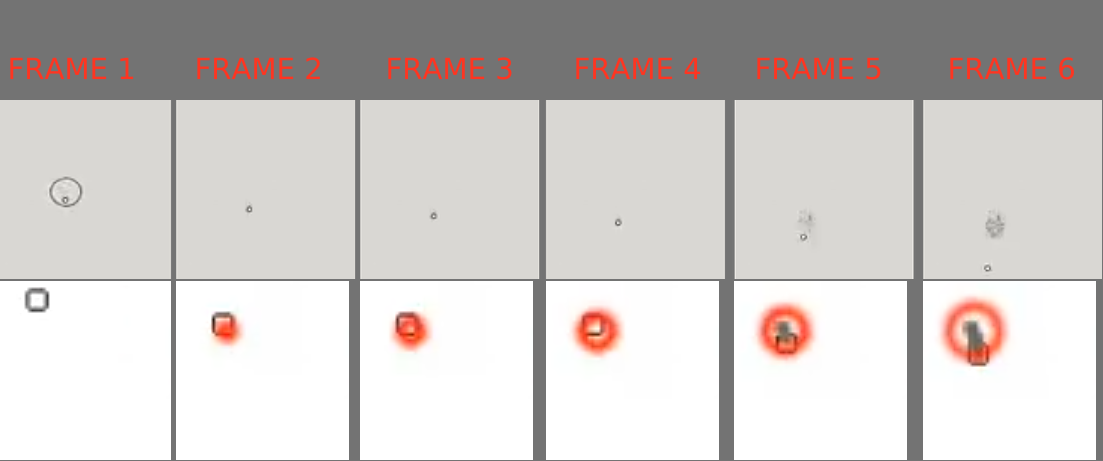
You can do this by playing the videos on your web browser, and using the comma key , and the period key .
Look how the stroke start 3 frames after the pen touch the canvas. Probably because the stabilizer are set to take 3 samples.
My theory: This natural delay on the stroke is more or less visible based on the frame rate of your Krita Canvas. My canvas were running at ~100 fps, so 3 frames for me took 10 ms each. If your canvas has a lower frame rate the same 3 frames of delay might look longer. Like a 60 fps canvas each frame would took 16,6667 ms.
If you look at the last of @Petresko video, the SAI one. You can see when the option Stabilizer = 15 is set the program stabilizes the brush outline even when the cursor is only hovering over the canvas.
Look at the 6-7 s mark of the video and use the frame by frame play to see it.
Maybe Krita could change the stabilizer code to use samples of the cursor even when not painting.
Cheers.
1 Like
If this is the normal behavior of the stabilizer then the stabilizer needs rewriting.
What’s the point of using it if it’s going to cause a delay when delay is disabled.
The stutter occurs no matter what the sample count is - 3, 5, 15,20,50,150 it really doesn’t matter. It happens the exact same way every single input.
The whole point of a stabilizer is to smooth out the crooked line your tablet produces, not drag your input.
It’s whatever at this point.
I’m sick to death of dealing with this so I’ll stick to the 3rd party software and let the developers figure it out.
In my opinion the Stabilizer is broken, doesn’t matter how it’s written. It gets in the way of getting work done.
If it’s suitable for artists who do single continuous strokes then fine.
It’s worthless for consecutive strokes because of the stacking stutters.
I’m not going to reply in this thread any further, I’ve had enough headaches.
1 Like
That’s always a pleasure to try to help people and only have aggression in return 
Grum999
Thank you for the patience. Hope someone with more knowledge or expertise helps you.
1 Like
Krita stabiliser is NOT equal to SAI stabilizer. It’s similar to Zbrush drag line that uses distance, it is not the same thing. Your comparing 2 different things that are not comparable. It is meant to drag. Now Krita weighted is equal to SAI stabilizer in behaviour.
I think there was another user that used the same exact expression for a similar issue with brushes or something, “microsecond stutter” I heard this before. I don’t remember if it was solved.
Yeah. Krita stabilizer especially with the Delay ON behaves exactly like the “Pulled String” stabilizer of others software. So I too think it is meant to drag.
However, you can look the OP’s two first videos and mine, playing frame by frame you can see the brush freezes for ~3 frames before starting to draw.
Now here is the case: It is intentional or accidental? Either way should be addressed or not?
Like I said in my post. The ‘freeze’ seem constant to ~3 frames, so it might be imperceptible in more faster machines.
The minimum sample count?
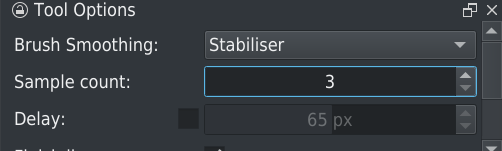
If you increase to 6 for example, does the number of frame increase to 6 too?
Grum999
1 Like
I made some more recordings here and don’t seem like it is.
I changed the default brush Basic-2 Opacity to a 7px size and constant Opacity of 100%. The idea was using a Pixel Engine brush, but that would be simple enough so I could see the drawing more clearly from the beginning.
For me the delay recorded was more like 5-8 frames (depending of the Brush Smoothing), while being recorded at 120 fps. So visually a 40 - 65 ms of delay. Not really perceivable in my honest opinion. More so when my monitor is a 60 Hz one.
The funny thing. This delay was seemingly constant between stabilizer at 3 Samples, 6 Samples and even 25 Samples. Always shy of an 7 to 8 frames.
With Brush Smoothing set to Basic the delay was constant at 5 frames.
Maybe in OP case the record of his was his exact visual experience. With his video at 30 fps and 3 frames of delay this would be ~90 ms of delay. Which is really clear.
Now if was a bug or just room for improvement in the Stabilizer code we might not be able to discover.
I agree with OP something in brush pixel engine is flawed (delays, stutters).
Rendering delay and inconsistent rendering speeds (no matter how powerful your rig is) may just be strenghten by use of stabilizer in this case. Code Issue.
Reading throught this whole Topic gave me PTSD
Im person that is really sensitive to frame drops/low fps and i know for a fact some of you arent(im happy for you). Without feeling issue you wont see it on video (or wont grasp concept what you looking at).
Iv been pointing that for years but there aren’t many people that voice similar opinion. Maybe, just, maybe because they bounce off Krita because (it doesnt feel good). Maybe because whenever you point out Krita performance could use some improvements or god forbit compare it to other drawing programs you just getting jumped on. And some of you can be really passive aggressive while doing that.
Like not realizing people complain because they care.
“it works for me” - is not help. Bless your kind soul but if OP has to explain to you basics of issue you most likely wont be able to help anyways and create clutter.
Like bringing solutions for Windows INK where OP stated in first post
When Brush Smoothing is set to None / Basic / Weighted it works perfectly without any delays.
When set to Stabilizer however, there is a 0.1sec lag
This means there is no global app issue. and Windows ink would affect bahaviour of whole app.
The road to community support is paved with good intentions.
Really, another post off-topic just to stir more controversy? 
I thought of a 30 plus line response for you, in the more considerate, respectful and amicable way. However I don’t have the will to do it. I’m done. With exception of one take of yours I will not address any other point you made.
Good intentions huh!?
How almost everybody was trying to understand one another, and not ever being ‘passive-aggressive’ but was met with harsh responses?
Or how I, myself, tried truthfully to see OP’s problem, even record my screen and make frame-by-frame comparisons?
Or maybe those were all clutter.
At this point I’m almost asking the forum moderator to close this topic.
Cheers.
2 Likes
This topic was automatically closed 15 days after the last reply. New replies are no longer allowed.