When I select “configure Krita”, the window pops up on the bottom right corner of the screen and it’s way bigger than it should be, even resizing it to the smallest it can be still doesn’t let it fully fit on my screen. I can’t acess some settings because of that.
I don’t know much about Android, but it seems that you may use system-wide screen scaling for your device to display anything bigger and perhaps better to read for you, because your Krita has nearly no space to work at but huge text, toolbars and icons. If that is the case on your side, and you use system-wide scaling, you will have to reduce that system-wide scaling.
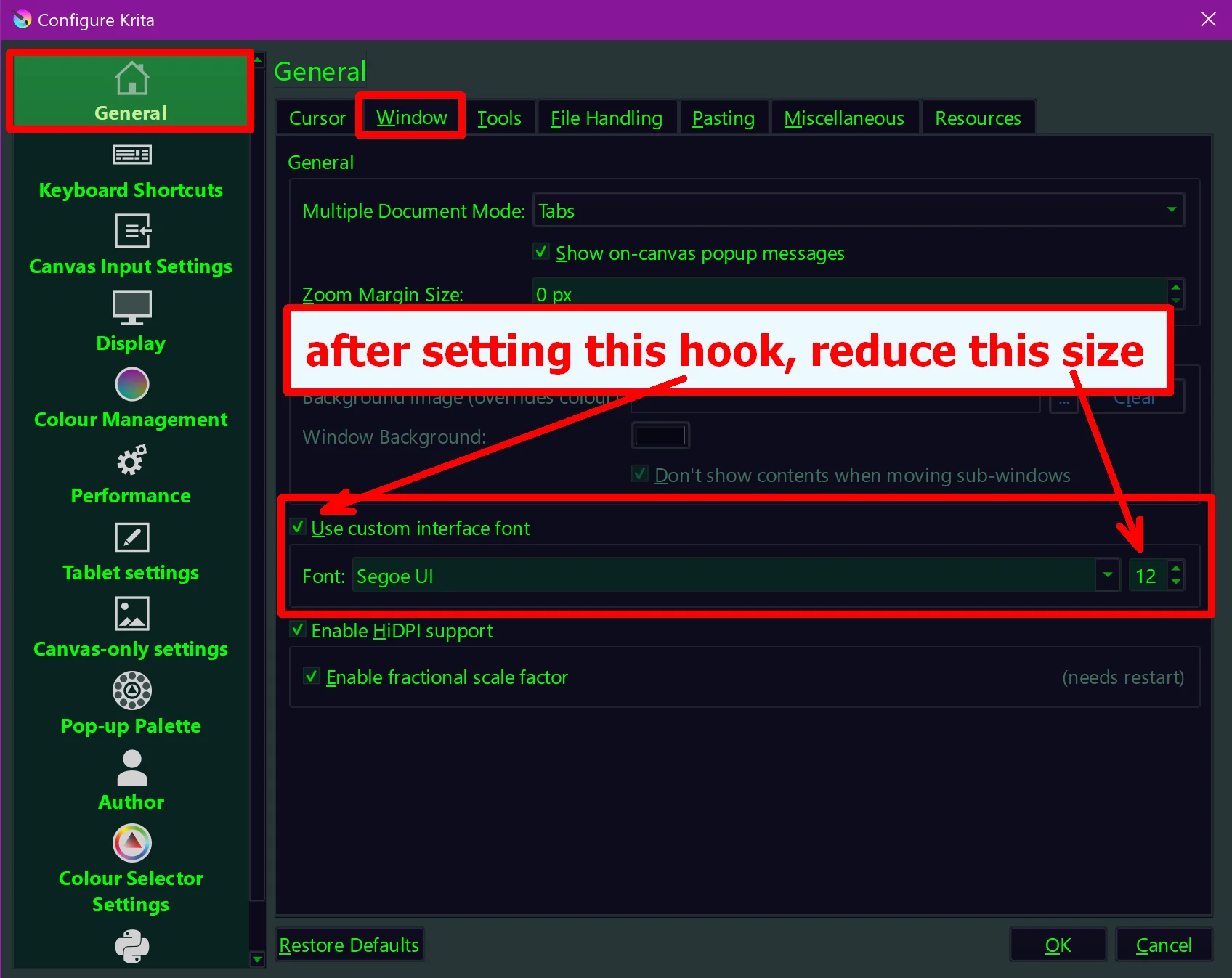
If you do not use it, then try if you can reach the following dialog in Krita via moving the settings dialog far to the left and as high as possible: Settings > Configure Krita > General in the tab Window > Use Custom Interface Font > Font try reducing the font size, see screenshot:
You can turn down the interface scale of your device in the device’s (not Krita’s) preferences. It seems like it is set to be very large, which makes a desktop application like Krita not fit on it.
You can also turn of “Enable HiDPI support” in the same place in the above post and then restart Krita by closing it via File → Quit. This will make Krita ignore all scaling, but the interface may be very small as a result.
I’m so glad it’s working, @Archiestein. When you have a moment please mark the solution button on whichever post was the most helpful. This will save others from opening your post thinking you’re still in need of help.