hello!
I use a xp pen artist 15.6 pro for 1.5 years now and i only had one or two problems with it during this period , which were always fixed by restarting the pentablet driver.
Regarding the red knob, i had no problem with it at all. Have you tried setting this up with the driver of the xp-pen? there is an option which you can set up hotkeys for the dial.

In order to use zoom in zoom out in krita i just have to set this to scroll… It also let you adjust different hotkeys for other software. There are also more functions you can set up to the red dial. You can switch functions mode for the dial by binding the KL/KR Mode Switch to a button on your tablet.
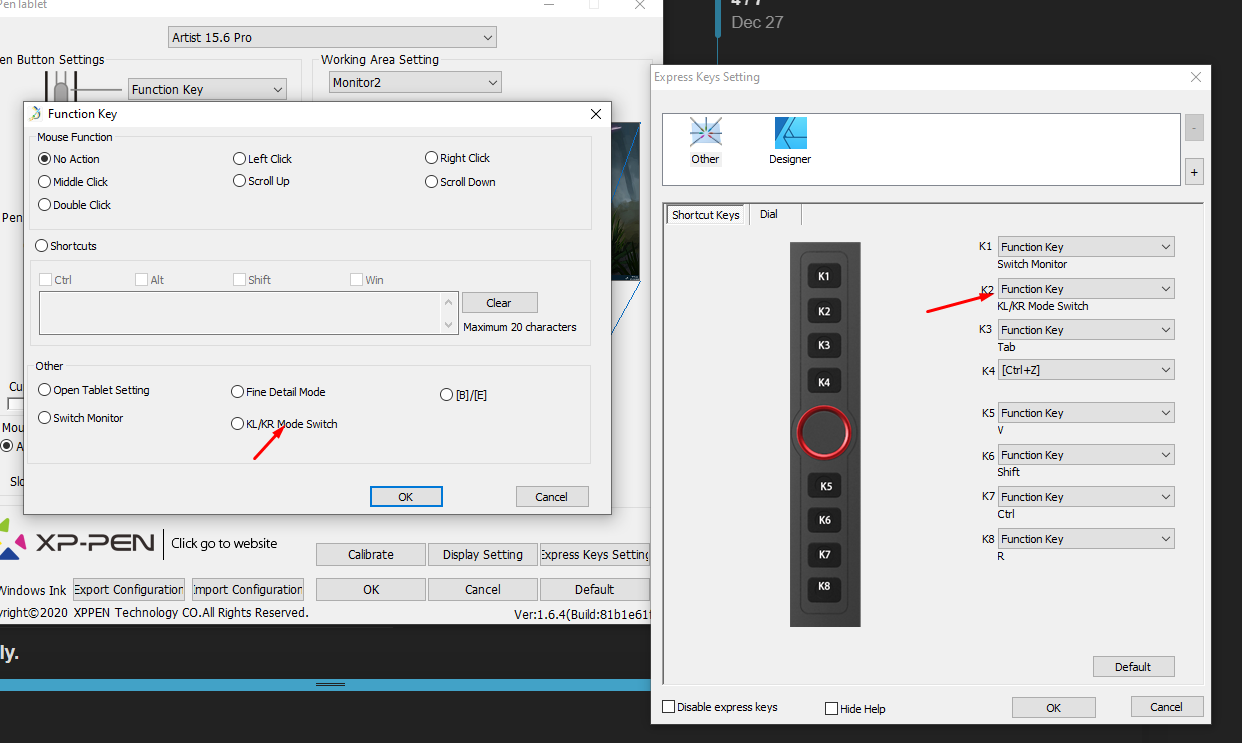
Another problem that i had is that i couldnt get the right click , which opens krita’s pop up pallete, to work when i binded it to one of the pen’s buttons. To overcome this i set up another hotkey through krita that did the same thing and binded this hotkey with the pen’s button. You can do this through Settings → Configure Krita → Canvas Input Settings → Show Popup Palette.
If you need any help regarding this tablet ill be happy to help. Overall for me it was and still is a pretty good experience!