I have a specific question to which I have not yet found an answer on the net. You have made an animation: my chicken mortale Chicken mortale. Now my fair husband said that I should let the chicken go back to the beginning. No problem, I thought.  I have the .png single images, then I’ll just go ahead and render it again. It worked quite well… not. The background is gone from the new pictures and I can’t find a way to put it back in. In other words: I want to let my chicken go back from the landing point to the jump point before it jumps again, and there I am now missing the background? (Wise words from @Michelist
  ) Has anyone an advice?
Greetings from the Deep South
Don’t you have the original KRA file anymore, where you rendered the animation from?
That description is confusing and does not explain what you have and why there is no ‘background’.
As a matter of interest, I only have your .gif animation and I can import it into krita using File → Import video animation:
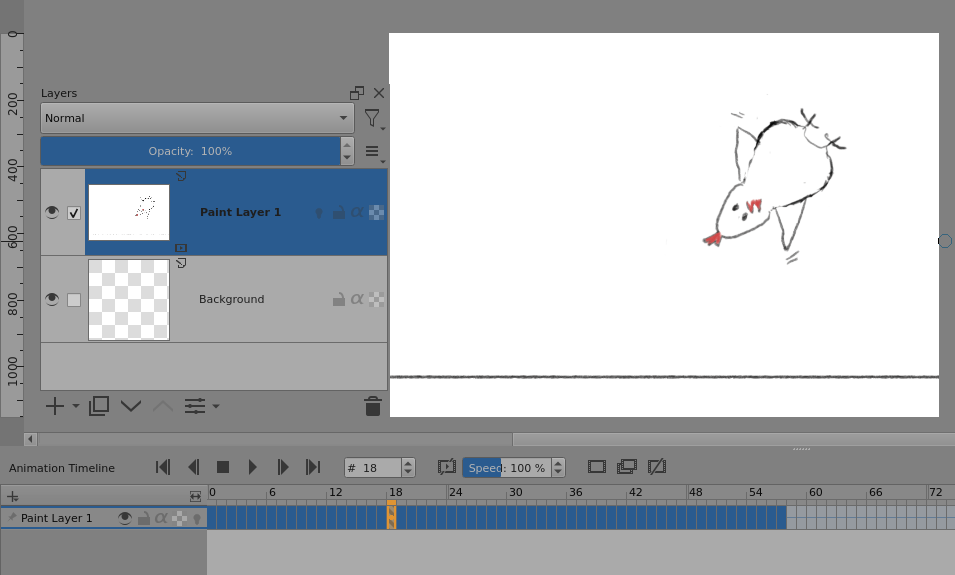
For some reason, frame-22 and frame-23 do not have the chicken present but do have the lower horizontal line.
It would be a simple matter to extend or otherwise modify the animation.
I do have them.
The problem is, that I have no Idea what I´m doing. I had the Idea of the flipping chicken and tried to make it. The most tutorials I´ve watched don´t explain how the program works. They say do this and that and for simple things it works. But when I did my work there where problems and I didn´t know am I the problem or the program.
For now I created a layer between the Backgroundlayer and the first layer. This layer I painted white and added the black line. Than I duplikated it a several times. Now it works, but for me it looks like it´s not the smartest way of finding a solution. It did the job.
I would like to know how I save my work to be able to work it over if it´s necessary.
That’s something you learn by experimenting for purely technical purposes with no regard to producing any ‘pleasing artistic output’.
I’ve deleted most of the animations I’ve made, shortly after I made them, because they were technical learning exercises.
The krita application works as described in the manual.
I think you would benefit from exploring the various actions and options that are available and using them to see what they do. This can be tedious but you can learn some cool and useful ‘tricks’ by doing that.
If you already have a white 'Background layer, as the default new file does, all you needed to do was paint a black ‘ground line’ on a new paint layer then leave it alone, no duplication needed. Any static paint layer will appear in every frame of the animation.
I would have drawn the egg on a different layer to the chicken and you may have done that.
The only sensible way to save your work is as a .kra file.
An animated .gif (or .mp4, etc.) is an output file for posting and display in a forum or other website. In the same way that a .png (or .jpg, etc.) file should only be used for creating an image file for display on a forum.
Only a .kra file can store the multi-layer components of an animation. Using different layers for different items and aspects of the animation is essential if you want to be able to easily make changes or modify your process while you are working on the animation or if you go back to it at a later date to rework it in some way.
Being able to show screenshots of your .kra file open in krita is essential for enabling other people to understand what you are doing and thus being able to offer help and advice.
Thank you very much. This is a huge help. 