hey y’all.
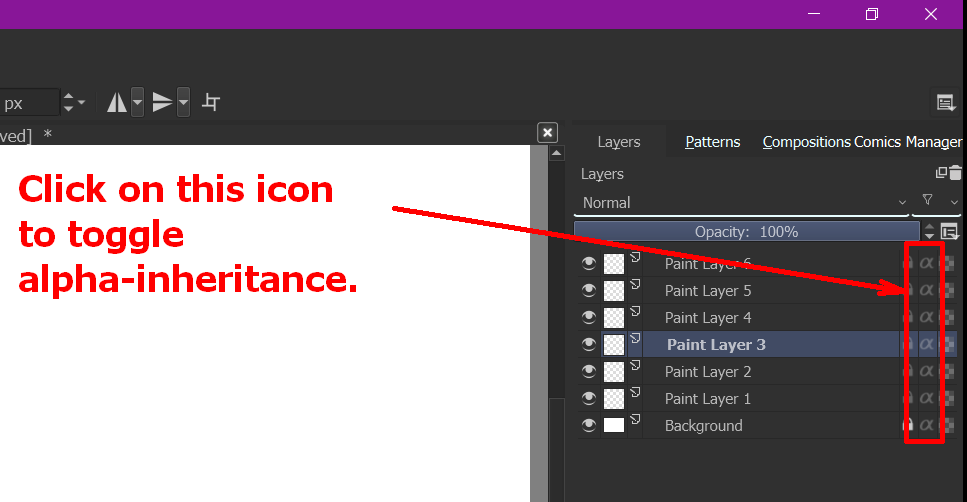
Is there a way to apply alpha inheritance to layer?
hey y’all.
Is there a way to apply alpha inheritance to layer?
Thanks for the reply but that is not what I am looking for.
I mean to bake the alpha clipping to the layer such that the excess part is removed from the layer itself without the toggle.
Quickly create a selection and then create an Transparency mask? But it has a problem, translucent areas will be displayed superimposed
I usually merge it a copy of the layer that is use to clip.
Though thinking about it hard, there might be an instance where you don’t want to merge them (maybe the layer has layer effects that will be gone if they are merge)- but want to keep the clipping permanent to the layer.
Something like “apply alpha inheritance to the layer” - without actually merging it to the layer that was use to clip/inherit alpha.
Is that what it is? I can see that being useful 
Yeah that’s what I mean.
Managing alpha inheritance with grouping is super awkward. I have run into such case where an alpha apply would be useful.
Suppose I have a layer structure like this
Character group
Hair group (masked)
Skin group (masked)
Cloths group (masked)
Mask for alpha inheritance.
I have a base hair that is clipped by alpha.
I wasn’t happy with the hair so I painted some strands outside the mask area. This layer can’t be clipped.
But then there is no way to paint only the hair area without some next level group wangling.
It’s lazy and not at all ‘elegant’ but I often visually isolate an aspect of work and then do New from Visible and carry on working from that.
It’s the ultimate bake-in but can be reworked later if needed.
Can’t you just select the masks, then invert selection and finally use that to clear those clipped areas in the other layer?
Please do not bump the topics create a new topic for new questions.
Sorry I couldn’t understand what you are doing in the video, may be I am missing something obvious, Why is there a pass through toggle?
You can keep on adding layers to create a combined base shape or keep on adding layer with alpha inheritance on to keep on adding masked layers. Why can’t the layer with strands be clipped?
If you add new layer below the alpha inheritance enabled layer it will be taken into account for clipping.
This is not a new problem. It is similar to the method proposed by Deif-Lou above. The translucent nature determines that they will be superimposed.


I think i understand what they are trying to achieved.
I do also paint in this way for my characters and this issue do usually pop in hair area also in laces design or other.
–Create Hair Group - Aplha inherit on
----HairColor [some point in time around painting you might want to paint a few fly away strand that is not clip to the base layer] but still want to stay in the same group [Hair]
Base Cutter [the layer where everything will be clip]
Mostly what i do is create a layer outside of the hair group of hair strands that will not be clip.
the issue is now your group organization is off because the stray hair strand layer is outside the hair group.
So they might want to make the clip permanent to the hair base layer, so they can turn of the inherit alpha off in that folder. Create the layer for the stray hairs inside the hair folder.
@kolloom here might want to make the above ^ to keep the initial clipping to the hair base layer as permanent and eventually be able to toggle off alpha inherit in the hair folder after applying the alpha inherit to that layer, and so they can make the stray hairs layer inside the said folder - and this layer can now go over the clip [because its not clipped anymore]
You can just place the hair above the Hair colour layer and not enable alpha inheritance for it, but that would just clip to the base cutter (silhouette). So yes if you need to draw something not clipped to the base layer then keeping it outside the group is best bet like you said. because you are enabling alpha inheritance to the group itself. I don’t think this is a problem though, this is how clipping works.
Thats how i do it. Though i do get that it can be frustrating to look at the layer structure if you look at groups as some sort of way to organize things.
I can see a use  i guess.
one can always create a sub-cutter/clip - base inside of the hair group and use that to clip the hair derived from the base clip. I usually do this by duplicating the base clip and cutting along- works well if the above layer is opaque - not so much if its translucent and there are layer in between.
There’s always work around, im just trying to interpret what they want from the vid - which is a use case i experience occasionally.
Yeah keeping all base layer of the parts in their own group seems like a good solution. It is also good for organising. you can then add effect or things for only that group.
Does krita not support object intersections?
There is one in photoshop
And one for affinity designer
https://affinity.help/designer/en-US.lproj/index.html?page=pages/ObjectControl/join.html?title=Joining%20objects
@kolloom According to the manual, yes:
I think intersections are supported under vector for vector shapes.
I remember seeing it when i was testing my speech bubble set.
Edit: I check and yep intersect is one of the option.
AhabGreybeard above linked the manual.
I don’t like it but this does work
This topic was automatically closed 7 days after the last reply. New replies are no longer allowed.
 Hello and welcome to the forum