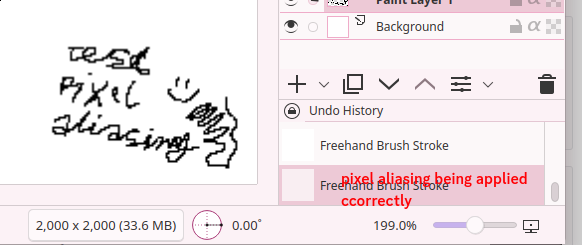
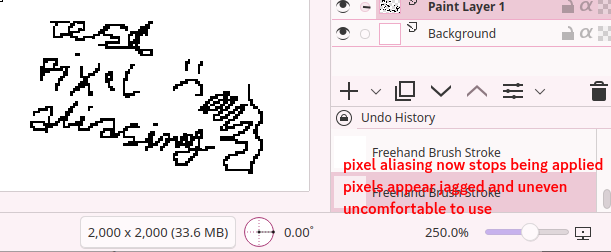
Krita by default applies anti-aliasing to smooth out the pixels when displaying the canvas at uneven percentages, like 150% or 75%. This stops working at 200%, so a 250% zoomed in image is displayed with nearest neighbor filtering instead of using the Scaling Mode setting in the Krita Display Settings.
I understand that this exists to display pixels correctly at big zoom levels, but disabling the aliasing at 200% feels too early, as pixels cant be perceivably somewhat-even yet, so moving this threshold at, say, 500% would feel much better
Considering the aliasing is being applied above 100% (150% for example), I assume that the aliasing threshold is hardcoded. Krita is open source, what file has this zoom aliasing threshold? Maybe one could edit the threshold and compile Krita from source with a different zoom aliasing threshold?
I’m no coder. And what use has it to know about the file that has to be manipulated, if one isn’t able to build Krita afterward?
Of course, it will be found at some point in the sources, but that would be the job of a volunteer to be found, which in the end doesn’t guarantee that you’ll see it in Krita, if the devs don’t want to see it (what I can not know).
What you could do is to wait for more answers, or wait for someone willing to create a script or plugin for you, or maybe even create a feature request, although that in most cases is the longest way with questionable chances, since I see your request as a niche request, if it were something the broad mass demands the chances would be significantly higher.
If you follow the rules on how to create a feature request, you significantly rise the chance that someone will be looking into it. But if you simply throw a bag of words in front of the feet supposed to hopefully do something for you, you kill any possible chance before it may be even considered.
Here, in the whole chapter “Step 1”, you’ll find how to create a feature request with a chance:
Thanks for the info, really appreciate it
I’ll see if I can create a patch myself to build it with different aliasing thresholds, as well as will follow the feature request guide
 Hello
Hello