Hello, I was tasked to create a drawing for something that needed to be about 10 feet wide and 8 feet tall. For storage and ram I set the DPI to 150 instead of 300 and now I’m worried that it won’t be acceptable to print due to a lower DPI along with that I also cut down the size too with it being 5 feet wide and 4 feet tall. Is there a way I can export that into the original requirements without losing or not losing that much quality? I put about 30 hours into it and now I feel like it was a whole big waste of time. 
Looks like you added all the tags you could find to the topic. I removed all the ones that don’t fit.
You can change the DPI but what’s really important is the dimensions of the file in pixels. DPI basically is just the density of colored dots the printer makes. As long as there are enough pixels you don’t have to worry since especially when printing at very large scales the density is usually really low to save on ink. So, ironically making the DPI higher now will basically make the print smaller (assuming the printer doesn’t outright ignore the value, which many do when you tell them to print it in a certain size). In any cases, image information that was lost (due the cropping or downsizing) is normally lost forever.
It’s always important to state exactly what you did, from the beginning - to the end, because there are various possible interpretations of what you said there.
Do you mean that when you created the document, in the Create New Document window, that you specified that you wanted a DPI of 300 and then later you used the options in Image → Scale Image to New Size to change the DPI to 150?
Or, did you create the document with a DPI of 150 to start with?
For the size change to 5 feet by 4 feet, (measured in pixels or whatever) did you make that adjustment in size as a deliberate act in Image → Scale Image to New Size or was that a consequence of changing the DPI in some way, such as by changing DPI from 150 to 300?
As long as you haven’t scaled the image down using the Pixel Dimensions inputs then there will have been no loss of information.
Changing the DPI value on its own will obviously result in a change in the image physical dimensions but not the size in pixels.
According to what I’ve read from people on this forum, about large size printed images, even a DPI of 150 may be more than is needed for a good looking image and a DPI of 100 is often good enough. It depends on the nature of the artwork and the expectations of the people who are intended to see it.
Is it a landscape painting for a fine art exhibition or is it an advertising poster for a music gig?
2 Likes
Its for a bus shelter. I scaled it down 1/4 the OG size originally and the DPI so it can run on my tablet. Here were the original measurements. Also here is what I’m working on rn. I was wrong about the time it’s been 10hrs instead of 30. I accidentally miss input 30
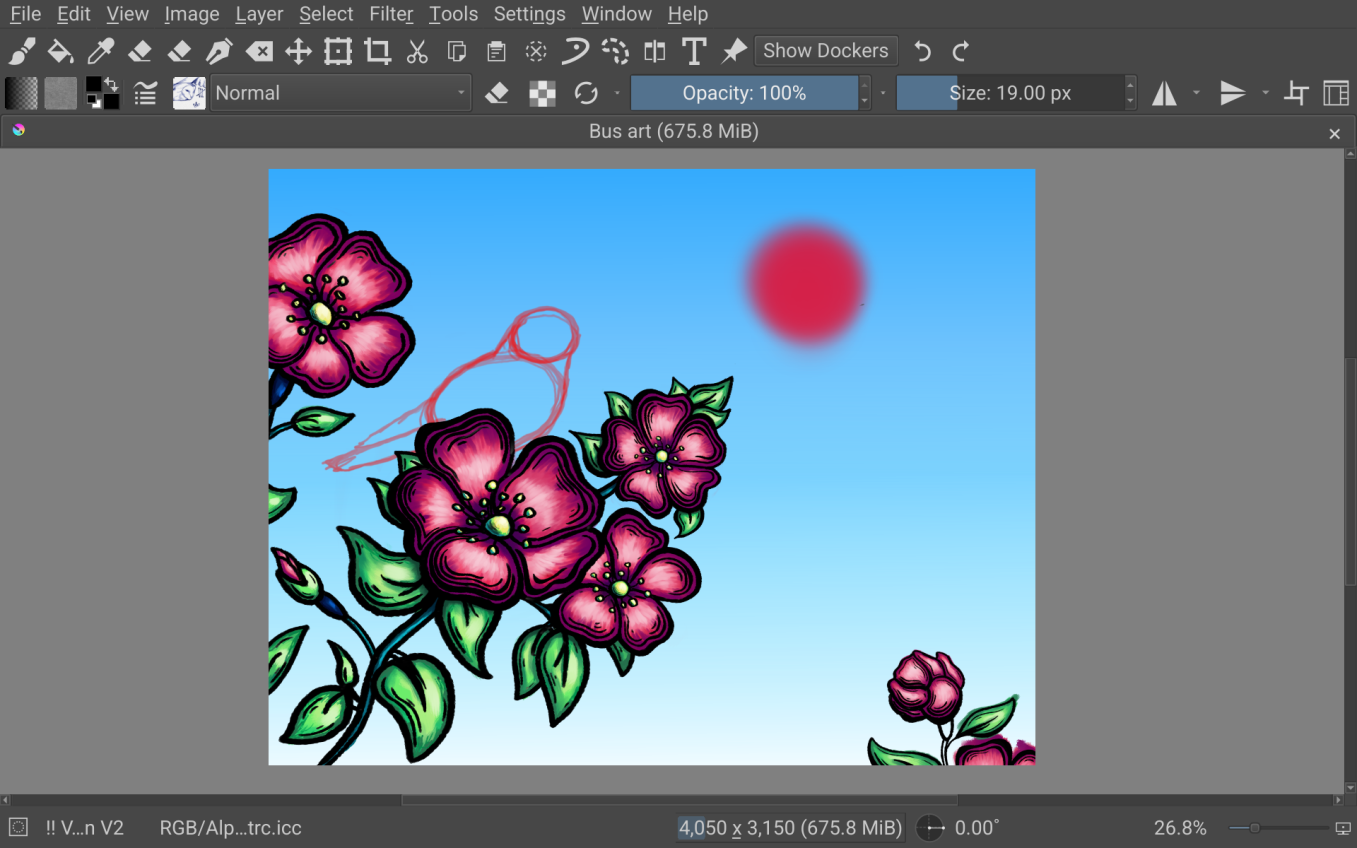
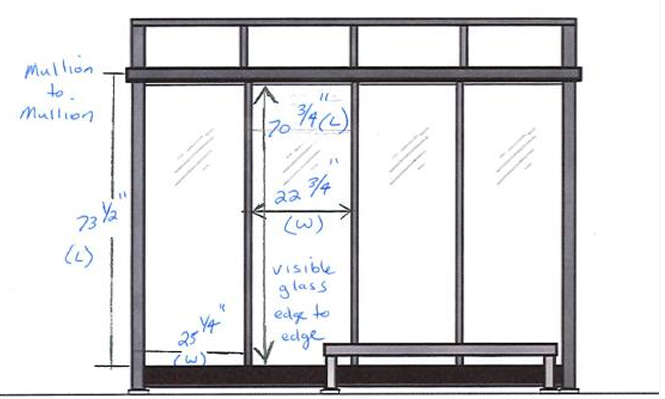
I want to say that I did a missinput and accidentally put in 30hrs instead of 10. The real time has been 10hrs for working on it
For a 10 ft by 8ft image at 150dpi, you’d need an image that was 18,000 x 14,400 pixels.
If you want to go down to 100dpi then that would need 12,000 x 9,600 pixels.
75dpi would need 9,000 x 7,200 pixels.
I have no experience of making images for printing at that size.
You seem to have an image that is 4,050 x 3,150 which would print to 40.5 inches by 31.5 inches if the resolution was 100dpi.
The image doesn’t have much fine detail so it may be ok to scale it up using Image → Scale Image to New Size. Use the Bicubic filter option (at least I think that would be best).
I suspect (but may be wrong) that you will not be printing this yourself so at this stage it would be a good idea to ask for advice from the people who will be printing it since they have experience in this subject.
1 Like
Your canvas size shows a dimension of 4050 x 3150. That’s just a bit larger than a sheet of paper, like the ones you write letters on.
Right now, I have it at 150dpi with 4,050 x 3,150.
This is the response I had from the person who’s running it.
”Creating the artwork at ½ or even ¼ of the final dimensions while maintaining the required DPI is acceptable. The key is that the resolution stays consistent so the final output remains clear when scaled up.”
I think that at some stage, you made a mistake that resulted in you ending up with an image that was only 4,050 x 3,150 pixels. Anyway, that’s where you are now.
If I was in your situation, I’d hope for a response such as, “That image doesn’t have many pixels but it’s not too finely detailed so if you scale it up by a factor of 4 with bicubic filtering and print it to 10 ft x 8ft then it will look ok when viewed from a distance of about six or more feet.”
Did you ask the right questions and did you show them your image?
What I can say is that if you scale your image up by x4 to give an image that is 16,200 x 12,600 and have that printed at a size of 10ft x 8ft then the resulting ‘real world’ printed resolution would be 135 dpi. More accurately it would be 135 ppi (pixels per inch). Dpi (dots per inch) is what printer equipment does with ink.
That might give you a nice looking large poster but I don’t know if it actually would.
I have zero experience of creating images intended to be printed at 10 ft x 8ft so I’d ask the opinion of people who do have that experience … but I don’t know anybody who does.
I seem to recall @raghukamath has had jobs of that type.
1 Like
Thanks @wolthera for the ping.
Yes I worked on projects that are similar - quiet a few office murals and lots of billboard ads.
I always keep the DPI to 150, it is what printers(who print these type of art) told me to keep. These type of artwork is not meant to be looked at from close distance so it does not matter. These are almost always looked at from a distance of 3-4ft far away, the more bigger the final print the more faraway the onlooker will be. You can try to take a look at existing artworks that are printed this way if you look at it from a close range you can see the print dots and pixels.
Talk to your printer and not the person commissioning you. I say this because sometimes I have had scenario where the person commissioning me to draw these artwork have had no clue about the DPI they just assume print = 300DPI. Talk to the printer ask the person commissioning you to give you the contact of the printer so that you can better co-ordinate and get better print. This will also help you get the final color profile of the specific print machine that way you can also be sure about the color reproduction.
Here is how I do the artwork. I take half or sometimes 1/4 the size of the final output but keep the PPI to 300. (Or sometimes I keep the final size but keep the PPI to 150) and then after everything is done I scale the final file. This has worked for me. Sometimes I have had really really big artworks in that case I create low resolution sketches, cut the sketches into different documents and work on them and then at a final stage stitch them into one using file layers, but this is really messy work, fortunately such big sizes (20ft x60ft) have only come twice in my 14 years of work. This also depends on the type of style your are using for that particular project. For example the mural may be 60ft in length but it might have various sections which can be looked from closer distance, for this type of work I would do the stitching method because you need to maintain some level of clarity at closer range.
5 Likes
This topic was automatically closed 30 days after the last reply. New replies are no longer allowed.