Is there a way to select and move parts like this?

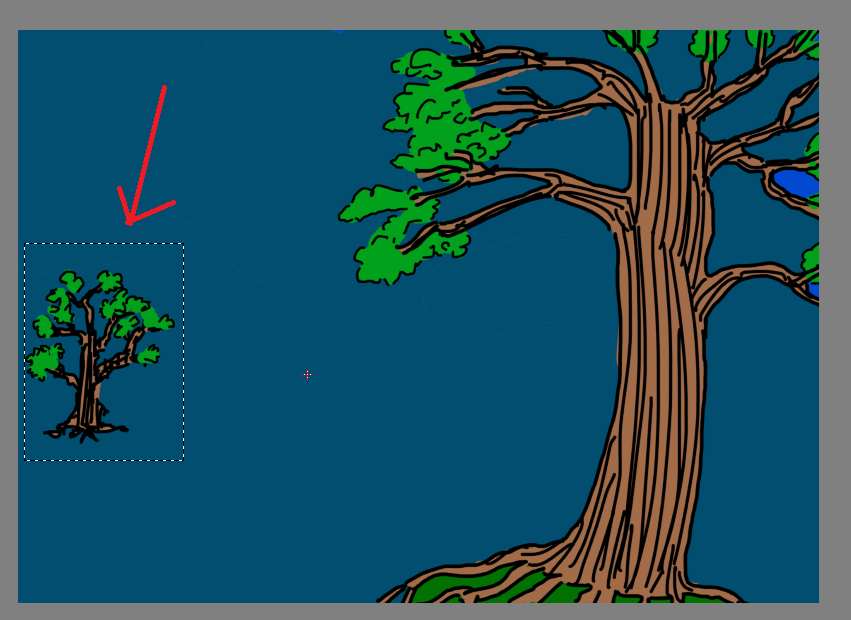
Hi, I made this drawing of 2 trees:

There are parts of both trees which share the same layers. I want to move the small tree using the move tool, but unsure if this is possible.

I know if the small tree was its own layer I could select and then move it, but because both trees share layers I don’t know how.

I tried selecting it (shown in red arrow) to try to do something but … yeah I got stumped.

Any help would be appreciated, thanks!

I tried to recreate your situation; make a group with all the layers you want to move. Select your tree, select the group layer, and use the transform tool to move your tree!

1 Like

Don’t recall exactly in which version this was introduced, but in 5.2.6 you can simply select all the layers involved - no need to make a group, and it works also with non-adjacent layers.
3 Likes

Edit - Oops… Sorry, still need some caffeine. Just saw that you have information on multiple layers that needs to move. Please ignore this post.

Thank you everyone, that worked :grinning:

@Verdant Please mark this topic as Solved by clicking on the ‘tick’ box for the reply that helped you.

This topic was automatically closed 4 days after the last reply. New replies are no longer allowed.