Hello everyone. I want to know if there is a feature to slide close and open different pannels. I am using a tablet and all the pannels are hiding my canvas. So i want to know if there is any solution for that. Thank you.
 Hello @Ram, and welcome to the forum!
I’m guessing you mean Krita’s docker when you talk about “pannels”.
There are several ways, you can set up different workspaces in Krita using the “Choose Workspace”-Icon on the right side of the toolbar with and without Krita’s dockers and then use that icon and select the configuration or configurations you created to create the workspace you need, this way you can switch between different workspaces how you need them.
You can also work in the so-called canvas only mode, I don’t know how this is invoked in Android, but it exits with a 4 finger tap (if I’m not mistaken, don’t use Krita on Android) but you can pick out the shortcuts in your Krita via the ‘‘Settings’’ >> ‘‘Configure Krita’’ >> ‘‘Keyboard Shortcuts’’ menu, and the ‘‘Settings’’ >> ‘‘Configure Krita’’ >> ‘‘Canvas Input Settings’’ menu.
Also, in Krita, you can use the ‘‘Settings’’ >> ‘‘Dockers’’ menu to show and hide the dockers to be displayed. This would be another way to call the dockers you need, when you need them, or hide them when not.
But maybe @CrazyCatBird or @sooz can tell you more about how you can handle this in Krita for Android.
Michelist
3 Likes
@Michelist did a good job of capturing methods.
My favourite is the 4-finger tap to toggle canvas only mode on and off.
Write back, @Ram, and let us know if these tips gave you what you need or if you want further info. Welcome to the forum.
4 Likes
Hi, thanks for your reply. As you said in the last point. I want to show and hide dockers. The settings option was nice, but is there any quicker way? Like with a click of a button you can hide/show whichever docker you want instead of going all the way around?
The 4 tap shortcut was nice. But it wasnt the exact solution I was looking for. I dont want everything to close. I only want to close what I want to. With a single click
There is an X on the corner of each docker. Tap that X and the docker will disappear.
To get it back on screen, go to Settings > Dockers > Select the docker you want.
1 Like
For the Workspaces, you may not have noticed that you can save any arrangement of dockers that you’ve made as a named workspace that will then appear in the list of available workspaces:
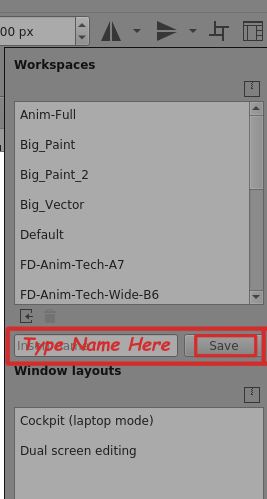
You can make a workspace that is minimalist with maybe just a colour selector and a layers docker for when you want to concentrate on painting.
Then make another that also has the patterns docker if you want to do texture work.
After that, you can switch between them via the Workspace Chooser.
Also, you can select colours and brush presets (and make other adjustments) using the Popup Palette. Right-click the canvas to get the popup palette. I think it’s one-finger tap on Android. Touch the canvas to remove the popup palette.
There are many ways to customise the UI and it’s worth spending time experimenting to get to know the methods for doing this.
4 Likes
You can try toggle display modes with Tab key.
On Android? I guess this will work then only with an additional Bluetooth-Keyboard. I don’t recall seeing such a button on any of the Android tablets I’ve looked at recently.
Michelist
1 Like
I would love to have a keyboard to use Krita on Android the way I do in Windows.
Without a keyboard one can use the 4-finger tap gesture to toggle in and out of canvas only mode.
2 Likes
This topic was automatically closed 30 days after the last reply. New replies are no longer allowed.