clicking the icon in the included image does it, but i was wondering if there might be a shortcut that does the same? i cant find one in the settings, nor am i seeing any kind of toggle style command in the action dictionary.
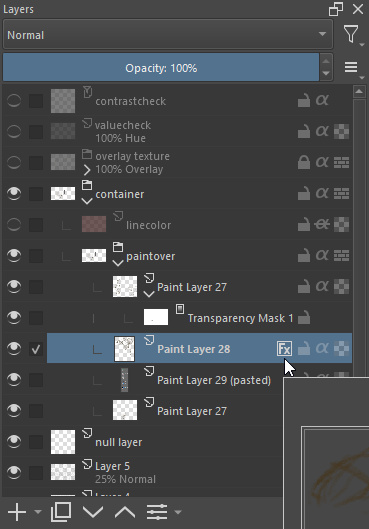
To be honest, I searched for that for hours a few months ago, and I could not find it.
The only way will be to discover the handles via the plugin Python Plugin Developer Tools and write a script for this, but that is above my abilities.
Michelist
1 Like
that’s a bummer, but i appreciate the reply. i’ve been fiddling with scripts a bit, but something like that would be well above my abilities as well.
1 Like
It isn’t that difficult as it is within layerStyleToAsl
import xml.etree.ElementTree as ET

doc = Krita.instance().activeDocument()
layer = doc.activeNode()
xml = layer.layerStyleToAsl()
xmldoc = ET.fromstring(xml)
aslnode = xmldoc.find(".//node[@key='masterFXSwitch']")
aslnode.set('value', '0' if aslnode.get('value') == '1' else '1')
xmlstr = str(ET.tostring(xmldoc), 'utf-8')

layer.setLayerStyleFromAsl(xmlstr)
2 Likes
well i’ll be damned. thank you kindly for your help. that works perfectly!
This topic was automatically closed 30 days after the last reply. New replies are no longer allowed.